How to Brief a WordPress Agency Effectively
Practical Client Checklist for Smooth Website Projects

Working with a WordPress agency goes best when everyone starts from the same clear brief. If that document is vague or missing key details, you often end up with missed expectations, scope creep, and designs that do not match what you had in mind. A strong, structured brief gives the agency the information they need to propose the right solution and price from day one.
This guide shows you how to define your project, what to include in a solid brief, and how to share it with a WordPress agency so you save time and avoid confusion. You will walk through project context, scope, budget, technical requirements, collaboration, and next steps, so your website project starts with clarity instead of guesswork.
Quick Answer: How to Brief a WordPress Agency
A good brief tells a WordPress agency who you are, what you need, and how success will be measured. Most effective briefs fit into three to eight pages and cover your business overview, target audience, current website, scope of work, budget, timeline, design style, technical constraints, and ongoing support needs.
You can structure your brief as a simple document that every stakeholder understands. Use the following steps to turn a vague idea into a practical briefing pack.
- Write a short overview of your business, products, and services.
- Describe your target audience and primary user journeys.
- List project goals, KPIs, and what will define success.
- Document your current website and main problems with it.
- Outline required pages, features, and integrations.
- Share your design preferences and brand assets.
- State your budget range, timeline, and approval process.
- Note technical, SEO, legal, and accessibility requirements.
- Explain who will provide content and who will maintain the site.
- One central briefing document shared with all stakeholders
- Clear goals and measurable outcomes
- Realistic scope and phased options
- Defined budget range and decision makers
This simple structure gives your agency enough detail to propose the right solution, estimate effort accurately, and spot risks before they become expensive problems.
What a Strong Brief Achieves
A strong brief keeps everyone aligned from day one, which reduces rework and shortens the project timeline. It also gives the agency a fair way to quote because they know what they are building and why it matters. In many cases, a clear brief is the difference between a smooth launch and a stressful rebuild a few months later.
When Should You Write Your Project Brief?
Draft your brief before asking for proposals, not after choosing an agency. When each WordPress agency receives the same information, you can compare their responses side by side. That approach makes it easier to see who really understands your needs rather than picking whoever simply sends the lowest price or the flashiest design.
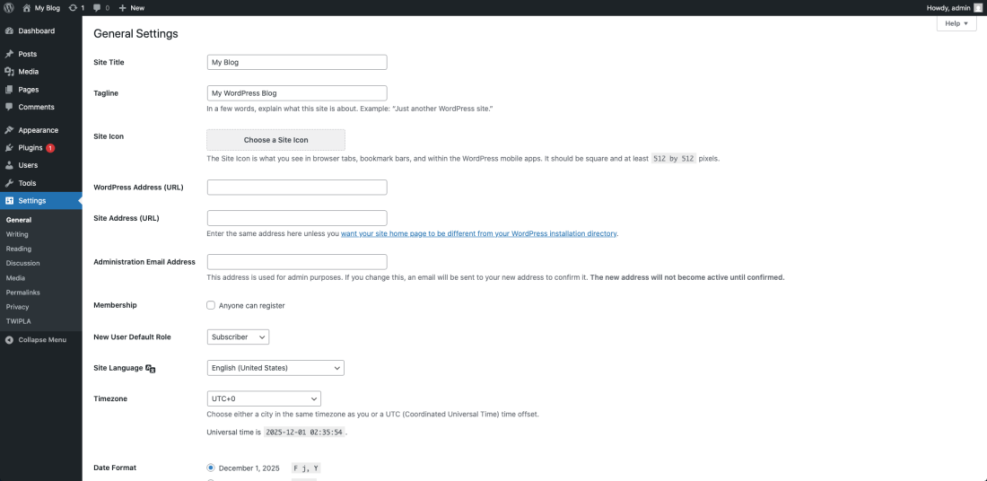
In your WordPress Dashboard, navigate to Settings » General and confirm your basic site title and tagline before taking screenshots or granting access. Clear labels here make it easier for an agency to understand how your site is currently positioned.
Understanding Your Website Project Context
Before talking about pages, plugins, and layouts, you should help your WordPress agency understand the bigger picture. Business context gives them the information they need to make smart technical and design decisions for your market, instead of making educated guesses.
What Background Details Do Agencies Need?
Include a short company overview, your core products or services, main competitors, and where you operate. Add your brand values and unique selling points so the team understands why customers choose you. With this background, a WordPress agency can shape content and design that supports your business model and not just produce a site that looks impressive on the surface.
Clarifying Business Goals and KPIs
Website goals should connect directly to outcomes such as leads, sales, bookings, or signups. For instance, you might aim to double qualified leads, increase newsletter subscribers by a certain percentage, or reduce support tickets by moving documentation online. When each goal links to a simple KPI, the agency can propose features that serve that metric instead of adding visual noise or low-impact extras.
Defining Your Target Audience Clearly
Describe who visits your site, how they find you, and what they care about most. Concrete examples make this part easier, such as “small law firms needing local SEO help” or “busy parents buying digital learning tools.” The clearer your audience description, the easier it is for the agency to propose layouts, messaging, and calls to action that speak to real people instead of a generic crowd.
Scoping Features, Content, and Design
Once the context is clear, you can move on to what the website should actually do. A well-defined scope covers pages, features, and content, plus the design style and examples you like. This section usually has the biggest impact on price and timeline, so it pays to be specific.
Listing Pages and Core Features
Start with a simple sitemap, even if it changes later. List core pages such as Home, Services, About, Blog, and Contact, then add special pages like landing pages, membership areas, or resource libraries. After that, describe key features such as forms, search, ecommerce, bookings, or multilingual support so the WordPress agency can suggest suitable plugins, custom blocks, or integrations.
It helps to see how a weak brief compares to a strong one.
| Aspect | Weak Brief | Strong Brief |
|---|---|---|
| Goals | “Make the site better” | “Increase qualified leads from 20 to 40 per month” |
| Scope | “Standard pages” | Named page list plus required forms, blog, and resource library |
| Audience | “Everyone” | Two or three well described audience groups |
| Budget | “Not sure yet” | Clear range with priority and “nice to have” features |
This comparison shows how detail directly affects estimates, timelines, and final results.
How Should You Describe Your Content Plan?
Make clear who will write and upload content, and when it will be ready. Some clients prefer the agency to handle copywriting for key pages, while internal teams handle blog posts or FAQs. Mention existing assets such as blog posts, videos, and downloads, and highlight any gaps that need new content so the WordPress agency can plan writing and content loading into the project schedule.
Explaining Design Preferences That Work
Vague phrases like “modern” or “clean” are hard to act on. Instead, show two or three example sites and explain exactly what you like about each one. You might point out colors, typography, and layout details such as bold hero sections, clear service grids, or calm white space. Attaching your brand guidelines, logo files, and any existing marketing materials helps the agency keep your new website consistent with the rest of your brand.
Budget, Timeline, and Collaboration
Budget and timing shape what your WordPress agency can realistically deliver. Transparent information here makes the rest of the project smoother for both sides and avoids awkward conversations halfway through the build.
How to Share Budget Expectations
Provide a realistic budget range rather than leaving the field blank. You can also add a list of “nice to have” features that can move into a later phase if they do not fit the initial budget. When a WordPress agency sees this range, they can match scope to your number and suggest tradeoffs instead of underquoting just to win the project.
Setting Milestones and Deadlines
Define your ideal launch window and note any internal deadlines such as campaigns, events, or board meetings. Breaking the project into stages like discovery, design, development, content loading, and testing is very helpful. With those stages named in your brief, an agency can propose milestone dates and explain what they need from you at each step to keep the schedule on track.
Choosing Tools for Communication
List your preferred tools for calls, chat, and task tracking, for example email, Zoom, and a shared project board or ticket system. Name one main contact and one backup decision maker so the agency knows who can sign off on designs, content, and scope changes. Clear ownership like this reduces delays caused by unclear internal approvals.
Technical, SEO, and Legal Requirements
A WordPress agency can only plan the right technical setup when they understand your constraints and expectations. That includes hosting, performance, analytics, SEO tools, and legal policies that must appear on the site.
Hosting and Performance Requirements
Mention whether you already have hosting and, if you do, share the provider, plan type, and access details. Some organisations prefer to move hosting under the agency’s care, while others must keep it in-house. If fast load times and good Core Web Vitals are important, say so in the brief and link to any existing performance reports. You can also include notes about uptime targets, backup expectations, and staging environments.
SEO Content and Tracking Needs
State which SEO tools and analytics platforms you already use, such as Google Analytics, Matomo, or a specific SEO plugin. Include the metrics you watch most: organic traffic, conversions, search rankings for key phrases, or engagement on key pages. With this information, your WordPress agency can keep or improve existing tracking, set up goals and events correctly, and design a site structure that supports your SEO strategy rather than harming it.
Legal Policies and Accessibility
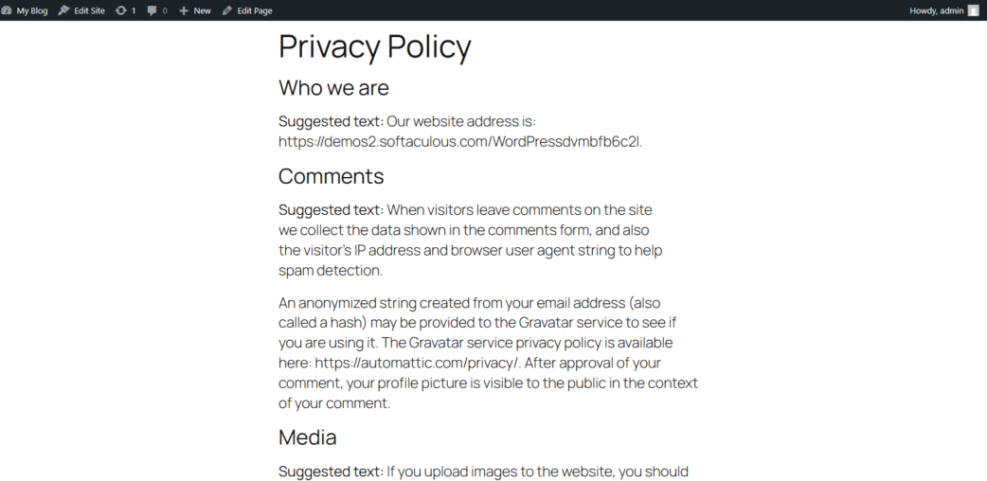
List the legal pages you need, including privacy policy, terms and conditions, cookie notices, and disclaimers. If your business follows a particular privacy framework, note that as well. It is also wise to share any accessibility targets, such as keyboard navigation, text alternatives for images, and readable colour contrast, so the agency can plan design and development with those standards in mind.
Sharing Assets, Feedback, and Decision Making
Your brief should finish with clear instructions about project assets, approvals, and how decisions are made. This section often prevents delays, repeated revisions, and last-minute changes that derail timelines.
What Assets to Prepare Beforehand
Create a shared folder structure for logos, brand guides, images, and documents, then grant access to your WordPress agency. Include current exports from your email tool, CRM, or booking system if there will be integrations. When assets are easy to find and clearly named, the project team spends less time hunting for files and more time building and testing your website.
How Can You Give Useful Feedback?
Feedback works best when it focuses on goals and users instead of personal taste. Rather than saying “I do not like this colour,” try explaining what might confuse your visitors or distract from the main call to action. Screenshots with notes, comments tied to sections, or a shared feedback document all make it easier for the agency to see what you mean and respond with practical design or copy changes.
Red Flags to Avoid in Briefs
Certain phrases in a brief almost guarantee problems later, such as “we will know it when we see it” or “we want something like big brand X but cheaper.” These lines signal unclear expectations and no clear success criteria. Replace them with explanations of your priorities, constraints, and the tradeoffs you are willing to make so the WordPress agency can guide you toward realistic solutions.
Before inviting an agency into your WordPress dashboard, go to Media » Library and tidy up your files. A media organisation plugin or a simple folder structure for logos, brand photos, blog images, and downloads makes collaboration faster and less frustrating.
If you prefer to start from a ready-made document, you can adapt a simple Brief WordPress agency and customise it for your project. Once it is in place, the same structure can support future websites, landing pages, and redesigns.
For more technical considerations, you might also link internally to a detailed Managed WordPress hosting guide so your team understands why certain hosting or performance details appear in the brief.
WordPress Agency Brief Conclusion
A thoughtful WordPress agency brief is one of the highest-return investments you can make in your next website project. Instead of rushing straight into design, you capture your business context, goals, scope, constraints, and collaboration rules in one clear document. That clarity allows the right agency to work as a partner who supports your strategy, not just a supplier who builds pages.
The next step is simple: set aside one focused hour to draft your first brief using the sections in this guide, then share it with internal stakeholders for comments. After a round of feedback and refinement, you will have a reusable template that makes every future WordPress project easier to start, compare, and deliver.
More WordPress Guides You Might Like
If you want to go deeper into working with agencies and planning your WordPress projects, these resources can help refine both your brief and your overall workflow.
- How to Compare WordPress Agencies
- Brief WordPress agency
- WordPress Guides and Tutorials Overview
- Best ftp clients for WordPress users
- Content briefs WordPress writing
Use these articles as a toolkit to compare agencies, reuse templates, and build an internal process that makes every future WordPress project faster and more predictable.
Frequently Asked Questions About Briefing a WordPress Agency
What should I send a WordPress agency before our first call?
How long should a WordPress agency brief be?
Do I need technical knowledge to brief a WordPress agency?
Should I include my budget in the brief or wait for quotes?
How often should I update my agency brief during a project?