What is the Purpose of Permalinks in WordPress
Understanding Why Your WordPress URLs Matter for SEO and Users

If you’ve ever seen a WordPress URL like https://example.com/?p=123 and wondered whether it matters, you’re already thinking about permalinks. These “permanent links” are more than just technical details – they shape how users, search engines, and even your future self understand and navigate your content.
In this guide, you’ll learn the real purpose of permalinks in WordPress: how they help your SEO, improve click-through rates, and keep your content structure clean and future-proof. If you need a step-by-step beginner walkthrough on what permalinks are and how to change them, you can also see this detailed permalink basics tutorial.
By the end, you’ll know which permalink structure makes sense for your site and how to avoid common mistakes that lead to broken links and lost rankings.
Prerequisites
Before you dive into the purpose and impact of permalinks, make sure you have a few basics in place so you can follow along and apply what you learn.
- An existing WordPress site installed and working.
- Administrator access to the WordPress dashboard (so you can open Settings → Permalinks).
- At least a few published posts or pages to look at real example URLs.
- A recent backup or staging site if you plan to change permalink settings on an existing site.
Step 1: Understand What WordPress Permalinks Actually Are
Before talking about their purpose, it helps to understand what a permalink really is. A permalink is the full URL that points to a specific post, page, category, or other content type on your WordPress site. It’s meant to stay “permanent” so people and search engines can rely on it.
A typical permalink looks like this: https://example.com/your-post-title/. It has:
- The protocol and domain:
https://example.com - The path: everything after the domain, such as
/blog/or/your-post-title/ - The slug: the last part of the URL that uniquely identifies the specific piece of content.
The slug is the human-friendly part of the URL, usually based on your post title (for example, /purpose-of-permalinks/). To better understand this piece, you may want to review how slugs work in WordPress in this separate guide: what is a slug in WordPress.
WordPress allows different structures for permalinks (plain, date-based, post name, custom structure, etc.), but their shared goal is the same: provide a stable way to reference each unique piece of content on your site.
Step 2: See How Permalinks Affect SEO and Click-Through Rates
One of the biggest purposes of permalinks in WordPress is search engine optimization (SEO). Search engines don’t just look at your page content; they also analyze your URLs.
Good permalinks help SEO in several ways:
- Relevance signals: Including your main keyword in the URL helps search engines understand the topic quickly.
- Click-through rates: Users are more likely to click on a clear, readable URL than a cryptic one full of numbers and symbols.
- Structure and crawlability: Logical URL paths (for example,
/blog/on-page-seo-checklist/) help search engines understand how your content is organized. - Consistency: Stable permalinks prevent accidental duplicate URLs that confuse search engines and dilute ranking signals.
If you’re working on your broader SEO strategy, it’s worth pairing a clean permalink structure with a solid optimization plan. For a foundational overview, see what is WordPress SEO to understand how URLs fit into the bigger SEO picture.
Step 3: Use Permalinks to Express Your Site’s Content Structure
Another important purpose of permalinks is to make your site structure visible and understandable. A URL can tell visitors where they are in your site and what type of content they’re viewing even before they click.
Here’s what good permalink design can communicate:
- Content type: For example, adding
/blog/or/resources/in the path makes it obvious that the page is part of your blog or knowledge base. - Topic hierarchy: Using categories (for instance,
/seo/what-is-a-permalink/) can show the topic group your article belongs to. - Language and region: Multilingual sites sometimes include language codes like
/en/or/es/for clarity.
When your URLs reflect a logical structure, it becomes easier to:
- Organize content for future growth.
- Share links with context in emails, social posts, or documentation.
- Identify and fix issues when you see unusual URLs in analytics or logs.
Step 4: Understand the WordPress Permalink Settings Screen
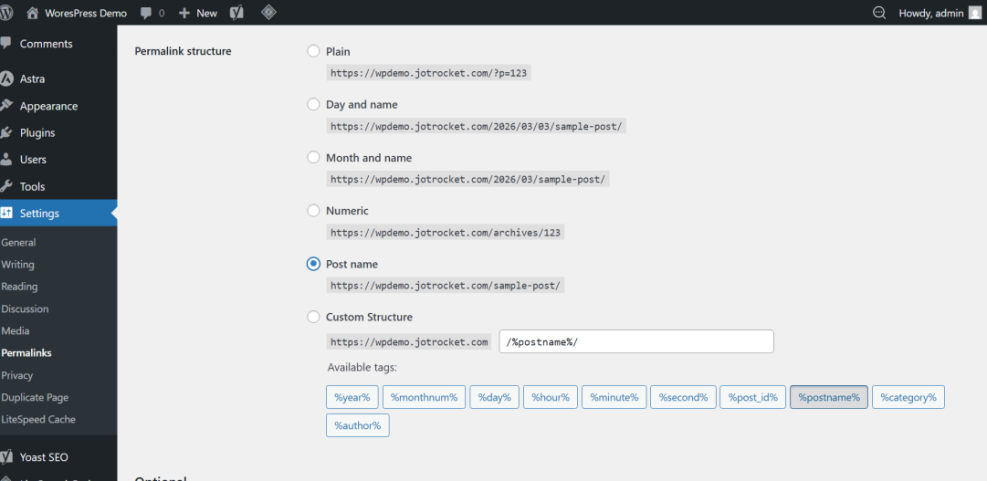
The Settings → Permalinks page is where you tell WordPress how to generate URLs for new content. Think of it as the blueprint that WordPress follows every time you create a post or page.
When you open the Permalinks settings screen, you’ll see several common options such as:
- Plain: URLs like
/?p=123. Functional, but terrible for readability and SEO. - Day and name / Month and name: Include the date in the URL, like
/2024/12/15/post-title/. - Post name: Uses only the slug:
/post-title/. - Custom structure: A pattern you define, such as
/%category%/%postname%/.
For most modern blogs and business sites, “Post name” is the simplest and most effective choice. It gives you clean, short URLs and avoids locking unnecessary dates into your structure.
Step 5: Protect Existing Links When Changing Permalinks
The “permanent” part of permalinks is not just marketing language. Once a URL is published and shared, people and search engines start relying on it. One of the key purposes of permalinks is to remain stable over time.
If you do need to change your permalink structure, treat it as a migration:
- Audit your current URLs: Export a list from analytics or your SEO tool so you know what’s already in use.
- Choose your new structure: For example, switching from date-based URLs to post-name URLs.
- Set up redirects: Create 301 redirects from every old URL to the new one so users and search engines are forwarded correctly.
- Update internal links: Make sure any hard-coded URLs in menus, widgets, or content point to the new permalinks.
- Test thoroughly: Crawl your site and try key URLs to ensure there are no 404 errors.
Even though WordPress will generate the new URLs automatically once you change the settings, it won’t automatically set up redirects for your old URLs. Handling that part is up to you (or your chosen plugin or hosting tools).
Why Smart Permalinks Are a Long-Term Investment
Permalinks in WordPress are more than just “how your URLs look.” They define how your content is referenced, understood, and trusted over time by users and search engines. A smart structure makes your site easier to navigate, improves click-through rates, and supports a cleaner SEO strategy.
By understanding the purpose of permalinks, choosing a simple and descriptive structure, and handling changes carefully with redirects, you set your site up for long-term stability. Take a few minutes to review your current permalink settings and make sure they match the future you want for your content.
Further Reading
- Internal Linking in WordPress for Beginners
- Beginner Guide to Categories and Tags in WordPress
- WordPress SEO Beginner Guide
- Step-by-Step Guide to On-Page SEO in WordPress
- How to Create a Sitemap in WordPress
Frequently Asked Questions
Do I need to change my permalinks on a brand-new WordPress site?
Will changing permalinks break my existing SEO?
Is it better to include dates or categories in my WordPress permalinks?
/blog/) if it fits their content strategy. Are there any security risks related to my permalink structure?
How long does it take to fix permalink issues on an established site?