If you are planning a new WordPress Website, figuring out the real cost can feel confusing. The software itself is free, but you still need to pay for domain registration, hosting, design, plugins, and ongoing maintenance. Without a clear plan, it is easy to overspend or under-budget and get stuck halfway through the project.
In this guide you will calculate how much a WordPress Website costs for your specific situation. You will break down every expense, compare common budget levels, and create a simple estimate you can hand to a client, your boss, or keep for your own planning.
What You Need to Start
- A clear idea of your site type, such as personal blog, small business site, portfolio, or online store.
- An approximate list of features you want, such as contact form, booking system, online payments, or membership area.
- A preferred currency and monthly or yearly budget range you can realistically afford.
- Access to a spreadsheet tool like Google Sheets or Excel to track costs.
- Optional access to an existing WordPress dashboard if you are upgrading an older site.
Step 1: Understand WordPress Website Cost Components
Before you look at specific numbers, separate the WordPress Website cost into predictable groups. This stops you from forgetting hidden fees and helps you compare options fairly.
- Open your spreadsheet tool and create columns for Domain, Hosting, Theme, Plugins, Development, and Maintenance.
- Under each column, add a row for One time costs and another row for Monthly or Yearly costs.
- In a notes column, list special needs such as ecommerce, learning management, booking, or high traffic.
- If you already run WordPress, log in to your Dashboard and review what you are currently paying for hosting and domains.
To verify, confirm every expense you can think of fits into one of your columns. If you find an item that does not fit, add another column instead of leaving it untracked.
Step 2: Estimate Hosting and Domain Costs
Hosting and domain registration are the base ongoing costs for any WordPress Website. Prices vary depending on performance, support, and whether you choose shared or managed hosting.
- Decide on at least one domain name idea and plan for a yearly domain cost of around $10–$20 for a standard .com.
- Open your browser and compare shared hosting and managed hosting plans from reputable providers that list WordPress support clearly.
- For a small new site, estimate shared hosting at roughly $3–$10 per month. For managed WordPress hosting, estimate around $20–$40 per month for starter plans.
- Add the domain yearly cost and one year of hosting to your spreadsheet under the Domain and Hosting columns.
To verify, make sure you know whether your chosen host supports the current WordPress requirements. You can review official requirements on WordPress.org.
Step 3: Plan Theme and Design Budget
Design costs range from a free theme to a fully custom design. For most new WordPress Website projects, a quality premium theme is a smart middle ground.
- Decide whether you want to start with a free theme or a premium theme from a trusted marketplace.
- For free themes, plan $0 now but expect to invest more time configuring layouts and styling.
- For premium themes, estimate $50–$100 as a one time purchase, plus optional yearly renewals for updates and support.
- Log in to your WordPress Dashboard and navigate to Appearance » Themes to see what you are using now.
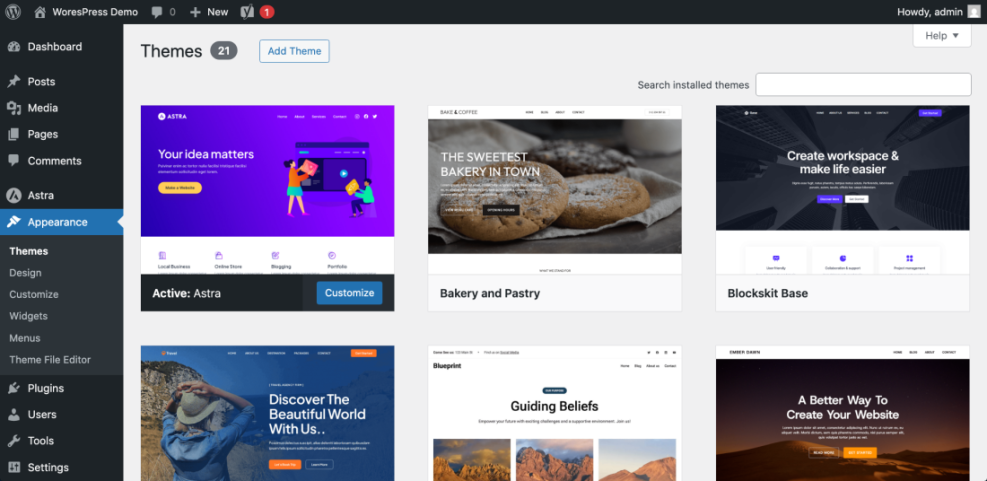
To verify, check that your theme is regularly updated and mobile responsive. If you plan to grow the site, explore guides such as Best ftp clients for WordPress users for cost conscious options.
Step 4: Estimate Plugin and Feature Costs
Plugins add major features to your WordPress Website, from SEO to forms and ecommerce. Many are free with optional paid upgrades for advanced features and support.
- List the essential features you need such as SEO, backups, security, contact forms, and caching.
- For each feature, plan a free plugin option plus a potential premium range of $50–$200 per year if you need advanced functionality.
- In your WordPress dashboard, navigate to Plugins » Add New and search for popular plugins that match each feature.
- Add separate rows in your spreadsheet for plugin subscriptions such as form builders, security suites, or ecommerce add ons.
To verify, ensure every planned feature is mapped to a plugin or built in theme feature. For a simple blog, you can often rely on free plugins listed in the official WordPress.org plugin directory.
Common Ways to Manage SEO Meta Tags in WordPress
Because SEO is a common reason to install plugins, it helps to understand the different ways you can control titles and meta descriptions in WordPress. This can influence both your plugin choices and your overall cost.
| Method | Where You Use It | Main Purpose |
|---|---|---|
| SEO Plugin (Yoast, Rank Math) | WordPress dashboard » SEO settings + post editor | Quickly manage title, meta description, and social tags for all content with user-friendly controls. |
| Theme SEO Options | Appearance » Customize or theme options panel | Use built-in theme settings to set basic meta tags without extra plugins (feature varies by theme). |
| Manual Code in Theme | Child theme functions.php or header.php | Add custom meta tag logic using PHP for advanced or lightweight setups. |
| Custom Fields + Code | Custom fields in editor + wp_head hook | Store per-page meta values in fields and output them via a custom function. |
| SEO Plugin Social Settings | SEO plugin » Social / Facebook / Twitter tabs | Fine-tune Open Graph and Twitter Card tags for better social sharing previews. |
Step 5: Decide Between DIY and Hiring a Developer
Development costs can be the largest part of a WordPress Website budget. The price depends on complexity, the developer’s experience, and whether you pay hourly or per project.
- Choose whether you will build the site yourself, use a page builder, or hire a freelancer or agency.
- For DIY builds using an existing theme, estimate $0 in direct fees but add your time cost.
- For small business sites, expect freelance projects to start around $500–$2,000 for setup and customization.
- For complex ecommerce or membership sites, use a wide range of $2,000–$10,000+ depending on features and integrations.
- Record your estimated development cost in the Development column, separating one time build fees from future change requests.
To verify, get at least two written quotes if you plan to hire help. Compare what each quote includes and check whether maintenance is part of the package or a separate service.
Step 6: Calculate Ongoing WordPress Maintenance Costs
Even after launch, a WordPress Website needs regular updates, backups, security checks, and performance tuning. You can handle this yourself or pay a provider.
- Decide who will handle updates for WordPress core, themes, and plugins every month.
- If you manage it yourself, estimate at least 1–2 hours per month of your time.
- If you outsource maintenance, plan roughly $30–$200 per month depending on what is included, such as monitoring, fixes, and support.
- Add backup storage, premium security services, and any paid uptime monitoring tools to your Maintenance column.
To verify, review checklists like WordPress migration checklist for blogs to ensure you are budgeting for every recurring task.
Step 7: Build Example WordPress Website Budgets
Now that you have all components, combine them into realistic example budgets. This helps you decide what level matches your goals and resources.
- In your spreadsheet, create three sections named Starter blog, Small business site, and Online store.
- For a starter blog, estimate around $50–$150 for the first year including domain, basic shared hosting, a free theme, and key plugins.
- For a small business site, estimate around $300–$2,000 for the first year, including premium theme, better hosting, and some design help.
- For an online store, estimate from $1,000–$15,000+ including stronger hosting, paid plugins, and professional development time.
- Use formulas to sum each section so you can see one time vs yearly totals clearly.
To verify, double check that every total includes domain, hosting, design, plugins, development, and maintenance. If you want a deeper breakdown of software-only costs, compare your numbers to How much does it cost to build a.
Step 8: Compare Your Estimate with Common Scenarios
With your own numbers in place, compare them to common WordPress Website scenarios. This acts as a sanity check and highlights where you might be over or under spending.
- Review your totals and see which scenario they match most closely, such as starter blog, local business site, or growing ecommerce shop.
- If your hosting cost is extremely low but you expect heavy traffic, consider moving toward a managed plan similar to guides like How to choose the best WordPress hosting.
- If plugin or development costs are very high, check whether a different theme or simpler feature set could reduce the total.
- Write a short summary statement such as “My WordPress Website will cost about $800 to launch and $40 per month to run.”
To verify, make sure your summary feels realistic given your goals. If it does not, adjust one category at a time instead of guessing at the total.
<!-- Example HTML budget table you can paste into a WordPress Custom HTML block -->
<table class="wpw-cost-table">
  <tr><th>Item</th><th>One Time</th><th>Monthly</th></tr>
  <tr><td>Domain</td><td>$15 / year</td><td>-</td></tr>
  <tr><td>Hosting</td><td>-</td><td>$15</td></tr>
  <tr><td>Theme</td><td>$75</td><td>-</td></tr>
  <tr><td>Plugins</td><td>$100</td><td>$10</td></tr>
  <tr><td>Maintenance</td><td>-</td><td>$40</td></tr>
</table>
Conclusion: You Are Ready to Go
By breaking every expense into clear categories, you now understand how much a WordPress Website really costs. You have estimated domain and hosting, design, plugins, development, and ongoing maintenance, then combined them into realistic example budgets.
With your spreadsheet and written summary, you can confidently plan your project, adjust scope to match your budget, or discuss options with a developer or hosting provider. You are ready to move on to actually building and launching your site.
Further Reading
- How much does it cost to build a
- Managed WordPress hosting guide
- How to build a website on WordPress
- WordPress migration checklist for blogs
- Beginner guide to WordPress speed optimization
Frequently Asked Questions
Is WordPress itself free or paid
What is the minimum budget for a simple WordPress Website
How much does a small business WordPress Website usually cost
Why are some WordPress Websites very expensive
How often do I need to pay for themes and plugins
Can I lower costs by switching hosting later
What ongoing costs are easy to forget when budgeting