How to Choose WordPress Hosting Comparison and Buying Guide
Practical buying checklist for clear hosting decisions and fewer mistakes

WordPress hosting can make or break how fast, secure, and stable your website feels every day. The right plan keeps your site online when traffic spikes, while the wrong one leaves you fixing errors, chasing support, and losing visitors.
This guide walks you through key hosting types, the most important features to compare, and practical checklists for different site sizes. By the end, you can read hosting plans with confidence, compare them side by side, and pick the option that fits your goals and budget.
How to Choose WordPress Hosting Quickly
Start With Your Site Goals
Before you look at any plan, decide what your site should do in the next one to two years. A small personal blog needs far less power than a growing WooCommerce store or a busy membership site. When you know your goals, you can match traffic, storage, and features to real needs instead of guessing.
Match Goals to Hosting Types
Next, connect those goals to a broad hosting type. Shared hosting works for small, low-traffic sites. Managed hosting fits busy blogs and business sites that need extra speed and help with updates. VPS or cloud hosting is better when you expect heavy traffic, custom code, or complex plugins.
Quick Checklist Before You Decide
- Estimate how many visitors you expect each month after six to twelve months.
- Check whether you need email accounts, staging, or advanced security tools.
- Look for clear uptime guarantees and honest renewal pricing.
- Confirm that one-click WordPress installs and automatic updates are included.
- Test support with a pre-sales chat or ticket before you buy.
When you can tick off every item in this checklist, you are ready to compare specific plans without feeling overwhelmed by marketing jargon.
Understanding Hosting Types for WordPress
What Type of Hosting Is Best for WordPress?
The “best” type depends on how much control you want versus how much work you are willing to do. Shared hosting is cheap and simple but less powerful. Managed plans cost more but handle maintenance for you. VPS and cloud hosting unlock more power and flexibility, but you usually need more technical skills.
Shared, Managed, VPS, and Cloud Compared
The table below summarizes how the most common hosting types differ so you can see where your needs fit.
| Hosting Type | Typical Price | Best For | Main Trade-Off |
|---|---|---|---|
| Shared Hosting | Low monthly cost | New blogs and small sites | Limited resources and slower performance at busy times |
| Managed WordPress Hosting | Medium monthly cost | Serious blogs and business sites | Less server control, higher price than shared |
| VPS Hosting | Medium to high cost | Growing sites needing custom setups | Requires more technical knowledge to manage |
| Cloud Hosting | Flexible, usage-based cost | High-traffic or unpredictable sites | Pricing and configuration can be more complex |
Once you understand where each type shines, it becomes much easier to ignore plans that obviously do not match your site’s size, complexity, or growth plans.
Self-Hosted Versus Hosted Platforms
With self-hosted WordPress, you rent hosting from any provider and install WordPress yourself. With hosted platforms, such as a WordPress-focused service, hosting is bundled with the software. Self-hosted offers more control, plugins, and themes. Hosted platforms reduce maintenance but may limit customizations and certain extensions.
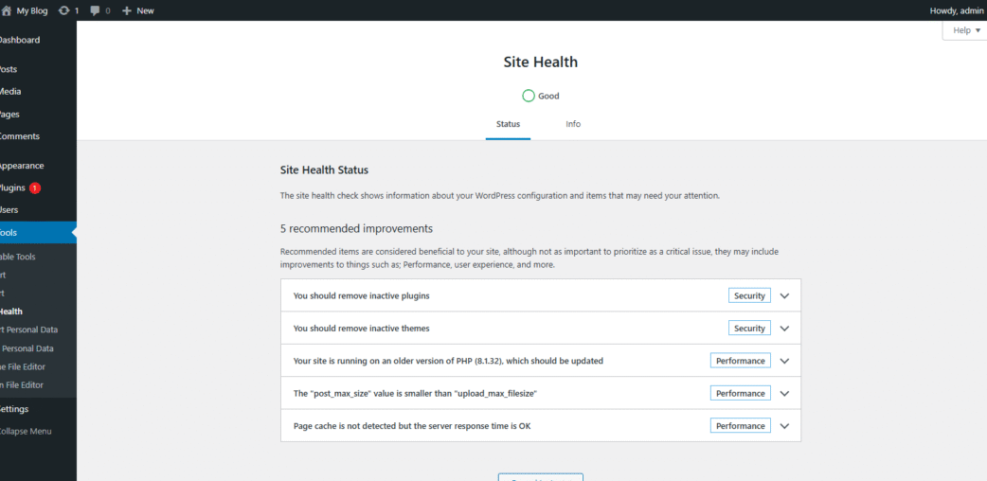
In the WordPress Dashboard, go to Tools » Site Health to review performance and security recommendations.
Key Factors Before You Buy
How Fast and Reliable Is the Host?
Speed and uptime directly affect revenue, search rankings, and user trust. Look for modern infrastructure, such as SSD storage and current PHP versions, plus built-in caching or support for a good caching plugin. Uptime guarantees should be clearly described, and independent tests or reviews should confirm that the host stays close to 100% availability over time.
Which Security and Backup Tools Are Included?
A good WordPress-focused host protects your site at the server level and helps you recover quickly if something goes wrong. Look for free SSL certificates, automatic malware scans, web application firewalls, and daily or more frequent backups. Ideally, restores are a single click away from your control panel.
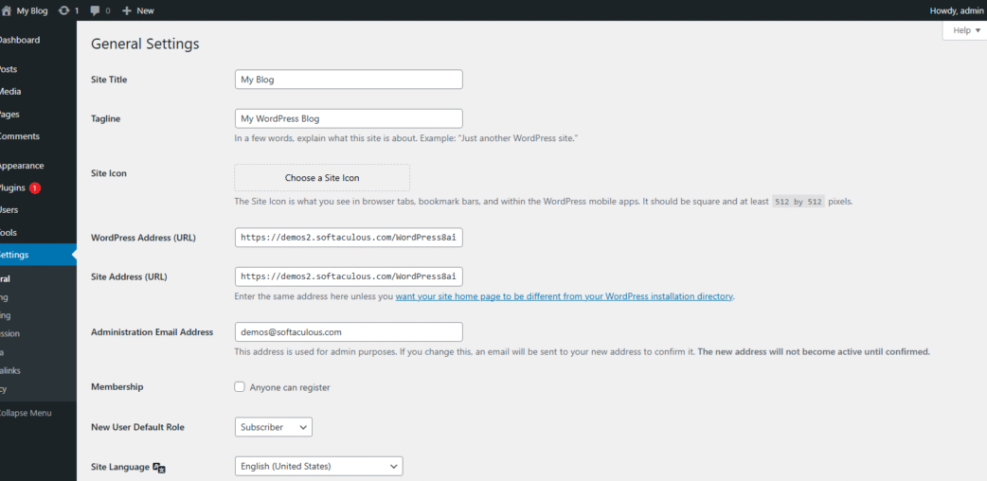
In the WordPress Dashboard, go to Settings » General and confirm that your WordPress Address and Site Address use https:// to match your SSL configuration.
How Easy Is Support and Daily Management?
Strong support turns a confusing problem into a small delay instead of a full outage. Check whether support is available through live chat, tickets, or phone, and whether it is offered around the clock. A clear control panel, one-click installers, and staging site tools reduce daily friction and help you stay focused on content instead of configuration.
What Pricing Traps Should You Avoid?
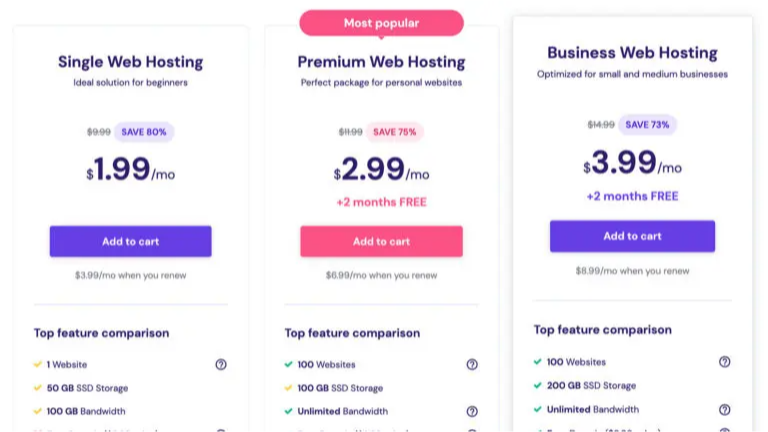
Hosting prices often start low and then rise sharply when you renew. Review both the intro price and the regular rate for the same plan length. Also, check add-ons like backups, email, or security, because these sometimes cost extra. When you compare total cost for one to three years, small differences in monthly price can add up quickly.
Matching Hosting to Real Sites
Best Option for a Simple Blog
A simple personal blog or hobby site can usually start with quality shared hosting. Look for a plan that supports at least one full website, includes free SSL, and offers one-click WordPress installs. When your monthly visitors grow or you notice slowdowns, you can upgrade to a higher shared plan or an entry-level managed option.
Best Option for a Business Website
For a business site, reliability, backups, and strong support matter more than saving a few dollars. Managed WordPress hosting is often a better fit because it handles updates, security, and performance tuning for you. This lets you focus on sales and content while the host keeps the site stable behind the scenes.
Best Option for a WooCommerce Store
Online stores need extra resources for carts, checkout, and payment plugins. Therefore, it is wiser to choose a managed plan or VPS that explicitly supports WooCommerce and offers easy scaling. Make sure the host has clear backup and restore tools, staging for testing changes, and good database performance for busy product and order tables.
Practical Setup and Migration Tips
Prepare Your Site Before Moving Hosts
When you switch providers, clean up your site before you move it. Remove unused themes and plugins, update everything to the latest version, and clear old cache files. Then create a full backup using a reliable backup plugin or your current host’s tools. A smaller, well-maintained site migrates faster and breaks less often.
Use Staging to Test Changes Safely
A staging site is a safe copy of your live site where you can test updates and new plugins. Many managed hosts offer one-click staging environments. Always apply big changes there first, check key pages and forms, then push the changes live. This habit prevents broken layouts, plugin conflicts, and checkout issues on your live site.
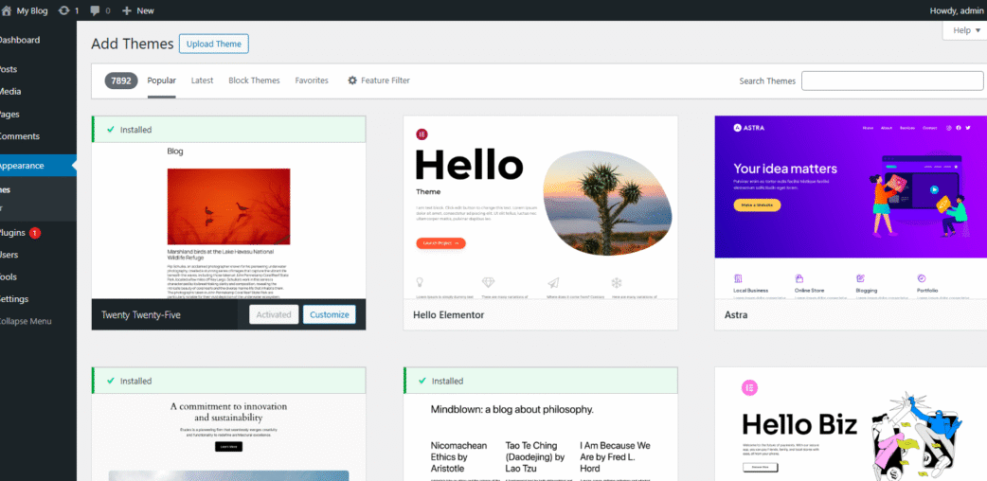
In the WordPress Dashboard, go to Appearance » Themes and click Add New to test a new theme on a staging copy instead of your live site.
Advanced Tip Adjust WordPress Memory Limit
Some hosts set conservative memory limits that can cause errors with heavy plugins or page builders. If your plan allows it, you can ask support to raise the memory limit or adjust it yourself in the configuration file. Always back up first, and only make changes that your host’s documentation or support team confirms as safe.
define( 'WP_MEMORY_LIMIT', '256M' );If this setting does not work, the host may enforce a strict limit, so contact support rather than editing server files blindly.
WordPress Hosting Conclusion
Choosing the right WordPress hosting is really about matching your site’s goals to the right type of plan, then double-checking speed, support, security, and long-term pricing. When you treat hosting as the foundation of your online business, you naturally lean toward reliable providers, realistic resource limits, and tools that keep your site stable as it grows.
The next step is simple: review your current or planned site, pick the hosting type that fits, and use the checklists from this guide to compare two or three providers. When you do that, your final choice feels like a clear decision instead of a gamble.
More WordPress Guides You Might Like
To deepen your skills, explore related topics that cover performance, security, and store setups. The ideas below help you build on a solid hosting choice and get more from every visit to your site.
- Managed WordPress Hosting Full Guide
- Beginner checklist optimizing WordPress blog posts
- WordPress migration blog guide
- Woocommerce performance tips for faster stores
- Common WordPress backup errors and how to fix
Working through these topics one by one turns your hosting plan into a complete, reliable platform that supports traffic growth, content marketing, and revenue over the long term.
Frequently Asked Questions About WordPress Hosting
How much should WordPress hosting cost per month?
Is managed WordPress hosting worth the higher price?
Can I change hosting providers later without losing my site?
Do I need a dedicated server for a small business site?
What is the most important feature in a WordPress hosting plan?