Best church website builders help your ministry share the gospel online without hiring a developer. With the right tools, you can publish sermons, accept online giving, and keep members informed without learning to code.
You will see how different types of church website builders compare, which platforms fit common church scenarios, and how WordPress fits into your long-term plan. By the end, you can match a builder to your budget, skills, and ministry needs with confidence.
Church Website Builders
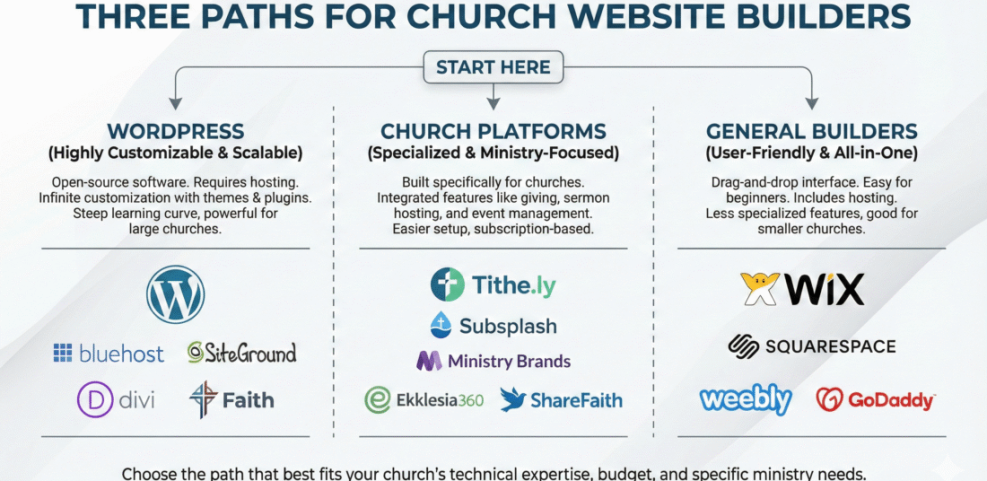
Most churches pick from three options: self-hosted WordPress, a church-focused platform like Tithely or Nucleus, or a general website builder such as Wix or Squarespace. Each option can work well when you match it to your team’s skills and the level of church-specific features you need, so it helps to think of them all as different types of church website builders.
As a quick rule of thumb, church-focused platforms suit teams that want built-in sermons, giving, and groups with minimal setup. WordPress fits churches that want full control, strong SEO, and easy switching later. General builders are best when design matters most and your feature list stays simple.
Before diving deeper, it helps to see how these three categories of church website builders compare side by side.
| Option Type | Best For | Typical Monthly Cost |
|---|---|---|
| Self-Hosted WordPress | Flexible sites, strong SEO, extendable features | About $5–$20 for hosting, plus optional add-ons |
| Church-Focused Platforms | All-in-one sermons, giving, events, and media | Usually around $40–$80 including hosting |
| General Website Builders | Drag-and-drop design and simple church pages | Around $15–$30 for ad-free plans |
This table gives you a quick idea of costs and tradeoffs so you can roughly place your church before you read the details and choose the best church website builder for your needs.
What Is a Church Website Builder?
A church website builder is a tool that lets you create and update your site through a visual interface instead of code. You design pages with drag-and-drop sections, built-in templates, and simple settings. In many cases, you can connect giving, events, and sermon media from the same dashboard.
When a Specialized Platform Makes Sense
Specialized church platforms work best when your staff has very limited time and technical confidence. Many of these tools include sermon libraries, event calendars, prayer requests, and online giving out of the box. Because everything is integrated, you also avoid juggling many separate services and logins compared to mixing several generic website builders for churches.
When WordPress Should Be Your Default
WordPress is a strong default option if you want full control over your content and design. You can switch themes, plugins, and even hosting without rebuilding from scratch. In addition, you own your data, which helps when you need to export sermons, giving reports, or mailing lists in the future. Many churches use WordPress as the core of their church website builder stack, pairing it with a page builder plugin.
Church Website Features
Before picking specific church website builders, you should clarify which features matter most to your church. This step prevents you from choosing based on design alone. It also ensures you do not miss critical ministry tools like giving or small group management.
How Easy Should the Builder Be?
Ease of use often matters more than raw power for church teams. If volunteers cannot update the homepage or add events, your site quickly becomes stale. Therefore, look for church website builders with clear menus, inline editing, and simple roles so nontechnical staff can safely make changes.
Essential Features for Ministry Workflows
Most churches need recurring events, sermon archives, online giving, and a clear “Plan a Visit” page. In addition, many ministries benefit from small group finders, simple forms, and basic email capture. When you compare church website builders, check whether these tools are native features or require several third-party integrations.
Budget, Pricing, and Long Term Costs
Sticker price is only one piece of the budget. Over time, transaction fees, premium templates, and extra storage can grow total costs. As a result, you should compare not only monthly fees but also likely add-ons, such as sermon hosting, live streaming tools, and email marketing services inside your chosen church website builder.
Church Website Platforms
Church-specific platforms are all-in-one church website builders that combine hosting, site design, and ministry tools in one subscription. They often include sermon players, event calendars, and online giving without extra plugins. In many cases, they also provide onboarding help tailored to church workflows.
Tithely Sites and Ministry Designs Overview
Tithely Sites focus on helping churches launch a modern website with built-in giving, sermon media, and calendars. Ministry Designs offers drag-and-drop editing, event landing pages, and search optimization tools tuned for churches. Both aim to reduce setup time so pastors can focus on people instead of tech, making them attractive church website builder options.
Nucleus, Sharefaith, and ChurchSpring Snapshot
Nucleus emphasizes a clean central hub where visitors can find next steps like groups, serving, and giving. Sharefaith pairs websites with media libraries, while ChurchSpring focuses on simple, mobile-friendly designs. For many churches, these platforms feel less overwhelming than starting from a blank WordPress install or a generic website builder for churches.
Strengths and Drawbacks of Church Platforms
Church-focused platforms shine when you want a fast launch and tight integration between sermons, giving, and events. However, they can feel limiting if you later need advanced customization or niche integrations. You are also usually locked into the provider’s hosting, which makes long-term switching to another church website builder harder.
WordPress Church Sites
WordPress powers a large share of sites on the web and works very well for churches. It is free, open source, and supported by a huge ecosystem of themes and plugins. With a good host, it can stay fast, secure, and easy for volunteers to maintain, which is why many people consider it the most flexible church website builder foundation.
Why WordPress Remains a Flexible Choice
With WordPress, you can start small and gradually add features as your church grows. For example, you might begin with a basic theme and later add sermon podcasts, live streaming embeds, and event registrations. Because the platform is widely used, it is also easy to find tutorials and local help for your WordPress-based church website builder setup.
Suggested Themes and Page Builders
You can pair WordPress with a page builder to get drag-and-drop editing similar to hosted church website builders. Popular options include Elementor, Kadence Blocks, and Spectra. In addition, many theme shops offer church-focused designs with prebuilt homepages for sermons, events, and “Plan a Visit” sections.
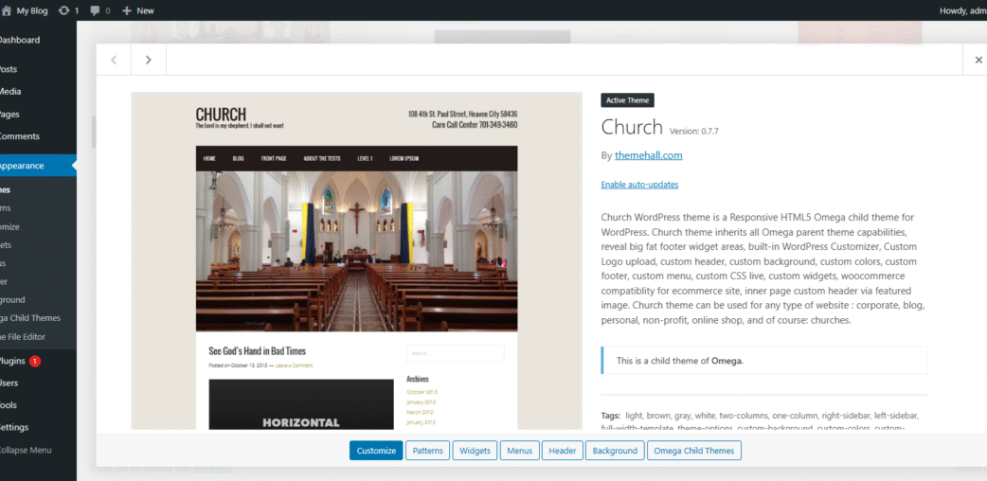
When you compare themes for your church website builder, focus less on flashy animations and more on readability, mobile layouts, and ease of editing. A simple, clear design is usually better for members and guests than a crowded homepage.
Key Plugins for Churches
Plugins can turn WordPress into a full ministry hub. You might add a giving plugin, an events calendar, a sermon library tool, and a form builder for prayer requests. To keep maintenance manageable, choose well-supported plugins with good reviews instead of stacking many niche tools in your WordPress-based church website builder.
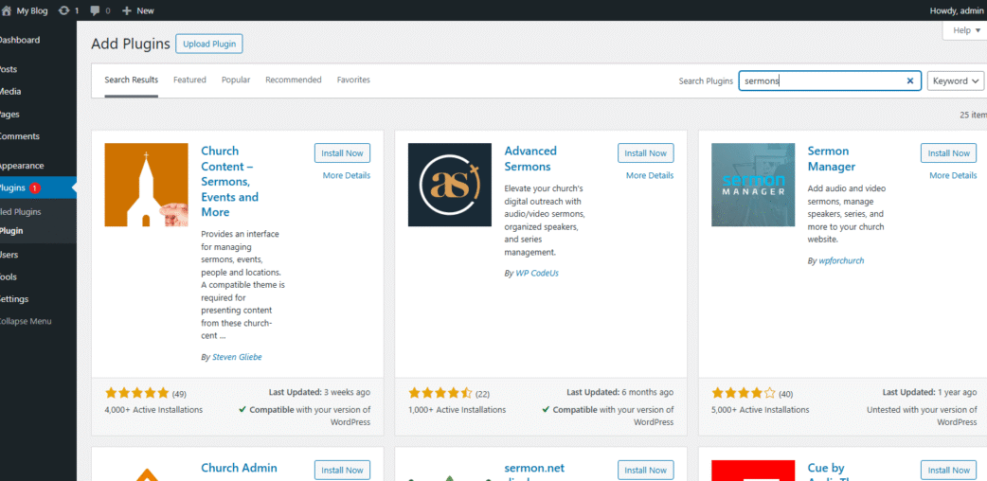
For step-by-step setup, you can follow a core guide such as Install WordPress and then layer church-specific features on top. Over time, this approach keeps you in control while still giving volunteers a friendly editing experience inside your church website builder.
To go deeper, you might later create a dedicated guide such as WordPress Church Themes or explore a focused article on Donation Plugins for more advanced setups.
General Website Builders
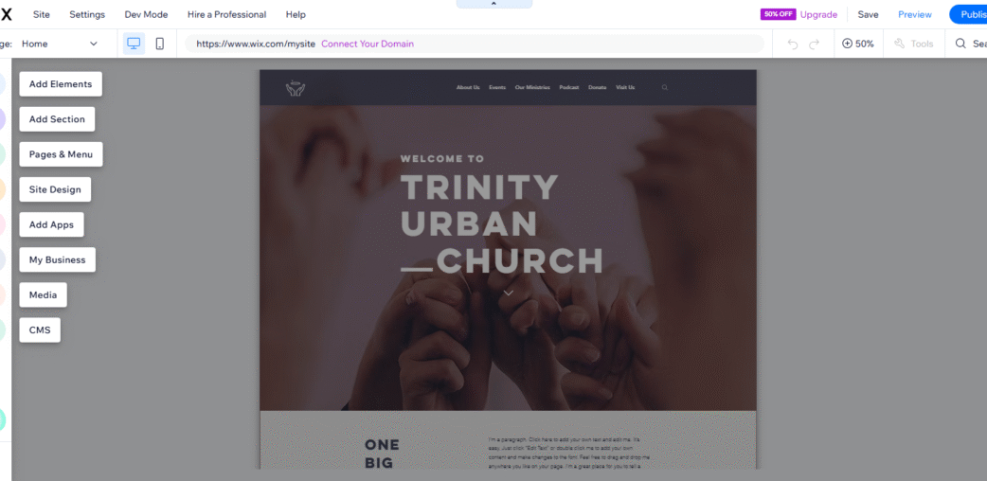
General website builders for churches such as Wix, Squarespace, and Hostinger Website Builder provide friendly drag-and-drop editors and polished templates. Many now include church or nonprofit layouts you can adapt quickly. They are especially helpful when you want attractive design without managing hosting or updates.
Wix, Squarespace, and Hostinger Basics
Wix offers multiple church templates, an app marketplace, and generous free plans. Squarespace focuses on clean, modern designs with strong typography and media handling. Hostinger’s builder bundles hosting and an AI-assisted editor, which can speed up launching basic church pages. Any of these can serve as simple church website builders for smaller ministries.
Where General Builders Work Well
General builders shine when your church needs a simple site with service times, location, and basic media. For example, a church plant may only require a homepage, about page, and giving link. In addition, these platforms often include built-in security and backups, which reduces technical overhead compared to self-managed church website builders.
Limits You Should Consider
The tradeoff is that advanced church features may require workarounds or extra services. Online giving might rely on external donation platforms, and sermon archives can feel less flexible than in WordPress. Therefore, you should test how each church website builder handles your top use cases before you commit for several years.
Choose Website Builder
Once you understand the main categories, you can work through a simple decision process. This prevents analysis paralysis and aligns your final choice with real ministry goals instead of just design preferences. Thinking in terms of specific church website builders instead of random tools will also keep you focused.
How Much Time Can You Invest?
Start by listing who will maintain the site and how many hours they can realistically spend each month. If your team has little time or experience, a church-focused platform or general church website builder may be safer. If you have a tech-savvy volunteer, self-hosted WordPress becomes much more attractive.
Checklist Before You Commit
Before entering payment details, run through a short checklist to confirm the church website builder really fits your church.
- Confirm you can easily add sermons, events, and giving.
- Check that volunteers can edit key pages without training sessions.
- Review renewal pricing, storage limits, and support channels.
- Test site speed on mobile devices used by your members.
- Verify you can export important data if you move later.
If a platform fails more than one item on this checklist, you should keep looking. A few extra hours of testing now will save significant time and money later and help you land on the right church website builder.
IMAGE: Diagram of three paths for church website builders labeled WordPress, Church Platforms, and General Builders with example logos under each
- Define your must-have features and monthly budget.
- Choose the category that fits your skills and needs.
- Create trial sites on two or three short-listed church website builders.
- Ask real members and staff to test core tasks.
- Commit to one platform and schedule regular content updates.
This step-by-step approach guides you from a vague idea to a clear, confident church website builder choice that supports your ministry for years.
Conclusion
The best church website builders are the ones your church can actually keep updated. WordPress offers unmatched flexibility and ownership when you have the right hosting and a willing volunteer. Church-focused platforms and general builders reduce complexity at the cost of some long-term freedom.
Your next step is simple: shortlist two or three church website builders, build quick test sites, and invite real feedback from leaders and members. With clear goals, realistic expectations, and a little experimentation, you can choose a builder that helps your church welcome visitors, disciple members, and share the gospel online with confidence.
WordPress Guides
The following planned guides will complement your choice of church website builder and help you get more from your church website over time.
- How to start a WordPress website
- Best ftp clients for WordPress users
- Best WordPress seo plugins and tools
- Best church website builders
- Creating Accessible Church Websites for All Visitors
As you explore these topics, you will be able to refine your design, improve member engagement, and keep your chosen church website builder delivering value for the long term.
Church Website FAQ
What is the cheapest way to use church website builders?
Can a small church start with a free website plan?
Do church website builders handle online donations securely?
Is WordPress too complex for volunteer teams?
How long does it take to launch a church website?