WordPress Church Themes Guide Design and Features Overview
Practical ways to choose a theme your church will love

WordPress church themes give your ministry an online home that feels as welcoming as Sunday service. When you choose the right theme, visitors can quickly find sermons, events, and ways to connect, even if your team has limited technical experience.
You will explore how church-focused themes differ from generic designs, which features truly matter, and how to set up and optimize a theme step by step. By the end, you can confidently pick a theme that supports your mission, not just your menu layout.
What WordPress Church Themes Should Deliver
A strong church theme makes it easy to share sermons, promote events, and invite people to services or groups. It combines clear design, simple content management, and built-in tools for ministries, donations, and communication, without forcing you to act like a developer.
Core Purpose of a Church Website
Your website should guide visitors quickly to service times, location, and what to expect. For members, it should provide sermons, event details, and ways to give or volunteer. When a theme reflects this purpose, every page supports real ministry instead of just looking pretty.
Essential Features at a Glance
Most church-focused themes include sermon archives, event calendars, ministry or small group pages, and support for online giving. Many also offer built-in sections for staff profiles, locations, and Sunday highlights. When these basics are present, you spend less time fighting layouts and more time sharing content.
Do You Really Need a Church Theme?
A general business theme can work if you are ready to customize everything. However, a dedicated church theme usually ships with sermon templates, event layouts, and donation styling ready to go. This saves time, reduces plugin conflicts, and keeps your site easier to manage for volunteers.
Essential Features for Church Websites
Before you fall in love with a demo, check whether the theme covers core church functions. Sermons, events, ministries, and giving tools are far more important than background animations or parallax effects.
How Should Sermons Work in a Theme?
A good church theme lets you organize sermons by series, speaker, and topic, with support for audio, video, and notes. Ideally, it integrates with common sermon plugins instead of locking you into custom post types that are hard to move later. This flexibility protects your content if you switch themes.
Events, Small Groups, and Ministries
Events should be easy to add and simple to browse. Look for recurring events, maps, and clear “Add to calendar” options. Ministry or small group pages should share a consistent layout so members can scan options quickly. When these elements match your church structure, navigation stays intuitive.
Online Giving and Donations Setup
Your theme does not need to process payments, but it should display giving calls to action clearly. For example, it should support prominent “Give” buttons in the header and footer, plus flexible layouts for donation pages. Make sure it plays well with dedicated giving plugins instead of duplicating their features.
Because many churches compare generic business themes with church-focused themes, it helps to see the contrasts side by side.
| Feature | Generic Business SEO and UX, and where you will see it in daily work.”>Theme | Church Theme |
|---|---|---|
| Sermon Support | Blog posts only | Sermon archive with media |
| Events | Basic blog or page list | Dedicated calendar and event layout |
| Online Giving | Manual button styling | Pre-styled giving sections and CTAs |
| Ministry Pages | Generic service pages | Templates for ministries or groups |
| New Visitor Info | About page only | Focused “Plan a Visit” layout |
| Volunteer Opportunities | Simple text sections | Highlight blocks and forms integration |
This comparison shows why a church theme can reduce setup time while giving visitors a clearer path through your content.
Design Principles for Church Websites
Clean layouts, readable text, and warm imagery matter more than flashy effects. Therefore, aim for a design that reflects your church’s personality while staying simple enough for all ages to use.
What Makes a Church Homepage Welcoming?
A welcoming homepage highlights service times, location, and a brief statement of who you are. Ideally, it pairs a clear headline with a photo that feels genuine, not stock-heavy. Prominent “Plan a Visit” and “Watch Sermons” buttons help visitors take their next step right away.
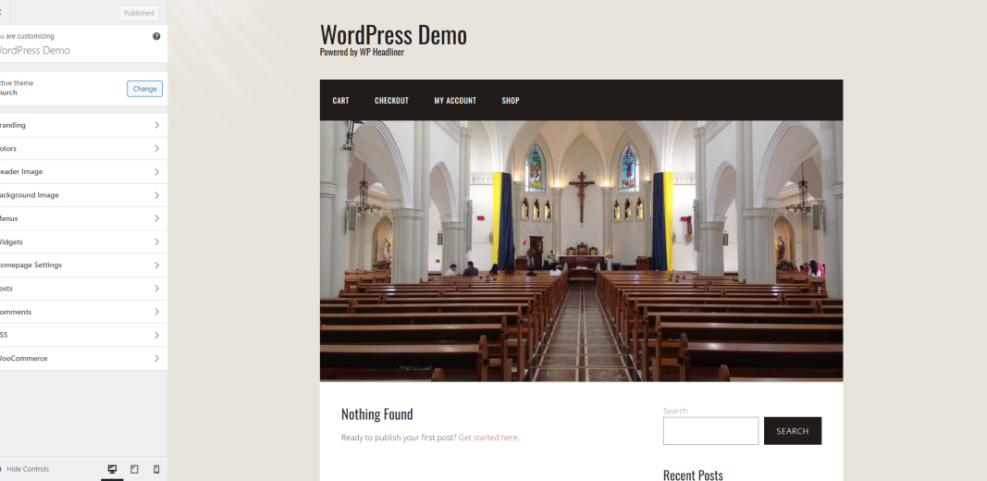
Navigate to Appearance » Customize and open Homepage Settings.
Typography and Color Choices
Readable typography means generous font sizes, strong contrast, and simple typefaces. Avoid thin scripts for body text, especially over images. For colors, use your church brand but keep enough contrast for older eyes and mobile screens. Reserve bright accent colors for calls to action, such as “Give” or “Join a Group.”
Mobile Friendly Layout Considerations
Most visitors will first see your website on a phone. Therefore, check whether the theme keeps menus, buttons, and forms large enough for thumbs. Test long sermon titles and multi-day events on small screens to ensure they do not break layouts or hide key information.
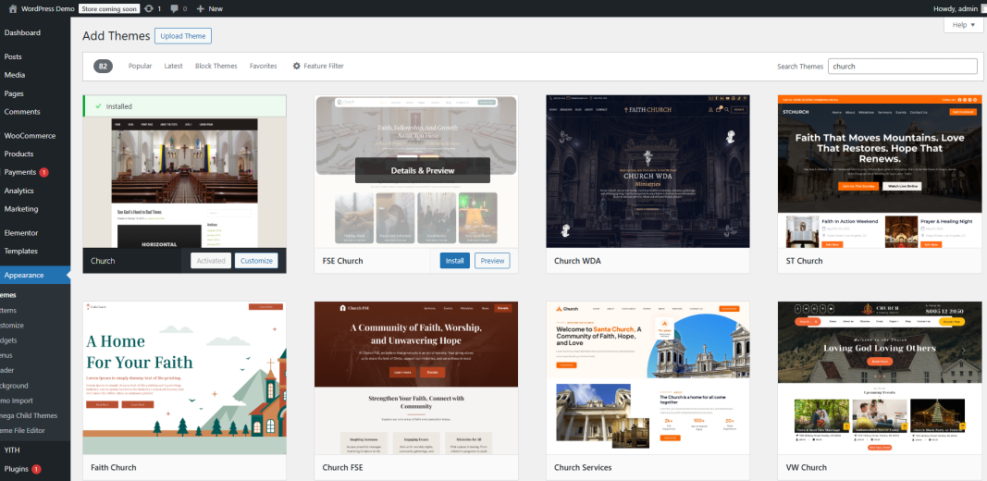
Navigate to Appearance » Themes and click Theme Details, then select the Live Preview responsive controls.
Free Versus Premium Church Themes
Many churches start with a free theme, then move to a premium option as needs grow. Both options can work well if you understand the trade-offs in support, features, and long-term flexibility.
When Is a Free Theme Enough?
A free theme can serve a smaller church that only needs basic pages, simple sermons, and a few events. However, you often trade away dedicated support and advanced layouts. If your budget is tight, focus on clean design, recent updates, and compatibility with core plugins.
When to Invest in Premium
Premium themes usually add more polished layouts, deeper customization, and better integration with page builders and plugins. As your church grows, these features reduce the time you spend fighting shortcodes or custom code. In addition, support and documentation become valuable when volunteers change.
How Do Licensing Terms Work?
Most premium themes use annual licenses for updates and support, while you can keep using the theme even if you do not renew. Before you buy, confirm how many sites the license covers and whether you get one-click demo imports. Clear licensing helps you budget without surprises.
You can think of the differences between free and premium themes in a simple overview.
| Aspect | Free Theme | Premium Theme |
|---|---|---|
| Price | $0 | Usually $40–$90 one time |
| Support | Community forums | Dedicated helpdesk |
| Design Variety | Limited layouts | Multiple page and header options |
| Church Features | Basic only | Rich sermon and event tools |
| Updates | Irregular in some cases | Regular updates with changelog |
| Demo Import | Sometimes missing | Usually one-click demo setup |
This table should help you decide whether a free theme will last or if you should budget for a premium option from the start.
Setting Up a Church Theme
Once you pick a theme, you need a clear process to install, configure, and test it. A simple workflow keeps your launch smooth and avoids last-minute surprises on Sunday morning.
Installing Your Chosen Theme
- Log in to your WordPress Dashboard.
- Go to Appearance » Themes and click Add New.
- Search for your church theme or upload the theme .zip file.
- Click Install, then Activate.
- Run any starter wizard or demo importer the theme provides.
This order avoids half-configured pages and makes sure all starter content appears correctly before you begin editing.
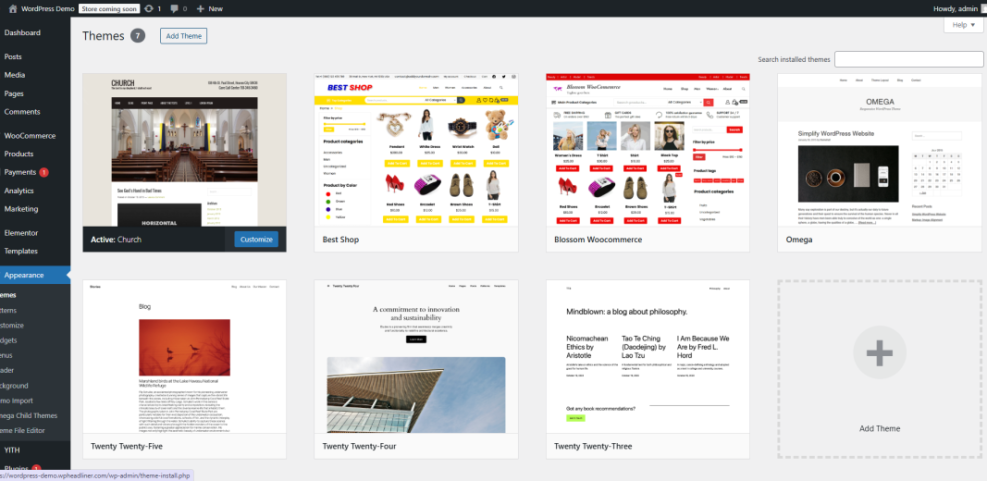
Navigate to Appearance » Themes and click Add New.
Configuring Core Content Sections
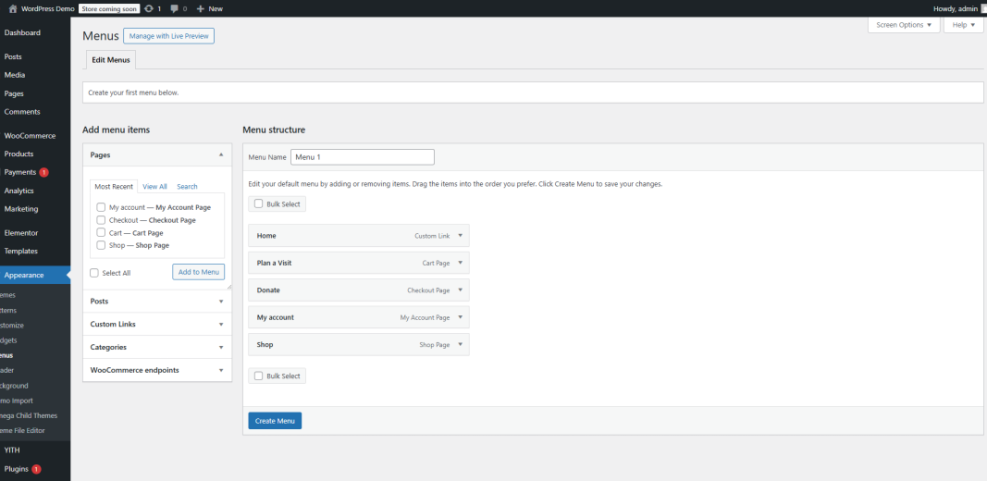
After activation, configure your menus, homepage, and post types. Start with navigation, then connect sermons, events, and ministries to the right menu items. Next, adjust your homepage hero area, highlight current series, and add buttons for “Plan a Visit” and “Give Online.”
Navigate to Appearance » Menus and choose your primary menu location.
Testing Performance and Accessibility
Before launch, test the theme on several devices and connections. Open your site on a slow phone network to see how it behaves. Use tools like PageSpeed Insights to check loading times, and adjust images or caching based on the results. Also, ensure keyboard navigation and screen reader labels work correctly.
You can also apply a small CSS tweak to improve readability for sermon titles on archive pages.
/* Make sermon titles larger on archive pages */ .archive-sermons .entry-title { font-size: 2rem; font-weight: 700; }This type of adjustment keeps content easier to scan without changing the theme’s core files.
Optimizing Your Church Theme Long Term
Choosing a theme is only the first step. Over time, you need consistent updates, fresh content, and some basic monitoring to keep your church website effective.
How Often Should You Update Content?
Service times, locations, and contact details should stay accurate every week. Sermon archives, events, and announcements benefit from regular updates so visitors trust the information. When people see recent content, they are more likely to explore ministries or plan a visit.
Keeping Performance and Security Strong
Update your theme, plugins, and WordPress core regularly to reduce security risks. In addition, remove unused plugins and heavy page-builder sections that slow down pages. A strong backup and security setup supports your theme, so pair it with resources like the WordPress security overview.
Tracking What Visitors Actually Use
Analytics show whether people watch sermons, read event details, or only visit the homepage. Therefore, connect your site to an analytics solution and watch which pages get the most traffic. When you see patterns, adjust your menu, homepage highlights, and calls to action around what people truly use.
If you ever feel that your theme limits you, compare it with full website-building options in resources like Church website builders to decide whether a bigger change makes sense.
WordPress Church Themes Conclusion
A thoughtful choice of WordPress church themes can reshape how people experience your ministry online. Start by prioritizing sermons, events, giving, and visitor pathways over visual tricks. Then, choose a free or premium theme that balances design, support, and long-term flexibility.
Your next step is simple: shortlist three themes, test each with demo content, and measure how quickly you can publish a new sermon and event. The theme that makes this easiest will usually support your team best, week after week.
More WordPress Guides You Might Like
These resources can help you go deeper into hosting, design, and optimization decisions that affect your church website.
- Best Church Website Builders
- Best Free WordPress Blog Themes
- WordPress Speed Optimization Step By Step Guide
- Best WordPress seo plugins and tools
- How to publish WordPress site
As you explore these guides, keep a running list of features and layouts your team truly needs so future decisions stay focused on ministry outcomes, not just design trends.
Frequently Asked Questions About WordPress Church Themes
What is a WordPress church theme?
Can I use a regular theme for my church site?
How much should a church WordPress theme cost?
Which plugins work well with church themes?
How do I switch church themes without breaking everything?