What Is WordPress Used For? A Beginner-Friendly Guide to Its Real-World Uses
Learn what WordPress is used for, the types of websites you can build with it, and why millions of businesses, bloggers, and developers rely on it.

WordPress powers a huge portion of the internet today, but many beginners still ask the same question: what is it actually used for? While it started as a simple blogging platform, It has evolved into a powerful content management system capable of building almost any type of website.
Whether you want to launch a personal blog, create a business website, run an online store, or build a learning platform, It gives you the tools to do it without needing advanced programming skills.
If you’re new to the platform, you may first want to understand what WordPress is and how it works before exploring the many ways it can be used in real-world websites.
Step 1: Creating Blogs and Content Websites
The original purpose of it was blogging, and it still remains one of the best platforms for publishing content online.
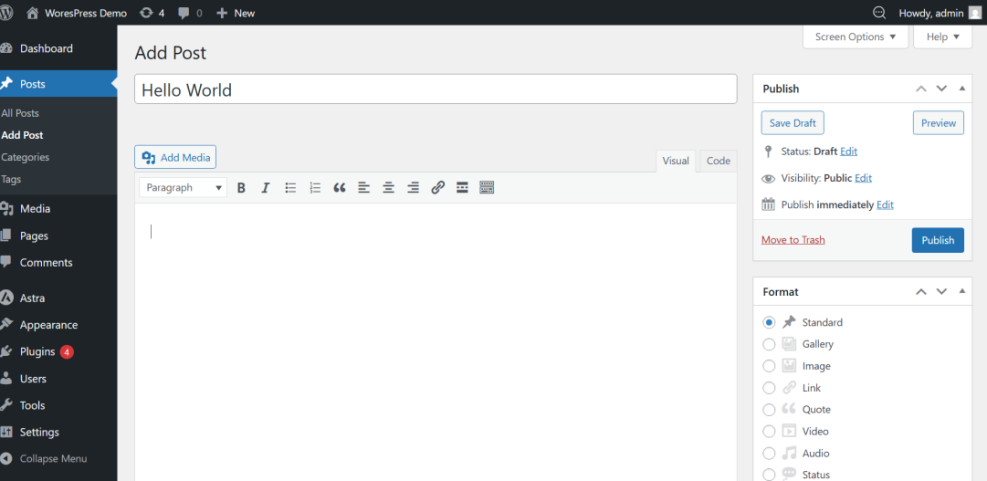
With WordPress, you can easily write articles, organize them into categories, and publish them in minutes. Built-in tools allow you to manage posts, schedule content, and allow readers to comment.
Why bloggers choose WordPress
- Easy publishing tools
- Built-in content organization
- Thousands of blog themes
- SEO-friendly structure
- Full ownership of your content
This is why millions of creators, writers, and marketers use this for their content websites.
Step 2: Building Business and Company Websites
Another major use of it is building professional websites for businesses, startups, and local companies.
With themes and page builders, you can design pages like Home, About, Services, and Contact without writing code. It allows you to customize layout, colors, typography, and branding.
Many beginners follow guides such as how to create a website with WordPress to launch their first professional site.
Common business websites built with WordPress
- Local business websites
- Startup landing pages
- Agency portfolios
- Service company websites
- Consultant websites
Because it is flexible and customizable, it works for businesses of nearly any size.
Step 3: Creating Online Stores (E-Commerce)
It can also power full online stores using plugins like WooCommerce. This allows you to sell physical products, digital downloads, or services directly from your website.
With an e-commerce setup, you can add product pages, manage inventory, accept payments, and track orders.
What you can sell with WordPress
- Physical products
- Digital downloads
- Subscriptions
- Membership access
- Online services
Step 4: Running SEO and Marketing Websites
WordPress is extremely popular among marketers because it supports search engine optimization, analytics, and lead generation tools.
You can add SEO plugins, create landing pages, integrate email marketing platforms, and track traffic performance.
Many website owners also follow guides like how to do SEO for WordPress websites to increase organic traffic and visibility in search engines.
Marketing features available in WordPress
- Search engine optimization tools
- Email marketing integration
- Landing page builders
- Lead generation forms
- Analytics tracking
These tools make it one of the most powerful platforms for digital marketing.
Step 5: Building Membership, Course, and Community Platforms
Beyond blogs and business sites, It can also power advanced platforms such as membership communities and online learning systems.
Using specialized plugins, you can create private content areas, sell courses, manage user accounts, and restrict content to members.
Examples of advanced WordPress sites
- Online course platforms
- Membership communities
- Subscription websites
- Private knowledge bases
- Educational websites
This flexibility is one of the reasons WordPress continues to dominate the website platform market.
Why WordPress Has Become the Internet’s Most Flexible Website Platform
WordPress is used for far more than blogging. Today, it powers business websites, online stores, marketing platforms, membership communities, and many other types of websites.
Its flexibility, massive plugin ecosystem, and customizable themes make it suitable for beginners and developers alike. Whether you want to launch a simple blog or build a complex online business, WordPress provides the tools needed to grow your website over time.
Once you understand its capabilities, you can start using WordPress to build nearly any type of website you imagine.
Further Reading
- How to Start a WordPress Website
- How to Install WordPress
- What Is WordPress Multisite
- How to Build a WordPress Website
Frequently Asked Questions
Is WordPress only used for blogging?
Can beginners use WordPress without coding?
Why does my WordPress site look different from the theme demo?
Is WordPress safe to use for websites?
How long does it take to build a WordPress website?