WordPress Maintenance Plans for Growing Businesses
How to choose the right website care package

When your website is actively bringing in leads and sales, “set it and forget it” is not an option. WordPress Maintenance Plans turn random, stressful fixes into a predictable routine that keeps your site fast, secure, and stable. Instead of logging in only when something breaks, you follow a plan that handles updates, backups, security, and performance on a clear schedule.
In this guide, you will learn what strong WordPress Maintenance Plans include, how your needs change as the business grows, and how to compare DIY care with managed services. You will also see how to build a checklist that assigns every recurring task to a specific person or provider, so nothing important slips through the cracks.
What Are WordPress Maintenance Plans?
Simple Definition
WordPress Maintenance Plans are ongoing service packages that keep your website healthy. A plan typically bundles updates, backups, security checks, performance tuning, and technical support into one predictable monthly arrangement. Instead of paying for emergencies, you invest in prevention.
Why Growing Sites Need a Plan
As a business grows, a website outage becomes expensive. A broken checkout, hacked page, or slow landing page can instantly cut into revenue and damage trust. A good WordPress maintenance plan reduces that risk by treating your site like an always-on asset, not a one-time project. Every important area—updates, backups, security, and speed—gets regular attention.
Key Outcomes You Should Expect
- Consistent uptime and fewer urgent “website down” messages.
- Faster page loads that improve conversions and SEO.
- Lower risk of hacks, malware, and data loss.
- Clear reports that show what your WordPress Maintenance Plans are doing each month.
Core Elements of Strong WordPress Maintenance Plans
Updates for Core, Themes, and Plugins
Every serious WordPress maintenance plan starts with safe updates. WordPress core, your theme, and your plugins receive regular security and feature releases. Delaying them increases security risks and compatibility issues.
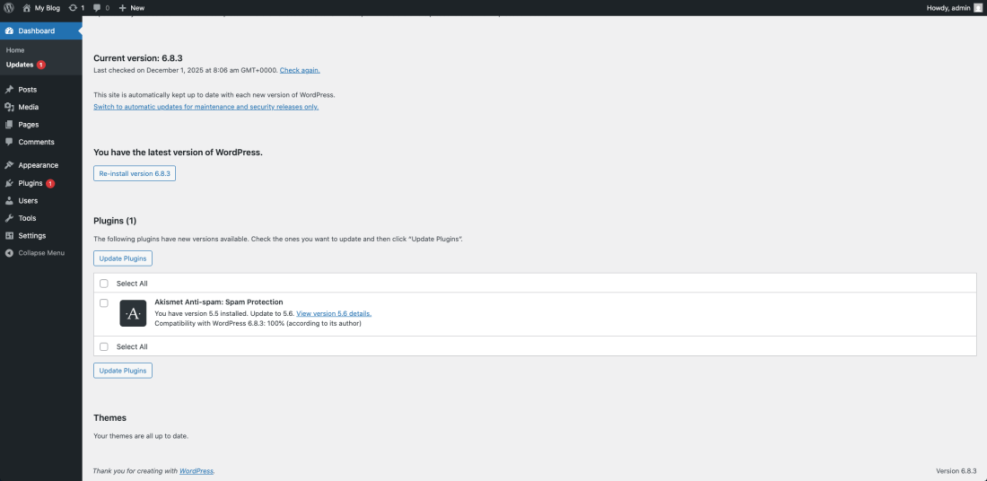
Navigate to Dashboard » Updates to see which components need attention. A professional plan will apply minor updates quickly, test major ones on a staging site, and roll back if something breaks.
Automated and Tested Backups
Backups are your safety net. Most WordPress Maintenance Plans include daily or even hourly backups stored off your main server. The plan should spell out how long backups are kept, where they live, and how to restore them quickly in an emergency.
Look for a plan that includes periodic “restore tests”. It is not enough to have backup files; you should know they actually work when you need them.
Security Monitoring and Hardening
Security is another core pillar of strong WordPress Maintenance Plans. At minimum, your plan should include:
- Firewall rules to block malicious traffic.
- Regular malware scans and integrity checks.
- Brute-force protection on the login page.
- Alerts when suspicious activity is detected.
Many providers combine a reputable security plugin with server-level protection from your host to give you multiple layers of defense.
Performance and Speed Optimization
If your pages are slow, every marketing campaign performs worse. A good WordPress maintenance plan includes recurring speed checks and tuning. This often means configuring caching, cleaning the database, optimizing images, and watching how your theme and plugins behave under load.
Go to Tools » Site Health to review basic performance recommendations, then complement this with tests from tools like PageSpeed Insights or GTmetrix.
Uptime Monitoring and Reporting
Most WordPress Maintenance Plans include uptime monitoring that alerts your team or provider when the site goes down. Monthly reports then summarize uptime percentages, update history, backup status, and notable security events, giving you visibility into what you are paying for.
Maintenance Needs at Different Growth Stages
Early-Stage Sites
New sites typically need lightweight WordPress Maintenance Plans. Simple daily backups, weekly updates, basic security scanning, and uptime alerts are usually enough. The main goal is to keep the site safe while you test offers and build your audience.
Scaling Businesses
As traffic and leads grow, the risk of downtime grows with them. Scaling businesses often move to mid-tier WordPress maintenance plans that add:
- Staging sites for safe testing of big updates.
- Daily or twice-daily backups with longer retention.
- Monthly performance reviews and database optimization.
- Faster support response times during business hours.
This is the stage where maintenance directly protects revenue rather than just the website itself.
High-Traffic Stores and Membership Sites
Ecommerce stores, membership sites, and course platforms need premium WordPress Maintenance Plans. These growth-focused plans often include 24/7 monitoring, advanced security hardening, real-time backups or incremental backups, and deeper performance tuning at the server level.
At this level, you are not just protecting pages—you are protecting active transactions, subscriptions, and customer accounts.
How to Choose the Right WordPress Maintenance Plan
Step 1: Calculate the Cost of Downtime
Start by asking how much money and trust you lose if your site is down or compromised for an hour, a day, or a weekend. If even a short outage could cost more than a month of fees, a stronger WordPress maintenance plan is justified.
Step 2: Map Your Current Stack
List your hosting provider, key plugins, theme, and any custom code. Some managed hosts already include backups, staging, or security features. The best WordPress Maintenance Plans build on those tools instead of paying twice for the same thing.
Step 3: Match Plan Features to Real Risks
- Identify your real risks: security, downtime, slow checkout, complex plugins, or frequent content changes.
- Shortlist WordPress Maintenance Plans that clearly address those risks with specific tasks, not vague promises.
- Compare backup frequency, response times, security coverage, and what counts as “included” support.
- Choose the plan that protects your biggest revenue drivers without adding features you will never use.
Step 4: Ask Providers the Right Questions
Before you sign up, ask:
- How often do you run backups and where are they stored?
- Do you test updates on staging before going live?
- What is your guaranteed response time for urgent issues?
- Does your WordPress maintenance plan include malware cleanup and performance tuning?
- How do we contact you during off-hours or during a launch?
DIY vs Managed WordPress Maintenance Plans
When DIY Care Can Work
If your team is comfortable with backups, staging sites, and basic troubleshooting, you may start with a DIY approach. In that case, your “internal” WordPress maintenance plan might involve weekly update sessions, daily backup checks, and monthly performance reviews handled by staff.
The Benefits of Managed Services
Managed WordPress Maintenance Plans trade money for peace of mind. A specialist team watches your site, applies updates safely, tunes performance, and responds to alarms while you focus on growth. For busy owners or marketing teams, this often costs less than losing a weekend to a sudden crisis.
Hybrid Approaches for Growing Teams
A hybrid model is popular with growing businesses. Internal staff handle content updates and simple plugin changes, while a provider manages the riskier tasks: backups, security monitoring, uptime alerts, and major upgrades. You still benefit from expert oversight without giving up control.
Here is a simple comparison to help you decide how you want to handle your WordPress maintenance plan:
| Feature | DIY Maintenance | Managed WordPress Maintenance Plans |
|---|---|---|
| Time Investment | Several hours per month | Minimal; mostly reviewing reports |
| Skills Required | Moderate WordPress and hosting skills | Low; provider handles technical work |
| Emergency Response | You troubleshoot or find ad-hoc help | Included in plan with clear SLAs |
| Update Testing | Manual; depends on your staging setup | Updates tested on staging then pushed live |
| Monitoring & Alerts | Only if you configure tools yourself | Continuous uptime and security monitoring |
| Cost Predictability | Lower ongoing cost but surprise incidents | Fixed monthly fees with fewer surprises |
Building Your Own Maintenance Checklist
Daily and Weekly Tasks
Whether you manage everything in-house or use external WordPress Maintenance Plans, a simple checklist keeps everyone aligned. Daily and weekly tasks often include:
- Confirm the site is online and key pages load quickly.
- Check uptime and security alerts for new issues.
- Verify that daily backups completed successfully.
- Review login attempts and lockouts for suspicious patterns.
- Apply small plugin updates and test key pages.
Monthly and Quarterly Deep-Dive Tasks
Monthly and quarterly maintenance goes deeper and is usually built into premium WordPress maintenance plans. Typical tasks include:
- Full site backup test and restore drill.
- Database cleanup and optimization.
- Speed tests on your top landing pages and checkout flows.
- SEO checks for key pages and core blog content.
- Plugin audits to remove unused or overlapping tools.
- Theme and PHP version reviews against current best practices.
Document Processes and Assign Owners
Finally, turn your checklist into a documented process. Write down where backups are stored, how to access your hosting control panel, which plugins handle security and caching, and how to roll back a bad update. Assign owners for each task, whether they are internal staff or included in your WordPress Maintenance Plans.
Open your hosting control panel and review the Backups or Snapshots section so everyone knows how to trigger a restore if needed.
Conclusion: Treat Maintenance as Growth Insurance
For growing businesses, WordPress Maintenance Plans are not a luxury add-on. They are a form of insurance that protects your revenue, reputation, and marketing investment. Instead of hoping nothing breaks, you adopt a plan that makes updates, backups, security, and speed part of normal operations.
Your next step is simple: estimate what downtime costs you, review what your host already provides, and decide whether DIY, managed, or hybrid WordPress Maintenance Plans fit your team best. Once your website becomes a reliable, well-maintained asset, every campaign you launch and every visitor you attract has a better chance of turning into real business.
Frequently Asked Questions About WordPress Maintenance Plans
Do small businesses really need WordPress Maintenance Plans?
How much do WordPress Maintenance Plans usually cost?
Can I handle my own WordPress maintenance instead of hiring a provider?
What should be included in a strong WordPress maintenance plan?
Does managed WordPress hosting replace WordPress Maintenance Plans?