Finding a reliable WordPress coupon can make your WordPress.com plan much more affordable. When you know how discounts work, you can choose the right plan, pay less for it, and still get the features and support you need.
You will see where real WordPress.com coupon deals come from, how to apply them, and how to avoid fake codes. You will also learn smart timing and billing strategies so you save money not only on day one, but over the whole life of your website.
Best WordPress Coupon Deals Today
What Is the Easiest Way to Save With a WordPress Coupon?
The easiest way to save is to combine an official promotion with a yearly or multi year plan. WordPress.com often runs targeted sales or sends flash coupons by email, and those discounts usually apply only to new purchases or upgrades. When you pair them with a longer billing cycle, the total discount adds up fast.
How Do WordPress.com Coupons Work?
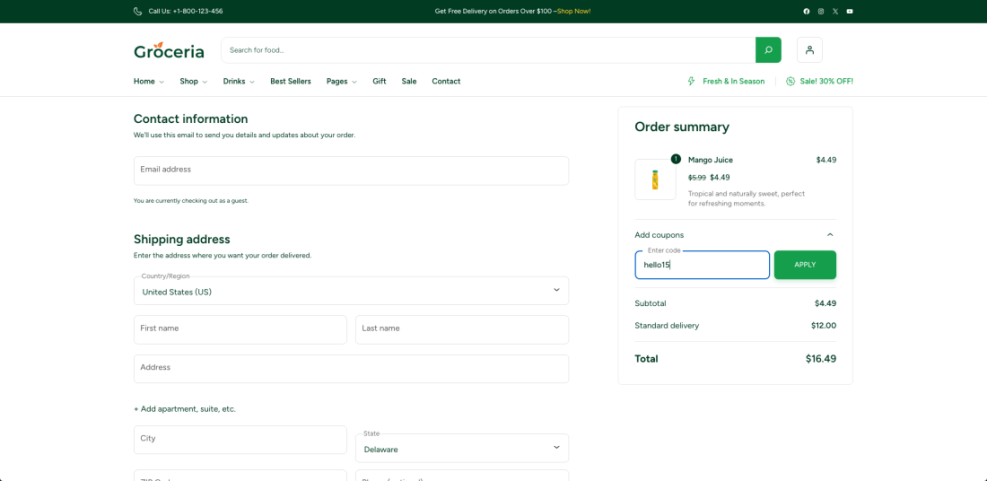
Most WordPress.com coupons reduce the first charge for a specific plan or upgrade. You usually paste a code into a promo field during checkout, then the total updates before you pay. Some deals work only on yearly billing, some on monthly, and many cannot be stacked with other automatic discounts like introductory pricing.
Are Third Party WordPress Coupon Sites Safe?
Many coupon directories list WordPress.com deals, but not all are accurate. You should favor sites that clearly show when a code was last checked and that link directly to WordPress.com, not to strange redirects. If a site promises a huge lifetime discount with no limits and no proof, close the tab and move on.
Understanding WordPress.com Coupon Pricing
Which WordPress.com Plan Gives Best Value With a Coupon?
Lower tier plans become very cheap when you add a decent coupon, but mid tier and business level plans usually deliver the best long term value. They unlock more storage, better performance tools, and options like ecommerce features and plugins. When a coupon drops their price close to a starter plan, upgrading is often worth it.
How WordPress.com Refunds Interact With Coupon Discounts
WordPress.com offers a refund window for new plan purchases. If you cancel within that period, you generally receive your money back to the original payment method, even if you used a coupon. However, you do not get the coupon back as a new reusable code, so you cannot apply the same one twice on different accounts.
When Do WordPress.com Sales and Coupon Promotions Happen?
Larger discounts often appear around big retail events such as Black Friday or during targeted email campaigns. In addition, WordPress.com sometimes runs short flash sales tied to new features or plan updates. Because these sales are temporary, you should compare your current renewal date and decide whether to switch plans early to capture the offer.
To plan your upgrade, it helps to review the official WordPress.com pricing page and the detailed plan features support page. These pages show which features each plan includes, such as custom domains, ecommerce, and plugin support, so you can see how much value a coupon will unlock.
Here is a simple way to think about common plan levels and how coupons change the value:
| Plan Level | Typical Use Case | Impact of a Coupon |
|---|---|---|
| Entry Level | Personal sites, simple blogs | Makes upgrading from free very cheap for first year |
| Mid Tier | Growing blogs, small business sites | Often best balance of price, features, and savings |
| Business Level | Serious content sites, ecommerce | Coupon can unlock advanced tools at starter level cost |
| Top Tier | High traffic, complex stores | Even a modest discount saves a lot on large bills |
This comparison helps you decide whether to stay small and pay very little, or jump to a higher tier while the discount makes it affordable.
Finding Legit WordPress.com Coupon Deals
Check Official WordPress.com Coupon Promotions
Your first stop should always be official WordPress.com promotions. You may see banners on the pricing page, special offers in the dashboard, or direct coupons in email campaigns. The WordPress.com sales FAQ explains how these promotions work and how to recognize genuine codes sent by the company.
Use Trusted WordPress Coupon Partner Sites Only
Some partners have agreements with WordPress.com and offer real, trackable discounts. These sites usually describe the plan details clearly and link straight to the official checkout page. When you see a partner badge or a clear disclosure and the pricing matches what WordPress.com shows, you can treat the offer as far more reliable.
Red Flags When a WordPress Coupon Is Fake
Fake or useless coupon codes waste your time and may even expose you to malware. Warning signs include sites that ask you to install browser extensions, download files, or enter your card before you ever reach WordPress.com. Codes that claim impossible discounts on every plan without any limits are another clear red flag.
How to Apply a WordPress.com Coupon
Step by Step WordPress.com Coupon Application
Applying a coupon on WordPress.com is straightforward when you follow a simple sequence.
- Log in to your WordPress.com account, or create a new one.
- Visit the pricing page and choose the plan you want to buy.
- Select your billing period, usually yearly or monthly.
- On the checkout page, locate the field for a promo or coupon code.
- Paste your code into the field, then click the apply button.
- Confirm that the total updates and shows the discount.
- Enter your payment details and complete the purchase.
Why Does My WordPress Coupon Code Not Work?
A coupon may fail for several reasons. It might have expired, apply only to new customers, or require a different billing period than the one you chose. Sometimes the code is valid only for specific plans, so trying it on a different tier can solve the problem. If it still fails, contact support before paying full price.
Can You Stack WordPress.com Coupon Discounts?
In most cases, you cannot stack multiple coupon codes on the same purchase. A single order usually accepts one code plus any automatic promotion that WordPress.com already applies. If you see an automatic discount, test both options and keep the one that gives the lower final price, even if that means skipping the manual code.
Smart WordPress Coupon Savings Strategies
Time Your WordPress Coupon Purchase Around Major Sales
Buying during a major sale can cut your first bill by a large amount. Seasonal events often bring special WordPress.com promotions, and partner sites may highlight them with clear expiry dates. When your current plan is close to renewal, watching for these windows and upgrading a little early can lock in a better rate.
Choose the Right Billing Period for Your WordPress Coupon
Yearly plans often include stronger base discounts than monthly plans before coupons even apply. When you add a coupon on top of that, the effective monthly price can drop to a fraction of the listed month to month rate. However, you should choose a term you are comfortable committing to, because refunds are time limited.
Combine WordPress Coupons With Free Extras
Some plans include extras such as a free domain for the first year or extra email options when you pay annually. When you apply a coupon to those plans, you save on both hosting and add ons. Comparing these bundles on the official pricing and plan feature pages ensures you do not skip valuable benefits for a tiny extra discount.
- Check for official sales before buying or renewing.
- Compare yearly and monthly pricing to see real savings.
- Pick the plan whose features you will actually use.
- Test the coupon in checkout before entering payment details.
- Review refund terms so you know your safety window.
This simple checklist helps you avoid rushed purchases and keeps your focus on long term savings instead of one time headlines.
WordPress Coupon Conclusion
Coupon codes are most powerful when you combine them with a clear plan for your site, not when you chase the biggest percentage off. When you understand WordPress.com pricing, know where real promotions come from, and follow a careful checkout process, you can lower your costs without losing important features.
Your next step is simple: decide what you want your site to achieve, match that goal to a plan, then wait for a solid WordPress.com promotion or trusted partner coupon. When the right offer appears, you will be ready to act quickly and confidently instead of guessing at the last minute.
More WordPress Coupon & Hosting Guides You Might Like
If you want to keep improving your site and lowering your long term costs, several related topics are worth a deeper look. The following planned guides will help you optimize setup, performance, and security so every dollar you spend on hosting works harder for you.
- How to choose the best WordPress hosting
- Beginner guide to WordPress speed optimization
- Best ftp clients for WordPress users
- Beginner checklist optimizing WordPress blog posts
- Beginner WordPress security best practices guide
As these guides roll out, you will be able to follow them in order and build a faster, safer, and more cost efficient WordPress presence.
Frequently Asked Questions About WordPress coupon
Do WordPress.com coupons work for existing customers?
Can I use a WordPress coupon on any plan?
Will my discount stay the same at renewal time?
Is it safe to buy during a flash sale?
What if I cannot find any valid coupon?