How to Use SEO Keywords in WordPress
A practical guide to planning, placing, and optimizing keywords in your WordPress content

Your WordPress site can have beautiful design and great writing, but if you don’t use SEO keywords correctly, search engines will struggle to understand what each page is about. That usually means fewer clicks, less traffic, and content that never reaches the people you wrote it for.
In this guide, you’ll learn how to choose, place, and measure SEO keywords in WordPress without falling into the trap of keyword stuffing. We’ll walk through planning your keyword map, using keywords in your content and meta data, and reinforcing them with smart internal links.
If you’re completely new to optimization, read our overview of what WordPress SEO is first, then come back to this step-by-step guide.
Prerequisites
Before you start changing keywords across your site, make sure you’re prepared. A small mistake in URLs or titles can harm your rankings instead of improving them.
- Admin access to your WordPress dashboard.
- An SEO plugin installed (for example, Yoast SEO, Rank Math, or All in One SEO).
- A basic list of topics and phrases your audience searches for.
- Access to Google Search Console and Google Analytics (optional but strongly recommended).
Step 1: Build a Keyword Plan for Your WordPress Site
You can’t “use” keywords effectively until you know which page should target which phrase. This is called a keyword map, and it helps you avoid keyword cannibalization (multiple pages competing for the same term).
Create a simple spreadsheet (or use a tool) and assign one main keyword to each important URL on your site.
- List your key pages and posts: homepage, service pages, category pages, and best-performing blog posts.
- Use tools like Google auto-suggest, “People also ask”, and SEO tools (for example, the options in these keyword research tools) to find phrases your audience actually uses.
- For each page, choose:
- One primary keyword (the exact phrase you want to rank for).
- Two to four secondary keywords (close variations and long-tail phrases).
- Record the search intent for each keyword (informational, commercial, transactional, navigational).
- Add a column for “Current ranking” so you can measure improvement later.
Checkpoint: You should now have a list or spreadsheet where every important page has one main keyword and a few variations that match its topic and intent.
Step 2: Use SEO Keywords in Your Content the Right Way
Once your plan is ready, it’s time to use those keywords inside your WordPress content. The goal is to make the topic obvious to search engines and still sound natural to human readers.
- In your WordPress dashboard, go to Posts > All Posts (or Pages > All Pages) and click Edit on the content you want to optimize.
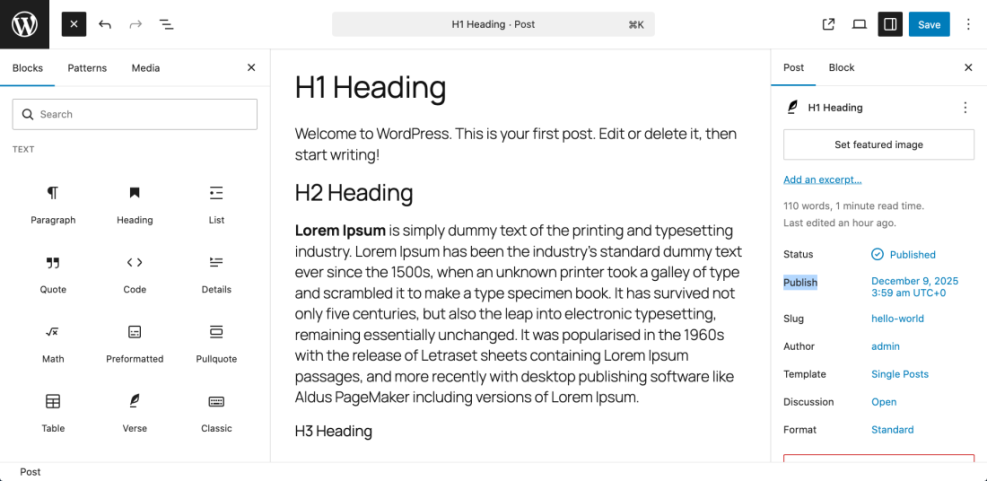
- Make sure your main heading (H1) includes the primary keyword or a close variation.
- Use the primary keyword once in the first 100–150 words of your opening paragraph.
- Sprinkle secondary keywords and natural variations throughout the body, especially in relevant H2 and H3 subheadings.
- Use related phrases and synonyms to keep the copy readable and avoid obvious repetition.
Don’t forget your images. When you add or edit an image in WordPress, use the Alt Text field to describe the image in natural language and, where appropriate, include a keyword variation.
Checkpoint: Your content now has a clear focus keyword in the title and introduction, with natural variations in headings, paragraphs, and image alt text—without sounding spammy.
Step 3: Add Keywords to SEO Titles and Meta Descriptions
Search results usually show your SEO title and meta description first, not your full article. This is where you confirm your main keyword and convince users to click.
- In the post or page editor, scroll down to your SEO plugin’s settings box (for example, the Yoast SEO or Rank Math panel).
- Locate the SEO title field. Include your primary keyword near the beginning, then add a benefit or brand name at the end.
- In the Meta description field, write 120–155 characters that:
- Include the primary keyword once.
- Promise a clear benefit or outcome.
- Use a gentle call to action, like “learn”, “discover”, or “see how”.
- If your plugin has a “Focus keyphrase” field, enter your primary keyword there as well and follow the plugin’s suggestions where they make sense.
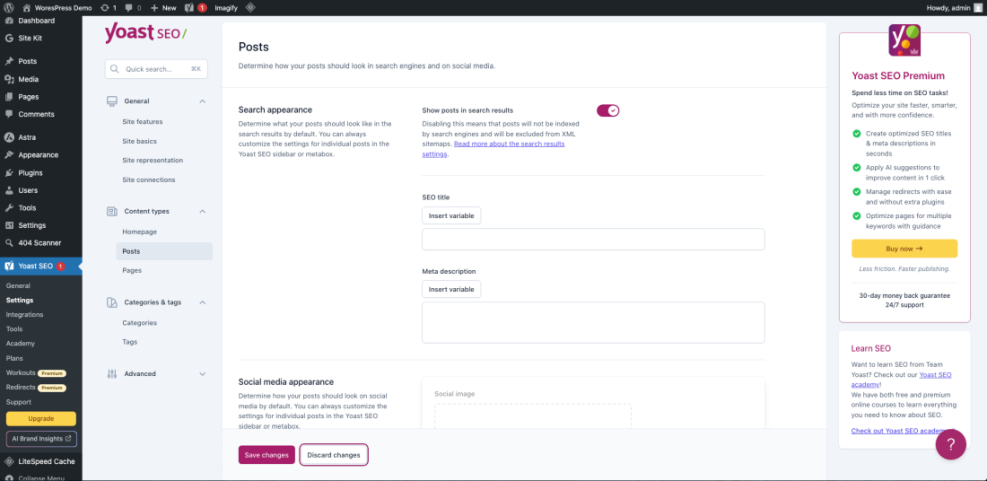
Example for a post about “SEO keywords in WordPress”:
SEO title: How to Use SEO Keywords in WordPress (Without Keyword Stuffing)
Meta description: Learn how to plan and use SEO keywords in WordPress posts, pages, and links so you rank higher and get more clicks.
Checkpoint: Every important post and page now has a compelling SEO title and meta description that use your primary keyword naturally.
Step 4: Use Keywords in URLs, Categories, and Internal Links
Search engines also rely on your URL structure, categories, and internal links to understand how topics relate. This is where you use keywords to clarify site structure.
Use clean, keyword-based URLs
- In the post editor, look at the URL slug under the title field.
- Click Edit (or use the permalink settings) and shorten the slug to include your primary keyword in a simple, readable way.
Good: /use-seo-keywords-wordpress/
Bad: /how-to-use-seo-keywords-in-wordpress-guide-2025-final/
Save your changes. Avoid changing URLs on existing content that already ranks unless you are prepared to set up proper 301 redirects.
Make categories and tags support your keyword strategy
- Assign posts to the most relevant category so your keywords sit inside logical topic groups.
- Use tags sparingly to reflect specific subtopics or entities, not every single keyword variation.
Reinforce keywords with internal links
Internal links tell search engines which pages are important for each topic. Use keyword-rich but natural anchor text, and point to your primary pages for that keyword.
- While editing a post, highlight a phrase that describes the topic of another important post.
- Click the Insert/edit link button and paste the URL of the related post.
- Use anchors like “internal linking strategies in WordPress” instead of “click here”.
For a deeper dive into this, check out our guide for beginners on internal linking in WordPress.
Checkpoint: Your key pages now have clear, keyword-focused URLs and are connected using descriptive internal links that support your overall topic structure.
Step 5: Track Keyword Performance and Refine Over Time
SEO keywords are not a one-time setup. You need to see how they perform, then refine your content and internal links based on real data.
- Open Google Search Console and go to Performance > Search results.
- Filter by a specific page and see which queries are driving impressions and clicks.
- Compare these queries to your keyword map and update your content to better match the phrases that are already performing.
- Use rank tracking tools (or plugins that integrate rank tracking) to monitor how your main keywords move over time.
On your site itself, watch metrics such as organic traffic, time on page, and bounce rate to see whether visitors find what they expect after clicking your keyword-optimized results.
Checkpoint: You have a simple routine for checking how your keywords perform and a process for updating content when you see new opportunities.
Turn Your Keyword Plan into Sustainable Search Traffic
Using SEO keywords in WordPress is less about cramming phrases into your posts and more about giving each page a clear, focused topic. With a solid keyword map, optimized content and meta data, and a smart internal linking structure, your site becomes easier for both users and search engines to understand.
As you publish new content, stick to the same process: assign a primary keyword, weave it naturally into your copy, support it with structure and links, and measure the results. Over time, this consistent approach will turn your WordPress site into a strong, keyword-driven source of organic traffic.
Further Reading
- How to Add SEO Keywords in Your WordPress Website
- Where to Add Keywords in WordPress
- Step-by-Step Guide to On-Page SEO in WordPress
- WordPress SEO Complete Beginners Guide
Frequently Asked Questions
How many times should I use a keyword in a WordPress post?
What should I do if multiple posts target the same SEO keyword?
Is it okay to use the same focus keyword in my SEO plugin on different pages?
Can keyword optimization in WordPress harm my site’s security or stability?
How long does it take to see results from keyword changes in WordPress?