What is SEO Title in WordPress
Understand what the SEO title really is in WordPress, how it shows up in Google, and how to use it correctly for better rankings and clicks.

When people talk about “SEO title” in WordPress, they usually mean the clickable blue headline you see in Google’s results — not just the title you type at the top of your post. Because WordPress, your theme, and your SEO plugin each play a role, it’s easy to get confused about what the SEO title really is.
In this guide, you’ll learn exactly what the SEO title is in WordPress, how it relates to the HTML <title> tag, how WordPress and SEO plugins generate it, and how to optimize it so more people click your results.
By the end, you’ll know how the SEO title fits into your broader optimization strategy and how it works alongside your headings, meta description, and URLs. If you’re new to optimization in general, you may also want to review our WordPress SEO beginner guide for a bigger picture of how titles, content, and technical settings work together.
Prerequisites
You don’t need to be a developer to understand or control the SEO title in WordPress, but a few basics will make this guide easier to follow.
- Administrator or Editor access to your WordPress dashboard.
- An active SEO plugin such as Yoast SEO or Rank Math (strongly recommended).
- A published post or page you can use for testing changes.
Step 1: Understand what the SEO title actually is
The SEO title is the title that search engines like Google read from your page and typically show as the main clickable headline in search results. Technically, it is usually the content of the HTML <title> tag for that URL.
In WordPress, people use several names for the same idea: “SEO title”, “meta title”, or “title tag”. Your SEO plugin (Yoast, Rank Math, etc.) exposes this as a field you can edit without touching code. That field controls the SEO title that’s sent to search engines, even if the on-page heading you see in the content editor looks different.
<h1> heading you see on the page. They can match, but they don’t have to — and sometimes it’s better if they don’t. Because the SEO title appears directly in search results, it has two primary jobs: tell Google what the page is about and convince humans to click your result instead of a competitor’s.
If you want to see how the HTML side of this works, you can also review a dedicated guide on how to add title tags in WordPress, which shows how the SEO title connects to the <title> tag in your site’s code.
Step 2: How WordPress creates SEO titles by default
Out of the box, WordPress doesn’t have a special “SEO title” field. Instead, it builds the <title> tag from your post or page title and your site name. For example, a post called “Best Coffee Beans” on a site called “Brew Lab” might generate a title like “Best Coffee Beans – Brew Lab”.
How that default looks depends on three pieces:
- The content title you type into the Title box when you create or edit a post.
- Your site name from
Settings > Generalin the WordPress dashboard. - Your theme behavior, which may append the site name, a separator (like “|” or “–”), or nothing at all.
These defaults are okay for simple sites, but they limit how precise you can be with keywords and how compelling your search result looks. That’s why nearly all serious WordPress sites rely on an SEO plugin to give them full control over SEO titles.
header.php) to change how titles are generated — which is not ideal for most site owners. Step 3: Where to edit the SEO title in WordPress
In a typical WordPress setup with an SEO plugin, you control the SEO title from within the post or page editor. The exact label may vary, but the workflow is very similar across plugins.
- Log into your WordPress dashboard.
- Go to Posts > All Posts or Pages > All Pages and click the title of the content you want to edit.
- Scroll to the SEO box below the content editor (or in the sidebar if you’re using the Block Editor).
- Look for the field labeled SEO title, Snippet Title, or similar.
- Type or adjust your SEO title. Many plugins will show you a live preview of how your page might appear in Google.
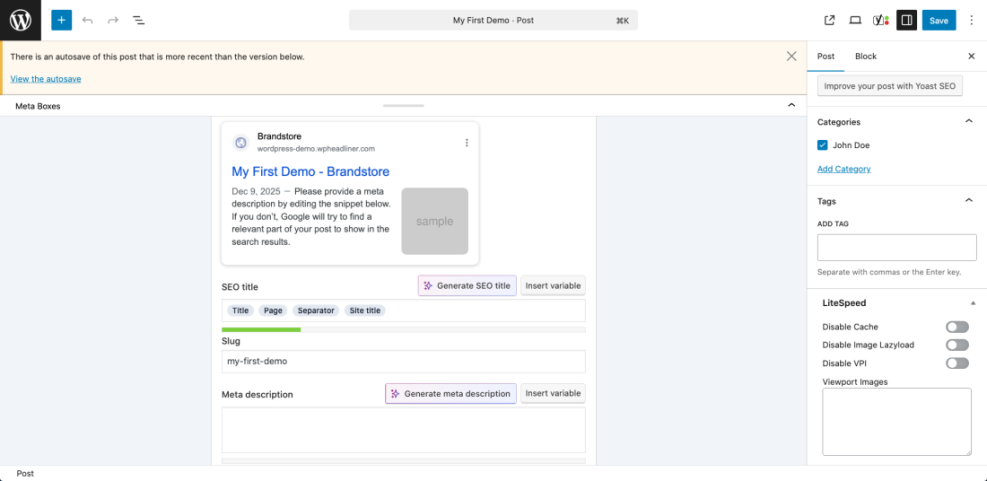
In Yoast SEO, for example, you’ll see a “Google Preview” box and a field labeled “SEO title”. By default, this uses a template like %%title%% %%sep%% %%sitename%%, but you can override it for any individual post by typing directly into the field.
Rank Math and other SEO plugins offer the same idea: a snippet preview and a title field, often with variables that pull in the post title, category, or site name. The mechanics differ slightly, but the goal is always to control what appears in the <title> tag for that URL.
If you’re looking for a full click-by-click walkthrough of changing titles across your site, including templates and bulk editing, you can follow the dedicated tutorial on how to change SEO title in WordPress. Here, we’ll stay focused on what the SEO title is and how to make it effective.
Step 4: Optimize your SEO titles for higher clicks and rankings
Once you know where to edit the SEO title, the next step is to make it work hard for both search engines and human visitors. A strong SEO title can improve your click-through rate (CTR), which signals to Google that your result is relevant and useful.
When optimizing SEO titles in WordPress, keep these principles in mind:
- Lead with your primary keyword. Put the main phrase you want to rank for near the beginning of the title. For example, “SEO Title in WordPress: A Beginner’s Guide” is better than “Beginner’s Guide to Making Your WordPress SEO Title Better”.
- Add a benefit or qualifier. Go beyond a plain keyword string. Add words like “step-by-step”, “for beginners”, “examples”, or a clear benefit like “for higher Google rankings”.
- Keep the length manageable. Aim for roughly 50–60 characters so your title is less likely to be truncated in search results. Your SEO plugin’s preview bar is a good visual guide.
- Include your brand when it makes sense. On important pages, append your brand name at the end using a separator like “–” or “|”. For example: “What is SEO Title in WordPress – WPHeadliner”.
- Make each title unique. Every important page should have a distinct SEO title so Google can easily understand which page is which.
It’s also important that your SEO title matches the promise of your content. If your title mentions “examples” or “checklist”, the page needs to deliver those. Misalignment can hurt your engagement metrics and might cause Google to rewrite your title in the results.
Step 5: Fix common SEO title problems
Even when you understand the basics, a few common issues can make SEO titles behave in unexpected ways. Here are the problems WordPress users see most often — and how to tackle them.
Problem 1: Google shows a different title than you set
Google doesn’t guarantee it will use your SEO title exactly as written. It may rewrite titles if it thinks another version is clearer or more relevant for a given query.
- Make sure the SEO title accurately describes the content and includes the main keyword found in the body and headings.
- Avoid keyword stuffing or overly salesy, clickbait-style titles.
- Check that you don’t have multiple pages targeting the same topic with nearly identical titles.
Problem 2: Titles are duplicated across many pages
If your theme or plugin templates are misconfigured, you might end up with dozens of pages sharing the same or very similar titles. This makes it hard for Google to know which page to rank.
- Review your SEO plugin’s title templates for posts, pages, categories, and archives.
- Adjust them so each content type includes unique elements (like the post title, category name, or pagination).
- Use your SEO plugin’s tools to flag duplicate titles and fix them one by one.
Problem 3: The SEO title field is missing in the editor
Sometimes the SEO meta box or sidebar panel gets hidden or disabled.
- In the Block Editor, open the top-right menu and ensure the SEO plugin’s panel (Yoast, Rank Math, etc.) is enabled.
- In the Classic Editor, check the “Screen Options” tab at the top and make sure the SEO meta box is checked.
- Confirm you’re using a user role that has permission to edit SEO meta data (Administrator or Editor usually works best).
Turn your WordPress SEO titles into reliable SEO assets
The SEO title in WordPress is more than just another field in your editor. It’s the bridge between your content and the search results page, telling both Google and human visitors why your page deserves attention.
By understanding how WordPress and your SEO plugin generate the SEO title, where to edit it, and what makes a title compelling, you can systematically upgrade the way your site appears in search. Start with your most important pages, refine your templates, and treat each SEO title as a small but powerful asset in your overall SEO strategy.
Further Reading
- WordPress SEO: Complete Beginner’s Guide
- How to Add Meta Description in WordPress
- Step-by-Step Guide to On-Page SEO in WordPress
- How to Add SEO Keywords to Your WordPress Website
- How to Add Meta Tags in WordPress
Frequently Asked Questions
Is the SEO title the same as the WordPress post title?
<h1>. The SEO title is the title sent to search engines via the <title> tag. They can be identical, but your SEO plugin lets you set a different SEO title if you want to tweak keywords or messaging for search results without changing the on-page heading. Is it safe to change SEO titles on existing posts and pages?
Why is Google showing a different title than the one I set in WordPress?
How long should an SEO title be in WordPress?
Why can’t I see the SEO title field in my WordPress editor?