Using AI to Generate Content Briefs for WordPress
Practical workflows for faster, more consistent WordPress content planning

AI content briefs can transform how you plan WordPress articles and pages. Instead of starting from a blank screen, you can use data from search results and competitors to guide every piece you publish.
You will see how to choose AI tools, design a repeatable workflow inside WordPress, and control quality at every step. The guide walks from quick concepts to prompts, plugin options, and practical examples so you can ship well planned content without adding chaos to your day.
How AI Content Briefs Work in WordPress
At a basic level, an AI content brief is a structured outline that includes target keywords, search intent, headings, key questions, and notes for voice or brand. AI tools build these briefs by scanning top ranking pages, spotting shared topics, and turning them into a clear content outline.
For WordPress publishers, this means you can move research into a separate step. You run the AI brief once, adjust it, and then use it as a blueprint for the post, the featured image, internal links, and even your calls to action.
What Is an AI Content Brief
An AI content brief is a document your writers can follow without guessing what to cover. It usually includes a primary keyword, related phrases, content angle, recommended length, heading structure, and questions to answer so the piece matches search intent and user needs.
Why Use AI Instead of Manual Briefs
Manual briefs often depend on one person’s notes and memory, which leads to gaps and inconsistent quality. AI tools, in contrast, scan many pages and search results in minutes, then show you recurring topics, missing subtopics, and related questions your content should address.
Here is a simple comparison between manual and AI assisted briefs.
| Aspect | Manual Brief | AI Assisted Brief |
|---|---|---|
| Research Time | Often 45–90 minutes per topic | Usually a few minutes |
| Keyword Coverage | Based on basic keyword research | Includes semantic and related terms |
| Outline Depth | Varies by editor experience | Consistent, structured sections |
| Competitor Insight | Checked only on a few pages | Summarizes many top ranking pages |
| Update Effort | Requires full manual review | Can refresh from new SERP data |
This mix of speed and structure is what makes AI brief generation so helpful for a busy WordPress site.
How Do AI Briefs Fit WordPress Workflows
Most teams treat AI briefs as the step between keyword research and drafting. You save the brief into your content calendar, attach it to a WordPress draft, and ask writers to keep it open while they write. This keeps posts aligned with search intent without turning writers into full time SEOs.
Choosing AI Tools for Content Briefs
You can generate briefs with general AI chat tools, dedicated content brief platforms, or WordPress specific plugins. Each choice has trade offs in control, cost, and how tightly they fit your publishing workflow.
Standalone AI Content Brief Generators
Standalone AI brief generators work in the browser and accept a topic or keyword as input. Many of them pull in SERP data, competitor headings, semantic keywords, common questions, and even suggested stats and external sources so you can hand writers a very detailed SEO content brief.
WordPress Plugins for Content Briefs
Some SEO plugins now include a built in AI content brief generator that lives inside your WordPress Dashboard. They can analyze your target keyword, suggest headings, and even propose metadata and schema while you prepare a draft, which removes the need to switch between tools.
How Do You Pick the Right Tool
You pick the best tool by looking at how your team already works. If your writers live in WordPress, a plugin that adds briefs next to the editor reduces friction. If you run a large editorial calendar, a separate platform with strong collaboration and approvals may be easier to manage.
Building an AI Brief Workflow in WordPress
To get the most from AI content briefs, you need a simple, repeatable workflow that everyone on your team can follow. The steps below work well for a small blog and also scale to an agency style content pipeline.
Set Topic and SEO Objectives
Start by defining the primary keyword, related topics, and the business goal of the post. Decide whether you are aiming for lead generation, email sign ups, or pure brand search visibility, because the brief should reflect that goal in angle and calls to action.
- Choose a primary keyword and 3–7 related terms.
- Check the current search intent by reviewing top results.
- Write a short one line content goal for the post.
- Note any internal pages that should be linked, such as a key guide like How to add keywords in WordPress without hurting.
This preparation gives the AI enough context to produce a brief that fits both SEO and your wider content strategy.
Run AI and Refine the Outline
Next, send your topic, intent, and audience notes to the AI brief tool. Ask it to return headings, subtopics, questions, and suggested word counts. Then review the result, remove irrelevant subtopics, add brand specific notes, and mark any sections that should include screenshots or internal links.
From the WordPress Dashboard, go to Plugins » Add New and search for your chosen AI brief plugin.
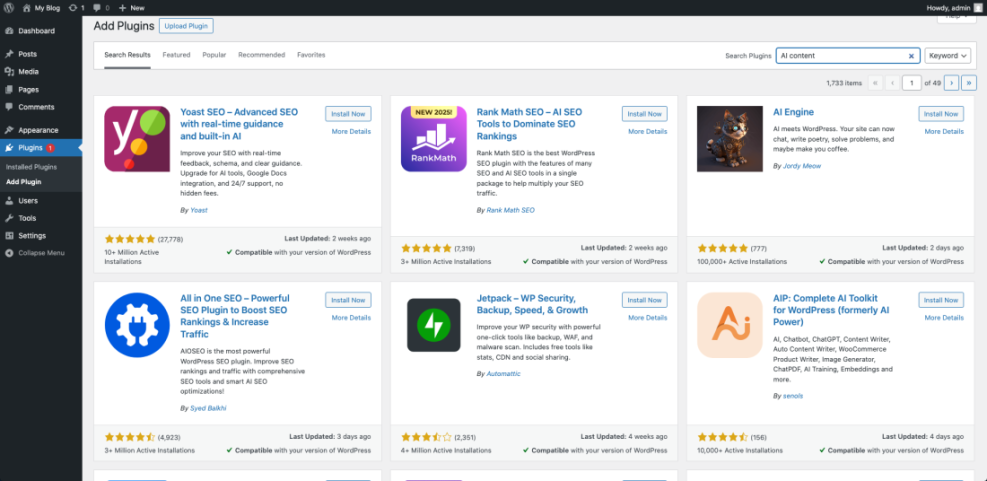
This view helps you connect your chosen AI workflow directly to your site, so you do not lose briefs in external documents.
How Do You Store Briefs in WordPress
Many teams store briefs as custom fields or comments on the post draft. Others paste them at the top of the editor and remove them before publishing. A more robust option is to use a custom meta box or a dedicated custom post type so briefs stay searchable and organized.
- Keep all briefs in a single shared location.
- Use a clear naming pattern for topics and keywords.
- Record who approved the brief and when.
- Note the target publish date to fit your editorial calendar.
This checklist keeps your AI generated briefs from turning into scattered notes and broken links.
Prompting AI for Strong WordPress Briefs
Good prompts are the difference between a vague outline and a detailed, usable brief. You need to give the AI clear instructions about audience, search intent, WordPress context, and how the content will be used.
Key Inputs for Reliable AI Briefs
To get consistent results, always include details such as your main keyword, audience level, site niche, and any products or services that must be mentioned. In addition, tell the AI which competitors to consider and which style or tone fits your brand voice.
Sample Prompt for a WordPress Blog Brief
You can use a pattern like this: “Create an SEO content brief for a WordPress blog post targeting [keyword]. The audience is [experience level]. Include search intent, angle, outline with H2 and H3 headings, questions to answer, internal link ideas, and notes for screenshots of the WordPress Dashboard.”
How Do You Avoid Generic AI Outlines
You avoid generic briefs by asking the AI to highlight gaps in existing search results and by adding your own expert notes. Ask for unique angles, examples from your niche, and any advanced tips that a beginner guide might skip so the final content stands out.
Turning Briefs Into Optimized WordPress Content
Once you have AI content briefs ready, the next step is to make sure writers use them while drafting in WordPress. This is where process and small details, like where you store the brief, make a big difference.
Align Writers Around the Brief
Share each brief with the writer, editor, and anyone who approves final content. Encourage writers to suggest changes before they start writing instead of silently ignoring sections they do not like. This keeps the final article aligned with the SEO and business goals.
Use the Brief While Writing
Ask writers to keep the brief open in a split screen or second monitor as they write. They should tick off sections as they cover them, keep headings close to the suggested outline, and add internal links and anchor text notes straight into the draft.
From the WordPress Dashboard, open Posts » All Posts, then click a draft to edit it in the Classic Editor.

This makes it easy to see both the brief and the live content while you work.
Sample Code to Store Brief Metadata
If you want a more robust setup, you can add a simple meta box for storing the brief on each post. The example below creates a “Content Brief” box on the post edit screen and saves its content as post meta.
function wpheadliner_add_brief_meta_box() {
    add_meta_box(
        'wpheadliner_content_brief',
        'Content Brief',
        'wpheadliner_render_brief_meta_box',
        'post',
        'side',
        'high'
    );
}
add_action( 'add_meta_boxes', 'wpheadliner_add_brief_meta_box' );

function wpheadliner_render_brief_meta_box( $post ) {
    $brief = get_post_meta( $post->ID, '_content_brief', true );
    echo '<textarea style="width:100%;min-height:150px;" name="wpheadliner_content_brief">';
    echo esc_textarea( $brief );
    echo '</textarea>';
    wp_nonce_field( 'wpheadliner_save_brief', 'wpheadliner_brief_nonce' );
}

function wpheadliner_save_brief_meta_box( $post_id ) {
    if ( ! isset( $_POST['wpheadliner_brief_nonce'] ) ||
         ! wp_verify_nonce( $_POST['wpheadliner_brief_nonce'], 'wpheadliner_save_brief' ) ) {
        return;
    }
    if ( defined( 'DOING_AUTOSAVE' ) && DOING_AUTOSAVE ) {
        return;
    }
    if ( isset( $_POST['wpheadliner_content_brief'] ) ) {
        update_post_meta(
            $post_id,
            '_content_brief',
            sanitize_textarea_field( $_POST['wpheadliner_content_brief'] )
        );
    }
}
add_action( 'save_post', 'wpheadliner_save_brief_meta_box' );
This small addition keeps every brief next to the post forever, which helps during updates, audits, and future onpage SEO work.
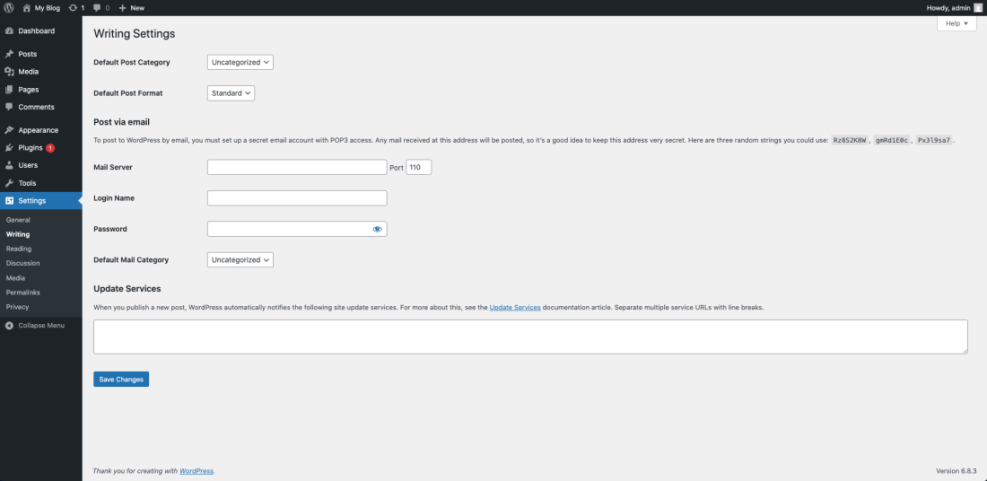
From the WordPress Dashboard, go to Settings » Writing if you want to review any editor options related to your content workflow.
Avoiding Mistakes With AI Generated Briefs
AI content briefs are powerful, but they can also create problems if you use them without checks. You still need human judgment to avoid repeating bad advice, stuffing keywords, or missing what makes your brand different.
Overtrusting AI Suggestions and Data
AI tools can misread search intent or overemphasize outdated tactics, such as repeating exact match keywords too often. You should always skim the live search results, remove low value sections, and update advice that conflicts with your own experience or current best practices.
Missing Search Intent and User Needs
Sometimes briefs focus too much on keywords and not enough on what the reader actually wants to achieve. Check that your outline includes clear how to steps, examples, and practical tips that match the intent behind the query, not just its wording.
How Do You Keep Briefs Updated
You keep briefs current by revisiting them whenever rankings drop or SERPs change shape. Regenerate or refine the brief, compare it with your live article, and schedule updates in your editorial calendar so content stays aligned with what people now expect to see.
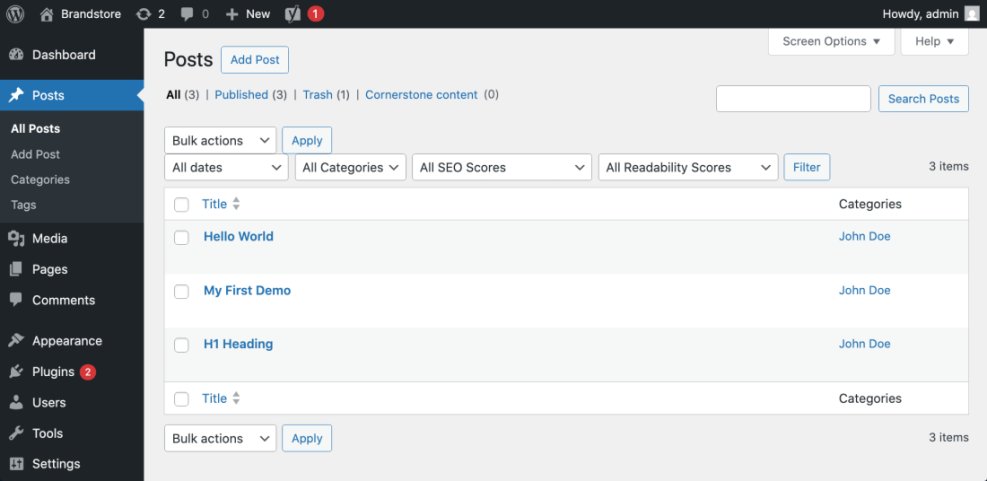
From the WordPress Dashboard, open Posts » All Posts and filter by category to find posts that were written from older briefs.
AI Content Briefs Conclusion
If you build a simple process and keep control of the final outline, AI content briefs can become the engine of a reliable WordPress content system. They help you plan posts faster, keep writers aligned with SEO goals, and make future updates easier because all the thinking is saved in one place.
Your next step is to choose one tool, define a standard prompt, and test a small batch of briefs on upcoming posts. As you refine that workflow, you can scale it across categories, add custom fields in WordPress, and connect briefs to a larger strategy that includes search, email, and social content built from the same plan.
More WordPress Guides You Might Like
To deepen your workflow and connect AI briefs with the rest of your WordPress stack, these resources make useful next reads.
- How to build a website on WordPress
- WordPress seo complete beginners guide
- Write Brief with AI for the WordPress Editor
- ThinkRank AI SEO Assistant Plugin Overview
- AI Content Brief Generator Features and Examples
Use these as inspiration for refining your own AI brief templates, storing briefs inside WordPress, and evolving your content strategy beyond single posts into themed series and campaigns.
Frequently Asked Questions About AI Content Briefs
Do I still need keyword research if I use AI content briefs?
Can I create AI content briefs with free tools?
How long should an AI content brief be for a blog post?
Is it safe to let writers see the full AI output?
How often should I regenerate AI content briefs for existing posts?