Choosing the best blogging platform shapes how easily you can grow your blog, control your brand, and earn money. The tools you pick now affect everything from how your site looks to how simple it is to move later, so this is a decision worth taking slowly.
You will see how to match a platform to your goals, compare key features, and understand costs, control, and growth potential. By the end, you can follow a simple checklist to choose with confidence instead of guessing or chasing hype.
Best Blogging Platform Quick Answer
For most serious bloggers, a self-hosted WordPress.org site is the strongest choice because you own your content, control your design, and can extend your site with thousands of themes and plugins. However, the best blogging platform for you depends on your goals, budget, and comfort with technology.
WordPress.org works best if you want to build a long-term brand, optimize for search, and monetize in many ways. Hosted website builders like Wix or Squarespace fit you better if you prefer a simplified, all-in-one setup. Writing-focused platforms such as Medium or Substack make sense when you only want to write and build an audience, not manage a full website.
When WordPress.org Is the Right Choice
Choose WordPress.org if you want full control over your domain, design, and monetization options. You install WordPress on your own hosting, then extend it with themes and plugins from places like WordPress.org. This route takes more setup, yet it gives you room to scale from a simple blog to a complete online business.
When a Hosted Builder Makes Sense
Platforms like Wix and Squarespace bundle hosting, security, and design tools into one subscription. You pick a template, edit it with a visual builder, and publish without touching code. This is ideal if you value ease of use over deep customization and you are comfortable staying inside their ecosystem for the long term.
When a Writing Network Works Better
Medium and Substack focus more on writing and readers than on custom design. You get a clean editor and built-in discovery, so new writers can find an audience faster. In return, you give up detailed design control, advanced SEO options, and many monetization paths that a full website can offer.
Clarify Your Blogging Goals
Before you compare features or pricing, you need clarity about why you are blogging at all. Different goals, such as building a personal brand, promoting a business, or running a niche content site, demand different strengths from your platform. When you start with goals, your choice becomes much easier.
What Is a Blogging Platform Exactly?
A blogging platform is the software or service you use to publish posts online, organize them, and present them to readers. It may run on your own hosting, like WordPress.org, or live as a hosted service, like Wix or Medium. In both cases, it controls your editor, design, and content structure.
Define Your Purpose and Audience
First, decide whether your blog is personal, professional, or business focused. Next, think about who you want to reach and how they will find you. When you know whether you are targeting clients, subscribers, or fans, you can prioritize features such as email signup forms, SEO tools, or membership options.
Think About Long Term Plans
In addition, consider where you want your blog to be in one to three years. Maybe you start with simple posts today, then plan to add online courses or a store. If that is likely, you will want a platform such as WordPress.org that can grow with you instead of forcing a painful migration later.
Essential Platform Features to Compare
Once your goals are clear, you can compare platforms using concrete criteria instead of vague impressions. You should look beyond templates and think about the editor experience, design flexibility, SEO, performance, and how easily you can extend features over time.
Ease of Use and Editor Experience
Your writing workflow should feel smooth, not frustrating. The WordPress block editor, documented on WordPress.org documentation, lets you mix text, images, and embeds without code. Likewise, website builders like Wix offer drag-and-drop editors, so you can design layouts visually while you write.
Design Flexibility and Branding
Your platform needs to support a professional look that matches your brand. WordPress themes and builders give you deep control over typography, colors, and layouts. Similarly, Squarespace provides polished templates that stay consistent across devices. Over time, this consistency helps readers recognize your site instantly.
SEO, Speed, and Performance
Search traffic is still one of the most reliable ways to grow a blog. Therefore, your platform should let you adjust titles, meta descriptions, headings, and URLs. It should also load pages quickly and follow best practices from resources like the Google SEO Starter Guide and Core Web Vitals overview.
Popular Blogging Platforms Compared
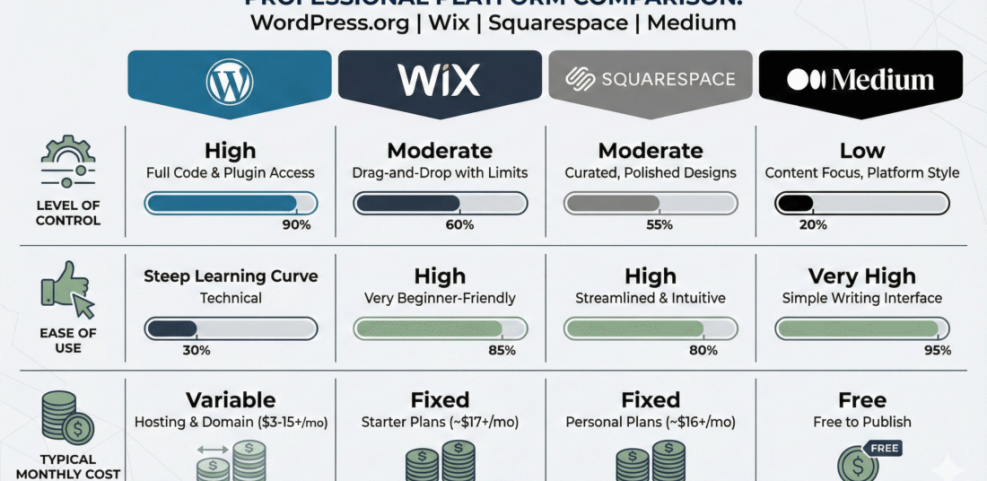
There are many blogging options, yet most people end up choosing between a few well-known platforms. The table below gives a simple, high-level comparison of four popular choices so you can see how control, ease of use, and cost differ.
| Platform | Control | Ease of Use | Typical Cost |
|---|---|---|---|
| WordPress.org | Full control, self-hosted | Moderate, some learning curve | Around $5–15 per month for hosting |
| Wix | Hosted, moderate control | Very easy, drag-and-drop | Around $15–25 per month |
| Squarespace | Hosted, curated control | Easy, design focused | Around $16–30 per month |
| Medium | Low design control | Very easy, writing first | Free to publish, optional membership |
This table does not cover every detail, yet it highlights the tradeoffs. WordPress.org gives you ownership and flexibility, while hosted builders trade some control for convenience. Writing networks simplify publishing but limit branding options.
WordPress.org for Full Control
With WordPress.org, you install the software on hosting from providers like Bluehost or SiteGround, then manage updates and backups yourself or with plugins. This means you can add advanced SEO plugins, ecommerce, membership tools, and almost any feature you imagine as your blog grows.
Hosted Builders Like Wix and Squarespace
Website builders handle hosting, security, and many design details for you. They offer visual editors and integrated features like forms and basic analytics. This works well if you want a beautiful blog quickly and you do not need the deep flexibility of a self-hosted content management system.
Writing Platforms Such as Medium and Substack
Medium and Substack let you publish long-form posts or newsletters without building a full site. Medium emphasizes discovery through its network, while Substack focuses on email subscriptions. These tools are attractive if you primarily care about writing and having readers, not about custom layouts or complex site structures.
Costs Monetization and Control
Budget naturally plays a big role in your decision, yet the cheapest option is not always the wisest choice. You should consider both your monthly costs and how your platform affects your ability to earn money later.
Understand Total Cost of Ownership
Self-hosted WordPress usually starts with domain and hosting costs, often around the price of a few coffees each month. Hosted builders fold these costs into a subscription. Over several years, subscription platforms may cost more, especially if you upgrade to higher tiers to unlock features you need.
Ways to Make Money from Blogging
You might monetize with display ads, affiliate links, sponsored posts, digital products, or memberships. WordPress.org supports all of these with plugins and integrations. Hosted builders and writing networks may restrict certain ad networks or make integrations harder, which limits your freedom to experiment with different income streams.
How Much Control Do You Need
Control matters most when you depend on your blog for income or leads. When you self-host, you can move hosts, change themes, or modify code as needed. On closed platforms, you accept their rules, pricing changes, and feature roadmap, which sometimes forces compromises you did not plan.
Technical Comfort Support and Maintenance
Your comfort with technical tasks should guide your platform choice as much as your budget. You can always learn new skills, yet it is better to match the platform to your current abilities so you do not stall before you publish.
How Much Tech Work Can You Handle?
Self-hosting requires you to connect a domain, configure basic settings, and keep backups. Many hosts automate much of this, yet you still need to understand what is happening. By contrast, website builders hide most of the technical details, which reduces flexibility but keeps your focus on creating content.
Evaluate Support and Community
Support can come from official channels and from user communities. WordPress has a huge ecosystem of tutorials, forums, and plugins on WordPress.org support. Meanwhile, hosted platforms offer live chat or ticket systems that answer account-specific questions but may not cover advanced customization.
Security Backups and Updates
Security should never be an afterthought. With WordPress.org, you combine good hosting and reputable security plugins to keep your site safe. Hosted platforms bundle security and backups into your subscription, which removes some responsibility but also limits your control over how those systems are configured.
Plan for Growth and Migration
A blog that starts as a simple side project can become a major asset over time. Therefore, you should think about how easy it will be to grow, reorganize, and even migrate your content as your needs change.
Can You Switch Platforms Later?
Most modern platforms offer some form of export, but the quality varies. WordPress.org uses standard formats that many tools can import. Some hosted builders and writing networks only export partial data, which makes clean migration difficult. You protect yourself by choosing tools that play nicely with others.
Scale Content and Traffic
As your content library grows, you need categories, tags, search, and internal linking tools that stay manageable. WordPress excels here because you can reorganize content, add custom post types, and use advanced navigation tools. Hosted builders handle moderate growth well but can feel limited at very large scales.
Protect Your Content Ownership
Owning your domain and having full access to your content is critical. When your blog lives on a subdomain under someone else’s brand, you depend on their policies and business health. A self-hosted site on your own domain keeps your content portable if you ever change platforms.
You can prepare for future moves by bookmarking a dedicated Blog Migration Guide that walks through exports, redirects, and testing once published.
Step by Step Decision Checklist
At this point, you have seen the major tradeoffs. Now you can use a simple, repeatable process to decide which platform fits your situation today while still leaving room to grow.
Follow This Simple Evaluation Process
- Write down your primary goal, such as leads, income, or practice writing.
- Decide how much you can spend per month for at least one year.
- Rate your technical comfort level from low to high.
- List must-have features like custom domain, email capture, or ecommerce.
- Shortlist two or three platforms that match your budget and skills.
- Create free or trial sites and publish two test posts on each.
- Compare how each platform feels, then choose one and commit.
When you use the same test posts across platforms, you can compare the editors, URLs, and preview speed more objectively. This makes your decision less emotional and more grounded in how the tools work for your real content.
- Custom domain and SSL available
- Easy-to-use editor you enjoy
- Simple way to add email signups
- Clear path to export your content
- Room to grow with plugins or apps
This quick checklist keeps you focused on essentials rather than shiny features. If a platform fails on multiple checklist items, it may not support your blog well over the long term.
Example Platform Choices for Common Scenarios
If you want full control and long-term growth, self-hosted WordPress.org is usually the best starting point. When you need a polished site quickly for a portfolio or local business, Squarespace or Wix can be good fits. If your main goal is newsletter-style writing, Substack or similar tools may serve you better.
When to Reevaluate Your Platform
You do not need to stay on the first platform forever. You should reconsider your choice when you hit hard limits, such as missing features, high fees, or slow performance. Before moving, look at options like Install WordPress to see whether a more flexible setup would solve your problems.
Best Blogging Platform Conclusion
You do not need a perfect platform to start, but you do need one that supports your next year of publishing. When in doubt, a self-hosted WordPress.org site gives you the widest range of themes, plugins, and monetization tools, and it keeps your content portable if your strategy changes.
Your next step is to shortlist two realistic platforms and create small test sites on each. Publish a few posts, try adding images, adjust URLs, and preview on mobile. After that, choose the option that feels reliable, flexible, and sustainable, then commit to publishing consistently for at least three months.
More WordPress Guides You Might Like
When you are ready to go deeper into WordPress and blogging strategy, the following planned guides will help you build, secure, and grow your site effectively.
- Beginner guide to WordPress speed optimization
- Is WordPress good for seo
- Developer hooks for optimizing WordPress plugins with code
- How to start a WordPress website
These resources will eventually give you step-by-step workflows for setup, optimization, and growth so you can turn your platform choice into a stable, successful blog.
Frequently Asked Questions About best blogging platform
What is the best blogging platform for beginners?
Is WordPress better than Wix for blogging?
Do I need hosting to start a blog?
Can I make money on a free blogging platform?
How long does it take to set up a blog?