How Do You Make Money on WordPress
Practical WordPress tips and strategies


Make Money on WordPress by selling digital products when you want a clean, scalable monetization model that does not depend on ads or huge traffic. With a simple WooCommerce setup, you can accept payments, deliver downloads securely, and automate follow-ups so your store runs smoothly.
In this step by step tutorial, you’ll learn how to make money on WordPress with digital downloads using WooCommerce, including payments, delivery, product page conversions, email automation, and sales tracking.
What You Need Before You Make Money on WordPress
- Administrator access to your WordPress site.
- A WordPress site where you can install plugins.
- A digital product file ready (PDF, ZIP, MP3, or a download link).
- A payment account you can connect to WooCommerce.
- A recent full backup before installing new plugins or editing code.
Step 1: Choose a Digital Product to Make Money on WordPress
WordPress Monetization Product Ideas
Before you build anything, pick one product that solves one specific problem. One focused offer is easier to launch, easier to market, and easier to improve.
- Template: A plug and play file (Notion template, spreadsheet, Canva design).
- Checklist: A printable process your buyer can follow.
- Mini guide: A short PDF that delivers a quick win.
- Resource bundle: A ZIP file with multiple assets.
- Workshop replay: A downloadable video and notes.
Verify success by writing a one-sentence promise and 5 bullet benefits you can add to your product page.
Step 2: Install WooCommerce to Monetize WordPress with Downloads
WooCommerce Setup That Supports WordPress Income
WooCommerce adds products, checkout, orders, and downloadable delivery to WordPress. Install it first so your store foundation is correct.
- Log in to your WordPress dashboard.
- Go to Plugins » Add New.
- Search for WooCommerce.
- Click Install Now, then click Activate.
- Follow the setup prompts for store address, currency, and basic preferences.
- If you want a dedicated walkthrough, follow Install WooCommerce.
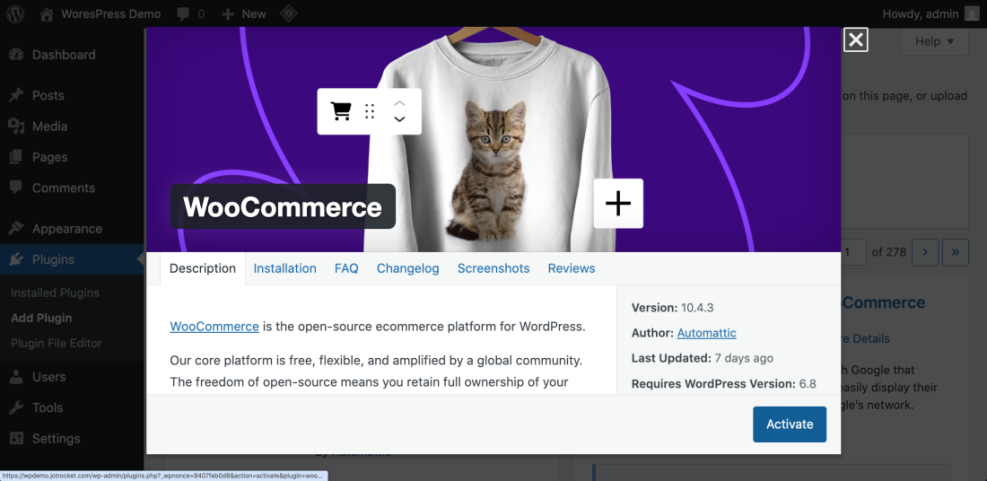
Verify success by confirming you see WooCommerce in the left admin menu and that WooCommerce created Cart and Checkout pages.
Step 3: Set Up Payments to Earn Money on WordPress
Test Checkout So You Can Make Money on WordPress Faster
You cannot make sales until customers can pay. Set up payments now so you can test the entire buying flow early.
- Go to WooCommerce » Settings.
- Click the Payments tab.
- Enable at least one payment method.
- Click Set up or Manage for the gateway and connect your account.
- Click Save changes.
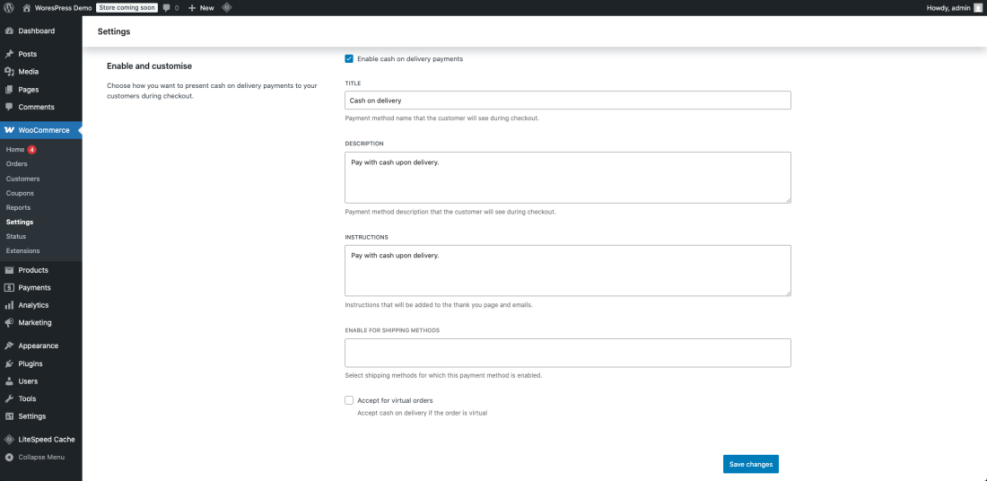
Verify success by confirming your payment method shows as enabled and you can open its settings without errors.
Step 4: Create a Downloadable Product to Make Money on WordPress
Secure Digital Delivery for WordPress Monetization
This is where your store becomes real. You will create a product, mark it as downloadable, and attach the file your customer receives after purchase.
- Go to Products » Add New.
- Enter a product Name and write a short description.
- In Product data, select Simple product.
- Check Virtual and check Downloadable.
- In the General tab, set the Regular price.
- In Downloadable files, click Add file and upload your file or add a secure file URL.
- Optional: Set Download limit and Download expiry.
- Click Publish.
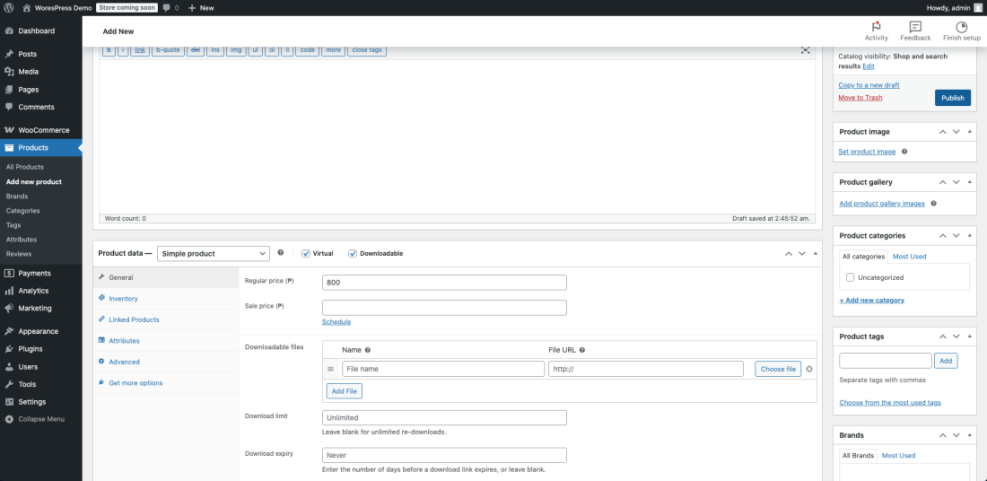
Verify success by viewing the product page and confirming it shows a price and an Add to cart button.
Step 5: Confirm Download Delivery for Reliable WordPress Income
Reduce Refunds and Support Requests
Digital products fail when buyers cannot access downloads. Confirm the customer email includes the download link and that access works after checkout.
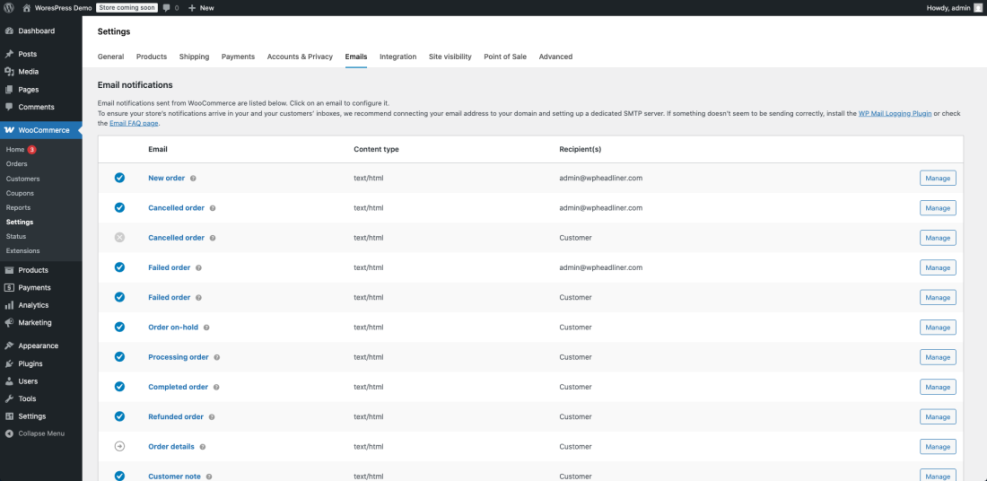
- Go to WooCommerce » Settings » Emails.
- Open the customer email used for completed purchases and confirm it is enabled.
- Place a test order using a real email address you control.
- Open the order email and confirm it includes a download link.
- If your store uses accounts, visit My account and confirm the file appears under Downloads.
Step 6: Build a Product Page That Helps You Make Money on WordPress
Improve Conversions to Monetize WordPress Traffic
Your product page does the selling. Keep it focused on outcomes, proof, and a clear call to action that is visible on mobile.
- Go to Products and open your product.
- Write a short first paragraph describing the outcome the buyer gets.
- Add 3 to 7 bullet benefits describing what is inside the download.
- Add a product image that matches the deliverable (cover, mockup, screenshot).
- Fill in Product short description with one strong summary sentence.
- Click Update.
- For checkout improvements, follow WordPress speed optimization step by step.
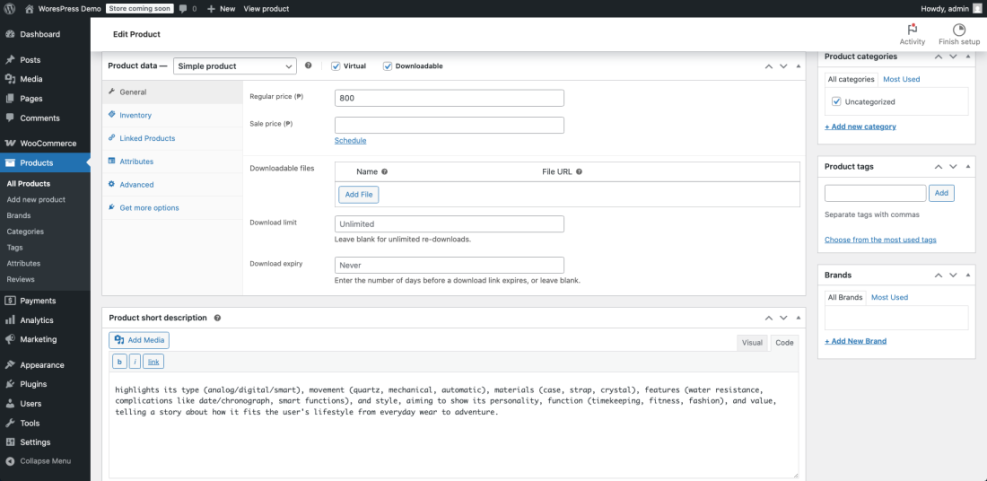
Verify success by checking your product page on mobile and confirming the price and button are easy to find.
Step 7: Use SEO to Make Money on WordPress Long Term
Optimize Product Titles and Snippets for WordPress Revenue
SEO helps your product pages and supporting content get discovered. Start with clean titles, useful meta descriptions, and share-friendly previews.
- Install one SEO plugin and complete its basic setup.
- On your product page, write a clear SEO title and a click-friendly meta description.
- Enable social metadata so your product looks good when shared.
- For a full setup walkthrough, follow WordPress seo complete beginners guide.
Verify success by sharing your product URL in a private message and confirming the preview title and image look correct.
Step 8: Use Email Automation to Earn More Money on WordPress
Post Purchase Emails That Increase WordPress Revenue
Email automation boosts repeat revenue and reduces refunds by helping buyers succeed quickly.
- Connect your email platform using a WooCommerce integration.
- Create a post-purchase email that explains how to use the download.
- Add a follow-up email that recommends a related product or service.
- Use Email marketing WordPress for a complete automation playbook.
Verify success by placing a test order and confirming the first automation email sends correctly.
Step 9: Track Sales to Grow WordPress Revenue
Measure What Works to Monetize WordPress Better
Tracking helps you improve without guessing. Start by measuring product views, add to cart rate, and completed orders.
- Install analytics and confirm pageviews are recording.
- Enable ecommerce tracking so purchases show as revenue events.
- Review product page views, add to cart rate, and checkout completion weekly.
- Use GA4 Ecommerce Tracking to implement store tracking.
Verify success by confirming at least one test purchase appears in your analytics reports.
Quick Comparison of Ways to Make Money on WordPress
Choose the Best WordPress Monetization Method
Use this table to choose the best income path based on your skills, timeline, and audience.
| Method | Where You Use It | Main Purpose |
|---|---|---|
| Affiliate Marketing | Blog posts, reviews, resource pages | Earn commissions by recommending tools and products with tracked links. |
| Display Ads | High-traffic blog content | Generate revenue from pageviews using ad networks and placements. |
| Digital Products | WooCommerce product pages and checkout | Sell downloads like templates and guides with high margins. |
| Memberships | Protected content and recurring payments | Create predictable monthly revenue by gating premium resources. |
| Services | Service pages and contact forms | Generate leads for paid work like design, SEO, or maintenance. |
Step 10: Add a Thank You Message to Protect WordPress Digital Sales
Lower Support Costs and Keep WordPress Income Smooth
This reduces support tickets by telling buyers where to find their download link and what to do if they cannot access it.
- Use a safe snippet plugin or a child theme so updates do not overwrite your changes.
- Add the code below and save.
- Place a test order and confirm the message appears after checkout.
add_action( 'woocommerce_thankyou', function( $order_id ) {
    if ( ! $order_id ) { return; }
    echo '<p><strong>Download tip:</strong> Your download link is in your order email and in your account downloads. If you do not see it, check spam and contact support with your order number.</p>';
}, 20 );
Verify success by completing a test order and confirming the message displays on the Thank You page.
Conclusion You Are Ready to Make Money on WordPress
You now have a complete setup to Make Money on WordPress with digital products, including WooCommerce, payments, secure downloads, conversion-focused pages, automation, and tracking.
Start by improving one metric at a time, then expand into additional products once your first offer converts consistently.
Frequently Asked Questions About Making Money on WordPress
Do I need a lot of traffic to make money on WordPress
Is WooCommerce a good choice for WordPress digital products
How do I secure downloadable files in WordPress
What should a product page include to increase WordPress revenue
Which payment method should I set up first
How do I know what to improve to get more sales