Email Marketing with WordPress List Building and Automation Basics
Grow Your WordPress Audience with Simple Automation

Email Marketing often feels confusing when you first connect it to WordPress. You may wonder which plugin to use, how to collect subscribers, and whether your messages will even reach the inbox.
This guide walks you through the full process, from picking tools and building your list to creating simple automation flows. You will see how each step fits into WordPress, so you can move from random newsletters to a reliable, repeatable system.
How Email Marketing Works in WordPress
The quick answer is simple: you use WordPress to capture email addresses, then send and automate campaigns through an email service or plugin. WordPress handles the forms and targeting on your site, while your email platform manages sending, scheduling, and analytics.
Why Email Lists Beat Social Followers
Social networks can change algorithms overnight, but your email list stays under your control. You can reach subscribers whenever you choose, without paying for boosted posts. In addition, email lets you tailor content to segments, which usually leads to higher engagement and more sales.
What Do You Need to Get Started?
You only need a few pieces to begin. First, you need an email service or a dedicated WordPress email plugin. Next, you need at least one list and one signup form. Finally, you need a simple plan for what to send, such as a welcome sequence and a regular newsletter.
How Does Automation Save You Time?
Automation sends the right message at the right moment without extra work each week. A new subscriber can receive a welcome series, product education, and reminders, all triggered by their actions. As a result, your list feels nurtured, even when you are busy with other tasks.
Setting Up Your Email Marketing Stack
Your stack is the combination of email platform, WordPress plugins, and forms you use. When these parts connect cleanly, you get fewer tech headaches and better data. Therefore, it pays to set things up with care before you start sending campaigns.
Choose the Right Email Service
Most site owners pick either a hosted email service or an all in one WordPress email plugin. Hosted tools handle deliverability and scaling for you, while WordPress plugins keep everything inside your dashboard. For a small list, cost, ease of use, and basic automation usually matter more than fancy features.
For deeper comparisons of popular services, you can review Best Email Marketing Services and match the options with your budget and goals.
Connect WordPress to Your Email Tool
After you create your email account, you connect it to WordPress so new subscribers flow into the right list.
- Create or log in to your chosen email service account.
- In WordPress, install the official plugin or connector for that service.
- Go to the plugin settings and paste in your API key or connect via OAuth.
- Select the default list or audience where new subscribers should be stored.
- Send a test signup to confirm it appears correctly in your email dashboard.
This simple setup ensures every form on your site feeds clean data into your email system from day one.
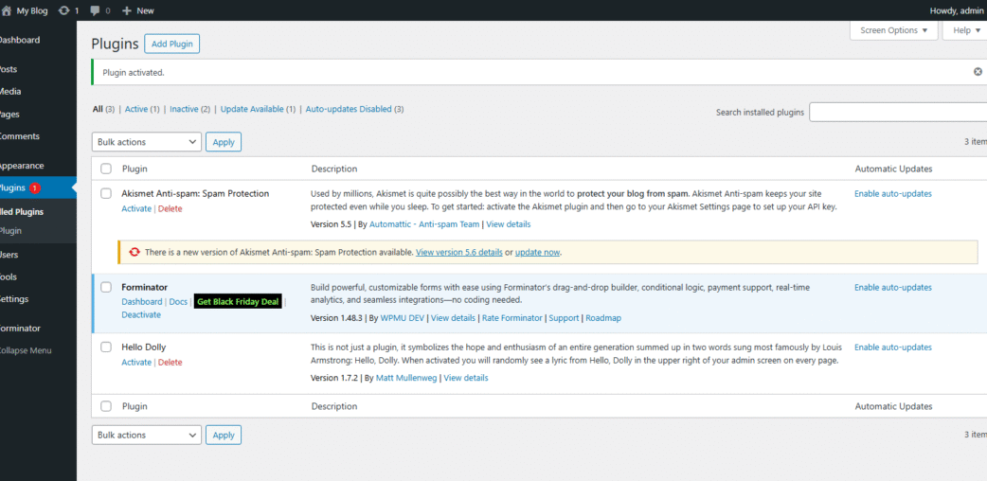
In your WordPress Dashboard, go to Plugins » Add New and search for the plugin that integrates with your email platform.
How Do You Create Your First Signup Form?
Once your connection works, you add a signup form so visitors can join your list. You can build it inside your email tool or with a WordPress form plugin that syncs to your list. Keep the form simple at first and only ask for an email address and, if needed, a first name.
For more advanced field control or conditional logic, you can explore Best Contact Form Plugins for WordPress and connect those forms to your lists.
Practical List Building Strategies on WordPress
With your basics in place, you can focus on steady list growth. Practical list building is less about tricks and more about clear offers, visible forms, and consistent traffic. When visitors see why they should subscribe and the process feels smooth, your list grows every week.
Where Should You Place Opt In Forms?
Location has a huge impact on signups. You usually get the best results from a combination of header or top bar forms, in content forms on high traffic posts, and simple footer or sidebar forms. In addition, exit intent or timed popups can capture visitors right before they leave.
In your WordPress Dashboard, edit a popular post under Posts » All Posts and insert your signup block near the middle of the article.
Offer Simple Lead Magnets That Convert
A lead magnet gives subscribers a clear reason to join your list. You might offer a short checklist, a mini email course, or a discount code. However, your lead magnet should solve one narrow problem rather than promise everything, so it feels quick to consume and easy to say yes to.
Avoid Common List Building Mistakes
Many site owners hide forms on a single page, ask for too much information, or use vague copy like “Sign up for updates.” You get better results when you explain what people receive, how often you send emails, and why the content matters. Clear, honest expectations reduce unsubscribes and spam complaints.
Basics of Email Automation Workflows
Automation turns one time subscribers into loyal readers or customers. Instead of sending one newsletter after another, you design reusable flows triggered by signups, purchases, or key actions. This keeps your messaging relevant without adding more manual work every week.
Create a Simple Welcome Series
A basic welcome series might contain three to five emails spread over a week or two. The first email delivers the lead magnet or promise, the second shares your best resources, and the third invites a small next step, such as booking a call or viewing a product page. This sequence builds trust quickly.
Use Behavioral Triggers in WordPress
Behavioral triggers respond to what people do on your site. For example, a completed checkout can start a product onboarding sequence, while an abandoned cart can trigger a reminder. Many modern WordPress email plugins let you trigger flows from form submissions, user registration, or WooCommerce events.
How Often Should You Email Subscribers?
There is no single perfect frequency, but most small sites do well with at least one useful email per week. If you send less often, people forget who you are. If you send too often without strong value, they tune out. Test a steady rhythm and adjust based on open and click rates.
- Map each automation to a single goal, such as a sale or reply.
- Limit early series to three to five messages per subscriber.
- Tag or segment subscribers based on what they click.
- Review flows every few months and remove outdated steps.
This simple checklist keeps your automation light, focused, and easier to maintain as your list grows.
In your WordPress Dashboard, go to Tools » Email Automation or the settings page of your email plugin to create a new workflow.
Tracking Results and Staying Out of Spam
Good reporting tells you whether your efforts work. At the same time, staying out of spam folders protects your reputation and revenue. When you watch key metrics and follow basic legal rules, you build a healthier, more responsive list.
Measure the Right Email Metrics
Focus on open rate trends, click through rate, unsubscribe rate, and spam complaints. High opens and clicks with low complaints usually mean your content matches what people expect. In contrast, falling engagement or rising complaints signal that you need to adjust subject lines, send frequency, or content.
Keep Deliverability Healthy Over Time
To protect deliverability, use verified sending domains, avoid spammy subject lines, and keep your list clean by removing inactive subscribers. In addition, every email should include a clear unsubscribe link and your real mailing address. Official guidance from the Federal Trade Commission explains these rules in more detail, along with penalties for ignoring them.
In your email service dashboard, open the reports area linked from your latest campaign to review opens, clicks, and complaints in one place.
Email Marketing Conclusion and Next Steps
At this point, you have the core pieces to run effective Email Marketing with WordPress. You know how to choose tools, place forms, design simple automation, and track results. The most important step now is consistency: send useful messages on a regular schedule and improve one element at a time.
Your next move is to pick a single goal, such as selling one product or booking more calls, and shape your list building and automation around that outcome. When every form, email, and workflow supports the same goal, your WordPress site becomes a focused system rather than a loose collection of plugins.
More WordPress Guides You Might Like
If you want to keep improving your site, these resources help you connect Email Marketing with a stronger overall WordPress strategy.
- WordPress Guides & Tutorials Overview
- Content Workflows for Multi Author WordPress Blogs
- Creating High Converting Lead Magnets in WordPress
- Is WordPress good for seo
- Using WooCommerce Data to Power Email Automation
These topics build on what you learned here, so your list, content, and site structure all work together instead of in separate silos.
Frequently Asked Questions About Email Marketing
Can WordPress handle Email Marketing on its own?
Do I need a big list before I start automation?
How many fields should my signup forms have?
What types of emails should I send first?
How do I know if subscribers feel overwhelmed?