Keyword research tools help you move beyond guesswork and find topics your audience actually searches for. When you rely on data instead of intuition, you can target phrases that match real demand, understand how competitive they are, and plan content that has a realistic chance to rank.
In this guide, you will see how different SEO keyword tools work together, which ones make sense for WordPress sites at different budgets, and how to build a simple workflow around them. By the end, you can choose a core toolkit and use it confidently for ongoing content planning.
Quick Answer The Best Keyword Research Tools
If you want a fast answer, combine one solid all-in-one SEO suite, one free data source from Google, and one tool that specializes in long-tail keyword ideas. This mix gives you search volume, keyword difficulty, and fresh keyword ideas without paying for ten different subscriptions.
- Semrush – powerful all-in-one SEO suite for deep keyword and competitor research.
- Ahrefs – excellent for keyword difficulty, SERP analysis, and backlink data.
- Google Keyword Planner – free search volume and ideas straight from Google Ads.
- AnswerThePublic or similar question tools – great for long-tail keywords and content ideas.
- Google Search Console – essential for seeing which queries already bring traffic to your site.
For many WordPress users, starting with Google Keyword Planner plus one paid suite such as Semrush or Ahrefs is enough. Then you can layer in a question-based tool for more content angles and use Search Console to refine your keyword strategy over time.
Top Picks At A Glance
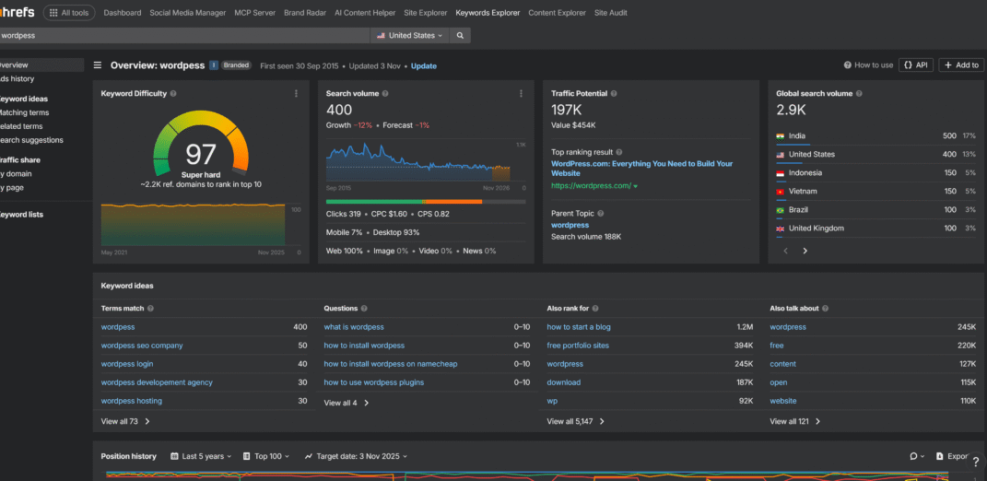
Semrush and Ahrefs are the most complete SEO keyword tools for serious sites that earn money. Google Keyword Planner and Google Search Console cost nothing, so they are ideal starting points. Question tools such as AnswerThePublic sit on top, turning raw keywords into content ideas, headings, and FAQ angles.
Which Keyword Tool Is Best For Beginners
For most beginners, the easiest starting point is Google Keyword Planner combined with Google Search Console. Keyword Planner shows search volume ranges and keyword ideas, while Search Console reveals what you already rank for. Together, they give you enough data to plan simple, focused content without overwhelming dashboards.
Do You Need More Than One Tool
Using more than one keyword tool gives you a broader view of search demand and competition. However, you do not need every tool on the market. A practical stack is one main SEO suite, one or two free tools, and your WordPress SEO plugin to help optimize each post.
Why Keyword Tools Matter For SEO
Good keyword research tools help you stop writing random posts and start building focused topic clusters. Instead of guessing what people type into Google, you can find search terms, group them by intent, and match them to pages that answer the query clearly.
How Do Keyword Research Tools Work
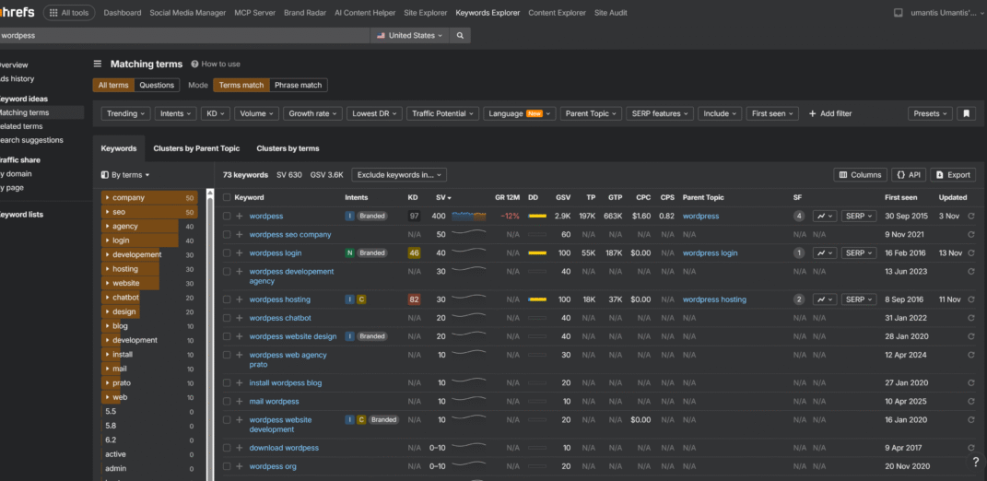
Most keyword tools start with a seed keyword and then pull related keyword ideas from search engine data. They estimate search volume, competition levels, and sometimes click-through rates. As a result, you can compare many keyword ideas quickly and choose those that match your niche, search intent, and difficulty level.
Understanding Search Volume And Difficulty
Search volume tells you how often people search for a keyword each month, while keyword difficulty estimates how hard it is to rank. High volume with high difficulty usually suits strong, established sites. Meanwhile, low or medium volume with lower difficulty often works better for newer WordPress blogs.
Finding Long Tail Opportunities
Long-tail keywords are more specific phrases such as “best WordPress backup plugin for small blogs.” These usually have lower search volume but clearer intent and less competition. Tools that surface question-based keywords and related phrases make it easier to find these long-tail terms and build focused content around them.
Key Features To Compare In Tools
When you look at different SEO keyword tools, focus less on buzzwords and more on a few core features. You want useful metrics, clean reports, and a fair balance between data depth and cost.
Essential Metrics To Check
At minimum, your tool should show search volume, keyword difficulty, and a snapshot of who already ranks in the top results. In addition, related keyword suggestions, questions, and SERP features help you decide how to structure your content, internal links, and calls to action.
The table below compares a few popular tools and what they are best for.
| Tool | Best For | Type | Free Plan |
|---|---|---|---|
| Semrush | Deep SEO campaigns | All-in-one suite | Limited daily reports |
| Ahrefs | Competitive research | All-in-one suite | Free keyword tools |
| Google Keyword Planner | Search volume data | Google Ads tool | Fully free |
| AnswerThePublic | Question-based ideas | Specialized generator | Limited daily searches |
| Google Search Console | Existing queries | Site performance tool | Fully free |
This overview helps you see how tools complement each other. One suite covers deep analysis, while lighter tools and Google data fill in gaps in your keyword research.
Interface Speed And Limits
A slow interface can make keyword research feel like a chore. Therefore, pay attention to how quickly reports load, how many keywords you can export, and whether there are strict daily limits. Fast tools encourage you to test more ideas and refine your content plan more often.
What About Data Accuracy
No keyword research tool is perfect, and each one estimates metrics differently. Instead of chasing exact numbers, compare ranges and trends across your tools. When a keyword looks promising in more than one data source, you can feel more confident investing time in a full article.
Leading Platforms For Keyword Discovery
You can choose from many keyword platforms, from full SEO toolsets to lightweight browser extensions. The best choice depends on your budget, how often you publish content, and whether you manage one WordPress site or several.
All In One SEO Suites
Platforms like Semrush and Ahrefs give you large keyword databases, competitor analysis, and backlink data in one place. Because they show full SERP snapshots, you can see which types of pages rank, how strong they are, and which related keywords they also target.
Specialized Keyword Idea Generators
Tools such as AnswerThePublic or other question-focused generators work well for long-tail keywords and People Also Ask-style headings. In addition, free tools like the Google Keyword Planner and Ahrefs Free Keyword Generator are helpful for validating search volume and difficulty for your best ideas.
WordPress Focused Solutions
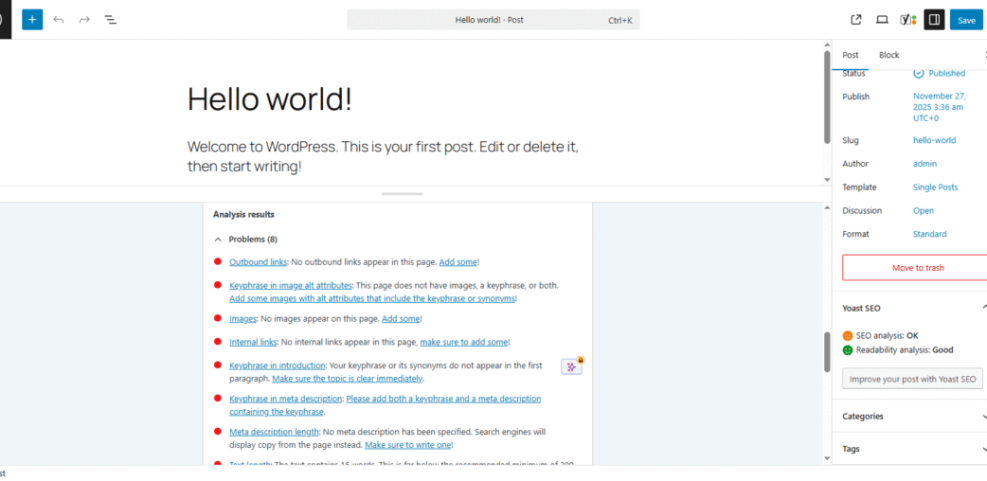
Your WordPress SEO plugin also acts as a simple keyword helper. For example, plugins like Yoast SEO or Rank Math let you set a focus keyphrase, check if it appears in your title, headings, and slug, and remind you about internal links. While these tools do not replace full keyword research, they keep on-page optimization consistent.
Free Options For Budget Conscious Sites
If you are just starting and cannot justify a paid subscription yet, you can still do solid keyword research. Several free keyword tools give you enough data to plan content, especially when you use them together.
Which Free Keyword Tool Is Best
For most site owners, the best free combination is Google Keyword Planner plus Google Search Console. Keyword Planner provides new keyword ideas and volume ranges, while Search Console shows which queries already bring impressions. Together, they help you refine topics and avoid writing about terms that never get searched.
Combining Several Free Tools
You can also pair those Google tools with question-based keyword generators and browser extensions. For example, you might generate ideas with AnswerThePublic, validate them in Keyword Planner, and then track performance inside Search Console. This stack keeps your costs low but still supports a smart content strategy.
When To Upgrade To Paid
Once your blog begins to earn consistent revenue, upgrading to a paid SEO suite makes sense. At that point, you will benefit from larger keyword databases, more accurate keyword difficulty scores, and detailed competitor reports. Upgrading then feels like an investment, not just another monthly expense.
Building A Practical Keyword Research Workflow
Owning great tools is not enough if you do keyword research only once every few months. Instead, you want a simple, repeatable workflow that turns keyword ideas into optimized WordPress content on a consistent schedule.
Step By Step Keyword Research Process
- List 3–5 broad topics your site should cover, based on your niche and offers.
- Use your main keyword tool to generate keyword ideas and filter by intent and difficulty.
- Group related keywords into clusters that can fit into one post or a small series.
- Prioritize clusters with realistic difficulty and clear intent, then map them to future posts.
- Create and optimize posts in WordPress, using your SEO plugin to refine titles and headings.
This process helps you build a content calendar instead of chasing random keyword ideas. In addition, it makes it easier to delegate research or writing later because your steps are documented.
Organizing Keywords Into Content Clusters
After you collect keyword ideas, group them into clusters that share the same intent. One primary keyword usually becomes the main focus of the article, while closely related phrases fill in headings and FAQs. Over time, these clusters become topic hubs that search engines recognize as strong resources.
Common Mistakes To Avoid
One common mistake is targeting only high-volume head terms that your site cannot rank for yet. Another is creating multiple posts that compete for the same keyword instead of one strong guide. Finally, avoid stuffing the same phrase into every heading; use natural variations and related phrases instead.
Keyword Research Tools Conclusion
Now is the right time to choose a primary keyword tool and commit to a consistent process. Start with a free stack built around Google Search Console and Keyword Planner, then add a paid suite like Semrush or Ahrefs when your site justifies the cost. Your content will become more focused, and your rankings can grow steadily.
Next Steps For Your WordPress SEO
A helpful next move is to build a simple SEO checklist for every post you publish. You might even save it in your notes or as a reusable draft in WordPress. When you are ready to go deeper, a planned guide like How to add keywords in WordPress without hurting can walk you through technical settings, internal links, and performance tweaks.
More WordPress Guides You Might Like
If you found this overview of keyword research tools useful, you will likely benefit from more focused guides on SEO and content planning. The following planned resources expand on related skills you can apply to your WordPress site.
- WordPress seo complete beginners guide
- How To Use Google Search Console With WordPress
- Step By Step Guide To On Page SEO
- Content Planning Calendar For WordPress Blogs
- Internal Linking Strategies For WordPress Sites
As you read and apply those guides, your keyword research will connect more directly to technical setup, content structure, and long-term growth for your site.
Frequently Asked Questions About Keyword Research Tools
What is the easiest keyword research tool to start with
Are free keyword tools enough for a new blog
How many keyword research tools do I really need
How often should I do keyword research
Can I use the same keywords for every post