Best Website Maintenance Services
Protect your WordPress site with the right care plan, from simple updates to full outsourced support.

Website maintenance services keep your site secure, fast, and online while you focus on customers instead of chasing bugs and broken forms. However, when updates pile up, backups fail, or malware slips in, a website can quickly turn from asset to headache.
This guide walks you through what ongoing website maintenance services really cover, how different service types work, and which trusted providers to consider for your own site. By the end, you will know what to check in each plan, how to compare pricing, and the steps to take before you sign up, so you can move forward with confidence.
Why Ongoing Website Maintenance Matters
Security And Uptime Protection
Most security issues start small: an outdated plugin, a weak password, or a missed patch. Over time those small gaps create an easy path for bots and attackers. As a result, a single neglected update can lead to hacks, downtime, or data loss.
Regular updates, backups, and security scans dramatically reduce the risk of these problems, especially on WordPress, where plugins and themes change often. When you treat maintenance as a routine instead of a one-off project, you catch problems early. Consequently, you face fewer surprise outages, fewer emergency invoices, and less stress when traffic or sales spike unexpectedly.
Performance, SEO, And Conversions
A site that loads slowly or throws random errors pushes visitors away before they ever read your message. In many cases, old plugins, database clutter, and missing updates all add friction. Therefore, ongoing website maintenance services should include performance checks, cleanup tasks, and basic SEO housekeeping so your site stays fast and easy to crawl.
As a result, visitors move through your pages smoothly, search engines can index your content, and key pages have a better chance to convert. You do not have to chase tiny speed tweaks every week, because a care plan keeps the technical basics under control and improves stability over time.
Time Savings And Peace Of Mind
Every hour you spend troubleshooting a plugin conflict is an hour you are not improving your offer or talking to customers. Instead of getting stuck in technical work, you can delegate these tasks. A good provider of website maintenance services acts like a small technical team on call. They run updates, test changes, and fix common issues so you can treat your website like a tool instead of a never-ending project.
Moreover, when you know professionals are watching your site, you can plan launches, campaigns, and promotions with more confidence.
Types Of Website Maintenance Services
One-Off Fixes And Small Jobs
Some website maintenance services focus on quick fixes: removing malware, repairing a broken layout, or restoring a backup after something goes wrong. These are useful when you have a single urgent problem and a tight budget. However, they do not replace a long-term maintenance plan, because new issues will appear in the future and you will face the same stress again.
Monthly Care Plans
Monthly care plans bundle the essentials into a predictable subscription. Typically, these tasks include core, theme, and plugin updates, backups, uptime monitoring, and basic support. In addition, many WordPress specialists who offer website maintenance services follow checklists similar to the official WordPress site maintenance guidance, which emphasizes regular updates, backups, and cleanup tasks.
White-Label Website Maintenance
Agencies and freelancers often use white-label website maintenance services. In this model, a specialist provider handles updates, backups, security, and small fixes, but reports carry the agency’s branding. This means agencies can sell ongoing care plans to clients without building a full in-house support team. As a result, they can scale more easily and focus on strategy and design.
Hybrid And In-House Approaches
Some site owners handle basic maintenance themselves and keep a service on standby for big tasks, audits, or emergency support. Others build in-house processes based on checklists from sources like Hostinger’s maintenance tips or similar guides, then bring in outside help only for complex issues. In both cases, the goal is the same: combine consistent routines with expert website maintenance services when needed.
What Website Maintenance Services Usually Include
Updates And Compatibility Checks
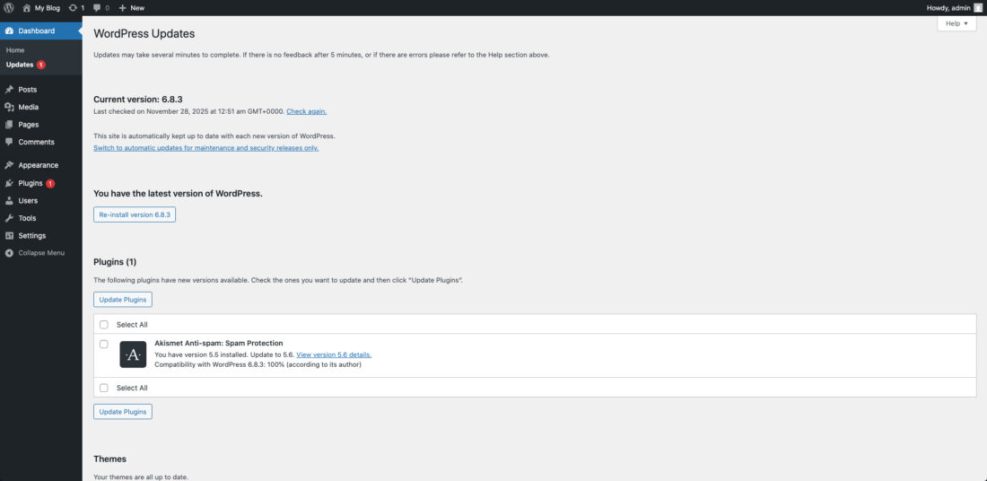
At the heart of every plan, you will find updates: WordPress core, plugins, and themes. The official security handbook stresses that staying updated is one of the most important steps for keeping a WordPress site safe, because patches close known vulnerabilities.
Good providers of website maintenance services do not just click “Update.” Instead, they test in staging when needed, watch for conflicts, and roll back changes if something breaks. That extra layer of care is what separates a real maintenance service from a simple automation script, and it often prevents costly downtime.
Backups And Disaster Recovery
Backups are your safety net. Many services run daily or even real-time backups and store them offsite so you can restore your site after hacks, hosting failures, or accidental deletions. In addition, some website maintenance services use dedicated backup tools or platforms, which allow one-click restores and easy migrations if you change hosts.
Security Monitoring And Hardening
Security work includes malware scans, firewall rules, brute-force protection, and login monitoring. Many providers follow best practices similar to the WordPress Advanced Security Handbook, which focuses on updates, least-privilege access, and trusted plugins.
You may also see website maintenance services that include security plugins, firewall integrations, or cleanup for hacked sites. Consequently, even if an attack happens, you have a clear plan and support in place to recover quickly.
Performance, SEO, And Small Edits
Many website maintenance services also handle performance checks, database cleanup, broken link scans, and small content edits each month. Together, these tasks keep your pages lean and help prevent issues that slow down users or hurt conversions over time.
Best Website Maintenance Services For WordPress Sites
There are many website maintenance services, but the same names appear again and again in independent reviews and comparison guides. The table below gives a quick overview of popular options and how they position their plans. Use it as a starting point, and then dig deeper into two or three that match your situation.
| Provider | Best For | Typical Price Range | Key Strengths |
|---|---|---|---|
| WP Buffs | Agencies and serious site owners | Roughly $70–$450+ per month | 24/7 support, strong security focus, white-label options |
| FixRunner | Owners who want on-demand fixes | Starting around $60–$100+ per month | Emergency support, speed optimization, uptime monitoring |
| SiteCare | Businesses that want done-for-you support | Starting around $90–$300+ per month | Performance tuning, security, proactive troubleshooting |
| GoWP | Agencies needing white-label care | From about $40–$130+ per month per site | Maintenance for client sites, optional content edits |
| Valet | Complex and ecommerce websites | Often $500–$2,000+ per month | Strategy, audits, UX, and high-touch technical support |
| BlogVault + care add-ons | Sites where backups are critical | Usually $100–$500+ per year per site | Advanced backups, staging, migration, security features |
| WP Kraken and similar agencies | Custom tasks and flexible support | From about $40–$300+ per month | Mix of ongoing care, audits, and one-off development work |
Exact pricing changes over time, but most professional plans fall somewhere between about $30 and $500+ per month, depending on traffic, complexity, and support level. In general, costs rise when you add more support hours, advanced performance work, or complex integrations. That range also lines up with independent cost guides that survey agencies, freelancers, and care plan providers.
How To Use This Shortlist
Think about your current situation first, then match it to the providers above. For example, a solo blogger with moderate traffic may start with a smaller plan from a provider like FixRunner or WP Buffs. Meanwhile, a digital agency might lean toward GoWP or another white-label specialist. A store running WooCommerce and multiple integrations may benefit from a more premium partner like Valet that offers high-end website maintenance services.
Where To Read Detailed Reviews
Before you commit, it helps to read independent reviews and side-by-side comparisons. Roundups from established WordPress publishers list pros, cons, and best-fit use cases for each service, which can clarify your decision when several options look similar on paper. Additionally, you can ask peers or communities for real-world feedback on response times and support quality.
How To Choose The Right Website Maintenance Service
Match Services To Your Tech Stack
Start by listing your tools: hosting provider, theme, key plugins, ecommerce platform, and any custom code. Then look for website maintenance services that specialize in similar setups. Many providers focus on WordPress and work closely with popular hosts, which makes troubleshooting and performance tuning easier.
It also helps to check whether a provider supports staging sites, care plans for multisite networks, or specific plugins your business depends on. Otherwise, you may face delays while they learn your stack.
Key Questions To Ask In A Discovery Call
When you speak with a potential provider, ask simple, direct questions:
- How often do you run updates, backups, and security scans?
- What happens if an update breaks my site?
- How fast do you respond to urgent tickets and downtime alerts?
- Do you include small content edits or only technical fixes?
- How will you keep me informed about work done each month?
The answers show how organized their processes are and whether their service level matches your risk tolerance and budget. In addition, you will see how clearly they communicate, which matters a lot during emergencies.
Spotting Red Flags Early
Certain patterns suggest that a website maintenance service may not be a good fit. For instance, very vague plan descriptions, no mention of backups or restore tests, unclear response times, and no sample reports all raise questions. If a provider promises to “do everything” for a very low flat fee, read the fine print carefully. Often, strict limits appear later in the terms.
DIY Maintenance vs Hiring A Service
When DIY Maintenance Works
If you run a small site with basic needs and enjoy technical tasks, you may manage your own maintenance. In that case, you can follow checklists from high-quality tutorials, use trusted plugins, and set reminders to handle weekly and monthly tasks. A clear routine makes DIY care manageable and keeps important jobs from slipping through the cracks.
When To Upgrade To Professional Help
Once your site drives steady leads or revenue, outages and hacks become more expensive than a monthly care plan. If you delay updates out of fear, feel nervous before making changes, or already spend several hours a month on technical work, it is a strong sign that professional website maintenance services will pay for themselves.
You can also combine DIY work with targeted help. For example, you might keep handling content and basic updates while hiring a service for security, backups, and emergency response. This hybrid approach lets you stay involved while still reducing your risk.
Website Maintenance Setup Checklist
Prepare Your Site For A Maintenance Service
Before you sign a contract, organize your website details. Note your hosting logins, domain registrar access, key plugin licenses, and any third-party integrations. Then clean up unused themes and plugins, and make sure at least one recent backup exists.
If you still need to set up your site from scratch, follow a basic Install WordPress tutorial first so you start from a clean, well-configured base. This preparation step makes onboarding smoother and avoids confusion later when you start using website maintenance services.
Onboarding With Your Provider
During onboarding, your new maintenance partner will connect monitoring tools, set up backups, and review your existing configuration. This is a good time to share business priorities, such as which pages bring in the most leads or revenue, so they know where to focus when issues appear.
You can also agree on a simple speed testing routine, perhaps based on a future WordPress speed optimization checklist, so you and your provider both track the same metrics over time. Consequently, you can measure the real impact of their website maintenance services.
Ongoing Review And Communication
Each month, review the maintenance report and ask questions about anything you do not recognize. If your site grows or you launch new campaigns, update your provider so they can adjust monitoring, caching, and backup settings. That ongoing communication keeps your plan aligned with real business needs and prevents surprises.
- Keep an up-to-date list of logins and licenses.
- Confirm how often backups run and how to restore them.
- Review maintenance reports and uptime summaries each month.
- Plan speed and security checks after major site changes.
- Revisit your plan once or twice per year as your site grows.
Conclusion: Choosing The Best Website Maintenance Service For You
The best website maintenance services combine solid processes, clear communication, and a plan that matches your site’s size and risk. Rather than chasing a single “winner,” focus on finding a partner that understands your tools, respects your budget, and reacts quickly when problems appear.
Your next step is simple: first list what you need, then shortlist two or three providers, and finally schedule quick calls to compare their answers. Once you see who explains their work clearly and offers a plan you trust, you can hand off day-to-day maintenance with confidence and let professional website maintenance services protect your site while you focus your time where it matters most.
More Resources On Website Maintenance
- WordPress Security Handbook
- WordPress maintenance tips
- Website maintenance checklist
- Best website maintenance services for WordPress
- Beginner WordPress security best practices guide
Frequently Asked Questions About Website Maintenance Services
How do I know if I need website maintenance services?
What do website maintenance services usually include?
How much do website maintenance services cost?
Can I handle website maintenance myself instead of hiring help?
Will changing to a new maintenance service affect my SEO or uptime?