Best Virtual Business Phone Number Apps
Pick a phone system that fits your online business


A virtual business phone number lets you run a professional phone line for your company without buying extra hardware or sharing your personal cell number. With a virtual number, you get call routing, voicemail, and texting in one app so you can look established even if you are a solo founder or a small remote team.
You will compare leading apps, see which features matter most, and learn how to plug your new number into your WordPress site. By the end, you can choose a provider, set up your first number, and make it easy for visitors to call you from any page.
Best Virtual Business Phone Number Apps
Top Virtual Phone Apps at a Glance
Several cloud phone apps stand out for small businesses: Google Voice, Grasshopper, RingCentral, Nextiva, Dialpad, Zoom Phone, OpenPhone, and Ooma Office. Each runs over VoIP, works on mobile and desktop, and gives you features like call forwarding, voicemail, and texting without a desk phone.
Most of these services bill per user or per number on a monthly plan. Starter plans usually include a local or toll-free number, a pool of minutes, voicemail, and basic call routing. Higher tiers add call recording, analytics, integrations, and more advanced routing rules.
Before you pick one, decide where most of your callers are based, which devices you want to use, and whether you need a full team inbox for calls and messages. That way you can avoid paying for a large contact center when you just need a simple second phone number app.
Here is a quick comparison of popular apps, price ranges, and best-fit use cases.
| App | Starting Cost (Approx.) | Best For | Key Strength |
|---|---|---|---|
| Google Voice | Around $10–15 per user/month | Very small teams on Google Workspace | Simple setup, solid voicemail, tight Google integration |
| Grasshopper | Around $30–40 per month | Solopreneurs and micro teams | Easy to add multiple extensions on one number |
| RingCentral | Around $20–30 per user/month | Growing small businesses | Rich features, video meetings, and CRM integrations |
| Nextiva | Around $20–30 per user/month | Service-heavy teams | Reliable calling with strong support tools |
| Dialpad | Around $15–25 per user/month | Remote and hybrid teams | AI-powered call summaries and live transcriptions |
| Zoom Phone | Around $15–20 per user/month | Teams already using Zoom | Unified meetings and calling in one platform |
Use this table as a starting point, then look at your exact needs, such as international calling, advanced analytics, or deep CRM integration.
Which App Is Best for Your Team Size?
If you are a solo founder who mostly answers calls yourself, a lightweight app like Google Voice or Grasshopper is usually enough. When you have a small support or sales team, providers like RingCentral, Nextiva, Dialpad, and Zoom Phone scale better with extensions, queues, and shared inboxes.
Larger teams benefit from apps that support advanced call routing, detailed analytics, and role-based permissions. Smaller teams often prefer a simpler interface over hundreds of options, so it makes sense to choose a provider with a clean dashboard and easy onboarding.
Whenever possible, take advantage of free trials. A week or two of real-world usage will show if call quality, notifications, and routing rules match how your team actually behaves during busy hours.
How Much Should You Budget Each Month?
Most small businesses can budget somewhere between $15 and $40 per user or per number each month. You may also pay small fees for toll-free minutes, international calling, or extra numbers. Many providers discount annual contracts, but you should only commit once you are sure the platform fits.
Remember to factor in taxes, regulatory fees, and potential add-ons such as call recording or extra texting limits. These are usually small amounts, yet they can add up if you manage many users or campaigns. Clear budgeting helps you compare quotes from different providers on equal terms.
As your call volume grows, compare your actual monthly usage against your plan. If you constantly hit limits, upgrading one tier often costs less than paying overage fees every month.
How Virtual Phone Numbers Work
What Is a Virtual Business Phone Number?
A virtual business phone number is a number that lives in the cloud instead of on a physical phone line. You receive calls over the internet and answer them on an app installed on your smartphone, desktop, or browser. Callers still dial a normal local, toll-free, or vanity number.
Because the number is not tied to a single device or location, you can route calls to different people, set schedules, or send calls to voicemail when you are unavailable. You can also use several numbers for different brands, departments, or marketing campaigns while keeping everything inside one account.
Behind the scenes, most providers use VoIP technology to convert voice into data packets. For you, that simply means you need a stable internet connection or mobile data so calls sound clear and reliable.
Essential Features To Look For
When you compare providers, focus on features that change how you and your customers feel during calls. Call forwarding, ring groups, voicemail-to-email, custom greetings, and business hours are usually must-haves. Text messaging, call recording, and integrations are next on the list.
Some apps also support multiple device types, such as mobile apps, browser apps, and physical desk phones. That flexibility lets you take calls from your laptop during the day and your phone after hours without changing numbers. It also makes handoffs between team members smoother.
In addition, check whether you can buy local, toll-free, and international numbers in the regions that matter to you. A local presence can increase trust, while a toll-free number can make you look established even if your team is small.
Do You Need a Full Cloud Phone System?
If you only need a second line on your cell phone, a simple second phone number app is usually enough. However, once you manage several teammates, departments, or locations, a full cloud phone system is easier to maintain. It centralizes user management, routing rules, and billing.
Cloud phone systems often bundle voice, SMS, video meetings, and team messaging. This combination avoids tool sprawl and keeps your communications in one place. As a result, it becomes easier to search past conversations and keep your customer records in sync with your CRM.
For many small businesses, starting with a lean virtual number and later upgrading to a broader unified communications platform is a practical path. You can keep your original numbers and migrate your routing rules when you outgrow the first app.
How To Choose the Right Phone App
Match Features to Your Use Cases
Start by listing what you actually want the phone system to do. For example, you may want calls during business hours to ring multiple teammates, after-hours calls to go straight to voicemail, and missed calls to create tickets in your help desk. Each use case maps to specific features.
Next, group features into must-haves and nice-to-haves. Must-haves could include call queues, mobile apps, or integration with your CRM. Nice-to-haves might be vanity numbers, call recording, or advanced analytics. This simple exercise keeps you from being distracted by shiny extras.
Finally, check which features are included on the plan you can afford. Some providers lock powerful options, such as call recording or analytics, behind higher tiers. Others include them earlier at a slightly higher base price, which might be better if you rely on those tools every day.
How Many Numbers and Users Do You Need?
Before you sign up, count how many users need their own login and how many separate numbers you want. Some providers charge per user, others per number, and some mix both. If you plan to add seasonal staff, choose a provider that lets you add and remove users quickly.
Consider whether you need dedicated numbers for sales, support, and marketing campaigns. Separate numbers make tracking easier, but they also increase cost and complexity. Many small businesses do well with one main number, a handful of extensions, and one or two tracking numbers.
In addition, think about future growth. A platform that lets you scale from a solo plan to a small contact center without switching providers can save you time, training effort, and potential downtime later.
Checklist Before You Sign Up
- Confirm your monthly budget range, including fees and taxes.
- List must-have and nice-to-have features in advance.
- Check availability of local, toll-free, and international numbers.
- Verify support hours and response channels for outages.
- Test call quality on your actual devices and networks.
Work through this checklist as you evaluate each provider. When you compare them side by side, you can quickly eliminate options that do not match your budget, required number types, or support expectations.
Connecting Your Virtual Number With WordPress
Add Click To Call Buttons on Your Site
Once your virtual business phone number is active, you should make calling you from your WordPress site as easy as a tap. The simplest way is to add a click to call button in WordPress using a simple tel: link in your menu or a call-to-action button that appears on mobile and desktop.
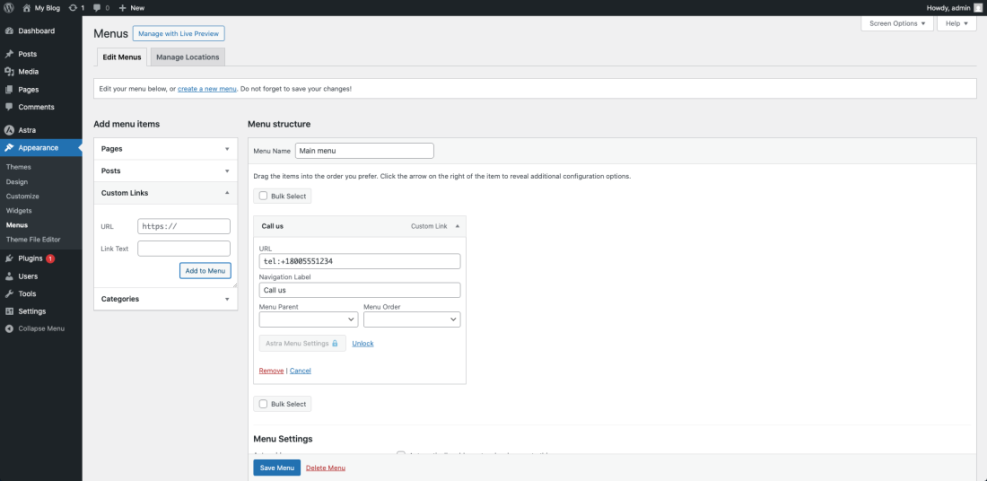
You can create tel: links manually, or you can install a click-to-call plugin from the WordPress plugin directory. After installation, add a floating call button or sticky bar, then paste in your new virtual number. Always test on several devices to confirm your phone app opens correctly.
Route Calls From Forms and Landing Pages
Many businesses mix phone calls with contact forms. A smart approach is to use one of the best WordPress contact form plugins and ask visitors if they prefer a callback rather than a long form. When they choose that option, your team can call them from the virtual phone app and keep the conversation in one place.
Some providers integrate with popular form plugins or marketing tools. You can automatically tag leads based on which form or landing page they used, then route calls accordingly. This kind of routing keeps sales-ready leads from waiting behind general support calls.
Avoid Common Setup Mistakes
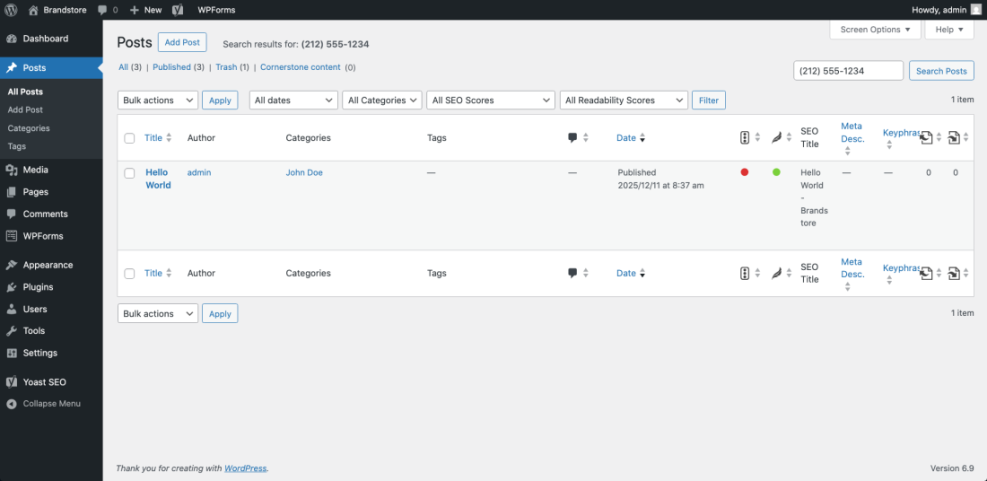
One common mistake is forgetting to update your number everywhere on your site. You may add the new number on your homepage but leave the old one in the footer, contact page, and blog posts. If you followed a guide like How to build a website on WordPress, make sure you also update the phone number in those sections. A quick search inside WordPress for the old number helps you catch these leftovers.
Another issue is not setting business hours and voicemail properly. Always record a clear greeting, set business and holiday hours, and test what happens when nobody answers. A short test sequence avoids missed leads and confusing caller experiences.
Benefits and Drawbacks of Virtual Numbers
Advantages for Remote and Hybrid Teams
Virtual numbers shine when your team is spread across locations. Everyone uses the same business caller ID, even if they answer from their own devices. You can see who answered which call, transfer callers between teammates, and monitor basic metrics like missed calls or average response time.
Because everything runs over the internet, you can toggle features without waiting for a technician. You can add a new user in minutes, create new numbers for campaigns, and adjust routing when your team grows or changes shifts. You can even combine this with Install google analytics on WordPress to see which campaigns drive the most calls.
What Are the Main Limitations?
Virtual numbers depend on your internet connection and mobile data, so poor networks can cause call drops or delays. You also need to think about backup options for critical lines, such as forwarding to a backup cell number during outages or downtimes.
Another limitation is that advanced features sometimes live behind higher-priced tiers. If you rely on call recording, advanced analytics, or specialized integrations, you may need to step up a plan. That is why it helps to map your must-have features to the exact plan you choose.
Finally, some industries have compliance and record-keeping rules for calls. If you work in finance, healthcare, or legal services, verify that your provider supports any regulatory requirements you face before you roll the system out to clients.
When Should You Stick With a Traditional Line?
In a few cases, a traditional landline or on-premise phone system still makes sense. If you have unreliable internet and no mobile data coverage, VoIP calls will suffer. Some businesses also need dedicated analog lines for alarms, fax machines, or other hardware that does not play well with virtual numbers.
When you rely on emergency calling from a fixed location, a traditional line can provide more predictable address information. However, many virtual providers now support enhanced emergency services as long as you keep your address details updated in the dashboard.
For most modern small businesses with decent internet, the benefits of flexibility, scalability, and lower hardware costs outweigh these drawbacks. You simply need to confirm that your physical setup and regulatory environment support the switch.
Virtual Business Phone Number Conclusion
Choose Your Provider and Take the Next Step
At this point, you have a clear picture of how virtual numbers work, which apps stand out, and how to connect everything to your WordPress site. The next step is to pick a provider that fits your budget, feature needs, and team size, then test it with real customers.
After you sign up, configure your first number, add a click-to-call button in WordPress, and monitor your first week of calls closely. Small tweaks to business hours, routing, and greetings often produce a big improvement in caller experience and conversion rates.
If the first provider does not feel right, do not be afraid to switch early. A virtual business phone number is meant to give you flexibility, not lock you into a tool that slows you down.
More WordPress Guides You Might Like
Related Guides for Phone Integration
You may want to explore related topics that deepen your setup, such as advanced contact forms, analytics, and performance tuning. The following guides can sit alongside your virtual number setup to round out your WordPress-powered business stack.
- Best contact form plugins for WordPress
- How to add keywords in WordPress without hurting
- Install google analytics on WordPress
- How to build a website on WordPress
- Connecting Your CRM to WordPress Forms
As you implement your virtual phone system, pairing it with strong forms, analytics, and CRM integration inside WordPress will help you capture more leads and understand which marketing channels drive valuable calls.
Frequently Asked Questions About virtual business phone number
Common Questions From Small Business Owners
Business owners often ask the same questions when they first move from a personal cell number to a cloud phone app. The toggles below answer the most frequent concerns based on real-world setups and typical small-business workflows.
Can I keep my existing business number?
Will a virtual number work with my mobile phone?
Do I need special hardware or a desk phone?
Can I use multiple numbers for different brands?
How do virtual numbers handle emergency calls?