Best CMS platforms can feel hard to choose when you first start planning a new website. There are so many options, from WordPress to all-in-one website builders, that it is easy to feel stuck and afraid of picking the wrong tool.
In this guide you will learn how CMS platforms work, which options are most popular, and how to match each system to your goals. You will also see a side-by-side comparison table plus simple checklists so you can move from confusion to a confident decision.
Best CMS Platforms Overview
A content management system, or CMS, lets you create, edit, and publish website content without writing code. Instead of editing raw HTML files, you log in to a dashboard, write posts or pages, and the CMS handles layout, menus, and much of the technical work in the background.
Most of the best CMS platforms combine three things: a visual editor, a way to manage users and roles, and a theme or template system for design. Some are open-source and self-hosted like WordPress.org, while others are hosted services like Wix or Squarespace that bundle the software and hosting together.
What Is A CMS Platform?
A CMS platform is software that runs your website and lets you manage content through a browser instead of code. You log in, create pages and posts, upload media, and the system builds the pages for visitors. This saves time and lets non-technical users keep a site updated.
How Does A CMS Work?
Most CMS tools store content in a database and use templates to render it as pages. When a visitor opens a URL, the CMS loads the matching content, applies the theme, and outputs HTML. You handle content and settings; the system handles routing, menus, and template logic.
Why WordPress Dominates CMS Market
WordPress.org powers a huge part of the web because it is free, open-source, and highly flexible. Thousands of themes and plugins make it suitable for blogs, company sites, portfolios, and even large ecommerce stores. You can start small and then grow without changing platforms later.
How To Choose A CMS
Before you compare the best CMS platforms by name, it helps to list your needs. Think about your budget, how often you will publish, who will edit the site, and what features you must have, such as ecommerce, multilingual content, or memberships.
You should also consider how much control you want over hosting. Self-hosted systems like WordPress.org give you full flexibility, but you must handle backups and security. Hosted builders like Wix or Squarespace are simpler but more limited and usually cost more per month for similar features.
What Features Matter Most In A CMS?
When you choose a CMS, focus on ease of use, design flexibility, plugin or app ecosystem, performance, and security. Make sure it supports mobile-friendly themes and SEO basics like clean URLs and sitemaps. If you sell products, built-in or add-on ecommerce support is also critical.
Checklist For Comparing CMS Options
- Define your main goal (blog, business site, store, portfolio).
- Set a monthly budget for hosting and tools.
- Decide who will edit content and their skill level.
- List must-have features like ecommerce or memberships.
- Check how easy backups, updates, and security are.
Working through this checklist forces you to think about long-term needs rather than just the first week after launch. Once you know your goal, budget, and technical comfort level, you can quickly rule out platforms that do not fit.
Is WordPress The Best CMS For Beginners?
WordPress.org is very beginner-friendly if you use a good host and a simple theme. Most hosts offer one-click installs, and modern page builders make editing almost as easy as drag-and-drop tools. However, you still need to handle updates and basic security, so very non-technical users may prefer a hosted builder.
When you plan your setup, also think about hosting quality. For example, reading a dedicated WordPress Hosting Guide can save you from choosing a slow provider that holds back your site from day one.
Best CMS Platforms Compared
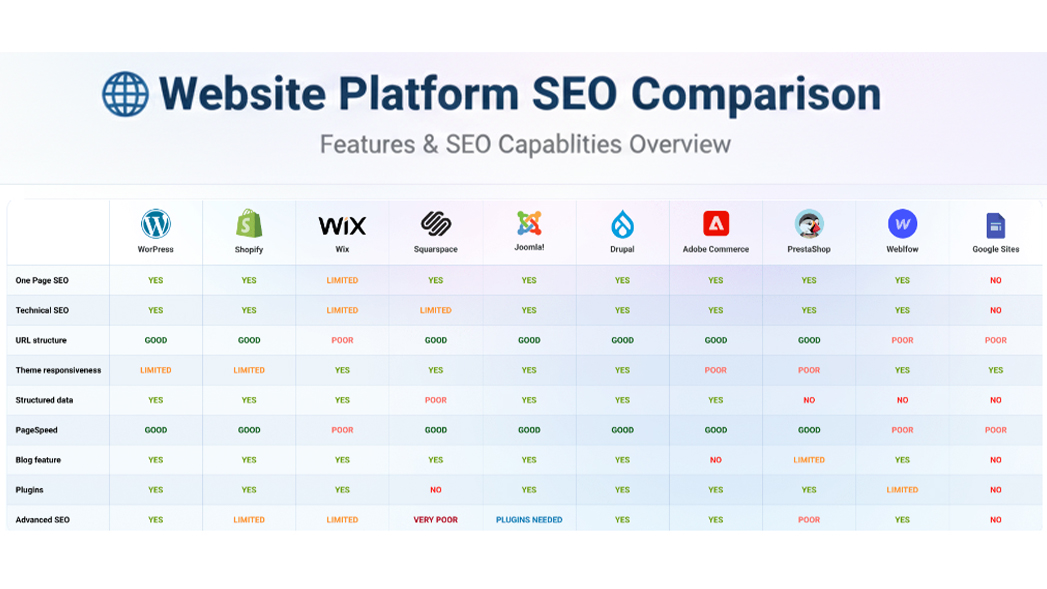
Now it is time to look at the best CMS platforms side by side. The table below summarizes the main options you will see most often, what type of system they are, who they suit best, and a rough idea of typical starting costs.
Use this overview as a quick filter. Then, in the paragraphs that follow, you will see how each system behaves in real projects so you can match the platform to your own website plan.
| CMS | Type | Best For | Typical Monthly Cost |
|---|---|---|---|
| WordPress.org | Self-hosted, open-source | Blogs, business sites, ecommerce | Hosting from around $10–20 |
| Wix | Hosted website builder | Small business sites, portfolios | From around $15–25 |
| Squarespace | Hosted website builder | Design-focused sites, creatives | From around $15–30 |
| Shopify | Hosted ecommerce platform | Online stores of all sizes | From around $30–80 |
| Joomla | Self-hosted, open-source | Community sites, portals | Hosting from around $10–20 |
| Drupal | Self-hosted, open-source | Complex, enterprise projects | Hosting from around $15–40 |
| Ghost | Self-hosted or hosted | Publishers, newsletters | Self-hosted from $10–20 |
This comparison shows that open-source platforms tend to have lower pure software costs but require you to manage hosting and updates. Hosted builders cost more each month but handle the technical layer for you. The right balance depends on how much control you want over the stack.
Is WordPress.org Still The Best Overall CMS?
For most general websites, WordPress.org is still the most flexible option. You get thousands of free and premium themes, a huge plugin ecosystem, and full ownership of your content. As your site grows, you can improve hosting, add caching, and scale without switching platforms.
Wix, Squarespace And Other Site Builders
Wix and Squarespace are hosted CMS platforms with drag-and-drop editors and attractive templates. They remove most technical headaches and include hosting, SSL, and basic security. However, they are less flexible than WordPress.org, and moving away later can be harder because exporting content and design is limited.
Shopify, Joomla, Drupal And Others
Shopify focuses on ecommerce and is ideal if your main goal is selling physical or digital products. Joomla and Drupal are powerful open-source systems that shine in more complex or custom projects but come with a steeper learning curve. Ghost targets publishers and newsletter-driven sites with a clean writing experience.
If you choose WordPress.org, you can later add ecommerce with WooCommerce and follow a dedicated WordPress seo complete beginners guide to grow into a full online store without leaving your original CMS.
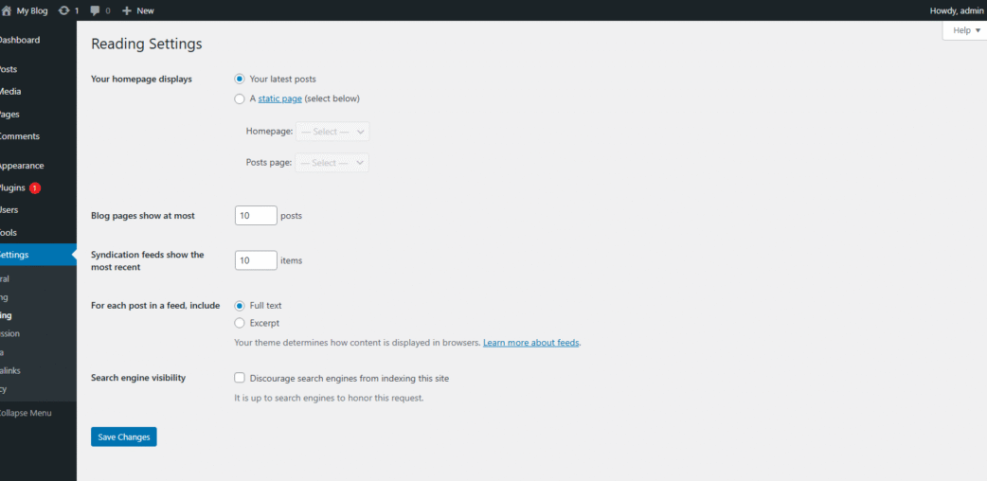
In WordPress, you can manage most of this through the admin area. For example, to adjust how your homepage works, you can go to Settings → Reading and choose whether to show a static page or your latest posts.
CMS Platforms For Different Needs
Different CMS platforms shine in different scenarios. Instead of asking which tool is “best” in general, match each option to a use case: blogging, business websites, ecommerce, portfolios, or membership communities. This makes the decision faster and far more practical.
Think about the next two to three years rather than just launch week. You want a CMS that can grow with your content, traffic, and business model. Rebuilding a site on a new platform later usually costs more time and money than choosing carefully now.
Which CMS Is Best For Blogs?
For pure blogging, WordPress.org and Ghost are top choices. WordPress offers more themes and plugins, while Ghost delivers a focused writing environment and built-in newsletter tools. If you want tight SEO control and flexibility, WordPress is usually the safer long-term bet.
Which CMS Is Best For Ecommerce Stores?
For ecommerce, Shopify and WooCommerce on WordPress are the most common paths. Shopify is simpler to start with but charges separate transaction and app fees. WooCommerce runs on top of WordPress, giving you full control over design, content marketing, and store functionality in one place.
When Should You Use A Headless CMS?
A headless CMS like Contentful or Strapi is useful when you need to deliver content to many front ends, such as apps, websites, and digital displays. However, these systems require developers who can build the front end, so they rarely make sense for small DIY projects.
Security and maintenance also vary between platforms. On WordPress, you should follow a simple Beginner WordPress security best practices guide checklist: keep plugins updated, use strong passwords, and enable automatic backups to protect your content.
Best CMS Platforms: Conclusion
Choosing between the best CMS platforms starts with your goals, not with the tools themselves. Once you know whether you need a blog, a business website, a store, or a content-heavy project, it becomes clearer whether WordPress.org, a hosted builder, or an ecommerce-first platform fits best.
For most WordPress-focused users, WordPress.org is still the strongest long-term choice thanks to its flexibility, huge ecosystem, and full content ownership. Hosted builders like Wix or Squarespace are helpful when you want a fast, low-maintenance launch. Take your checklist, compare options carefully, and then commit so you can focus on creating content instead of switching platforms.
More WordPress Guides You Might Like
If you want to go deeper into planning, launching, and growing a site on your chosen CMS, the following WordPress-focused guides would be helpful additions to your reading list.
- How to choose the best WordPress hosting
- Beginner WordPress security best practices guide
- Woocommerce performance tips for faster stores
- Install WordPress step by step
- WordPress migration checklist for blogs
These guides expand on hosting, security, ecommerce, and migrations, so you can move from picking a CMS to actually launching and growing a stable, high-performing WordPress-based website.
Frequently Asked Questions About Best CMS Platforms
Which Of The Best CMS Platforms Is Easiest For Beginners?
Can I Switch From One CMS Platform To Another Later?
Do The Best CMS Platforms Affect My SEO Directly?
How Much Should I Budget For A CMS Based Website?
When Is An Enterprise CMS Like Drupal A Better Choice?