The best business phone services make it easy for your small business to handle calls, texts, and team communication without buying bulky hardware or old-school phone lines. Instead of juggling personal numbers and missed calls, you can route calls to the right person, log activity, and keep customer details organized across your tools.
You will see how modern phone systems work, which options fit different team sizes, and how to compare providers without getting lost in jargon. You will also learn how to connect your phone service with WordPress so visitors can tap to call you straight from your website.
Best Business Phone Services at a Glance
For most small and mid-sized teams, cloud-based VoIP services are the best business phone services because they combine flexibility, lower costs, and advanced features in one place. You can manage calls from apps on your computer or phone, keep your existing numbers, and add new lines as your business grows.
The table below gives a quick comparison of popular providers and their strengths. Prices are approximate starting points per user each month, based on typical entry-level plans.
| Service | Best For | Typical Starting Price | Key Use Case |
|---|---|---|---|
| Nextiva | Most small businesses | Around $20–30/user | All-in-one calling and team collaboration |
| RingCentral | Hybrid and remote teams | Around $25–35/user | Calling, video meetings, and integrations |
| Ooma Office | Traditional offices | Around $20–25/user | Easy transition from landlines to VoIP |
| Aircall | Support and sales desks | Around $30–40/user | Call queues, analytics, and CRM sync |
| Grasshopper | Solopreneurs and very small teams | Flat monthly packages | Virtual numbers on existing devices |
These providers all offer mobile and desktop apps, number porting, and core features like call forwarding, voicemail, and caller ID. The real differences show up in advanced routing, analytics, integrations, and support.
Which Service Works Best for Small Teams?
Small teams usually need simple setup, mobile apps, and clear pricing rather than deep enterprise features. In many cases, a provider like Nextiva, RingCentral, or Grasshopper is enough, because they offer reliable calling, basic routing, and integrations with common CRMs and help desks without requiring an in-house IT team.
What Features Do the Top Providers Share?
Most leading services bundle unlimited domestic calling, business SMS, voicemail-to-email, call forwarding, and basic auto-attendant menus. In addition, many offer call recording, analytics, and integrations with tools like HubSpot, Salesforce, and help desk platforms. When providers share a long feature list, response times and real-world support often become the deciding factors.
How to Use This Shortlist
Treat the shortlist as a starting point rather than a final decision. First, rule out any service that does not support your region or preferred devices. Next, compare two or three options side by side, focusing on call quality, ease of administration, and how well they integrate with your existing tools and workflows.
Main Types of Business Phone Systems
Before you pick a provider, you need a clear picture of the major system types. Each option has different costs, hardware needs, and flexibility. Understanding these differences helps you avoid paying for equipment you do not need or locking yourself into a rigid setup.
VoIP Cloud Phone Systems Explained
VoIP systems send voice calls over your internet connection instead of copper phone lines. Because everything runs in the cloud, you manage numbers, users, and routing from a web dashboard, and your team answers calls through apps or IP phones. As a result, VoIP scales quickly and often cuts communication costs compared to traditional lines.
Are Landlines Still Worth Considering?
Landlines and on-premise PBX systems can still make sense in locations with unreliable internet or strict compliance rules. However, they require dedicated hardware, ongoing maintenance, and less flexible routing. For most small businesses, the extra cost and complexity of landlines no longer match everyday communication needs.
Virtual Numbers and Mobile-First Setups
Virtual numbers let you use a business number that forwards to your existing mobile phones or apps. This approach keeps your personal number private while still giving customers a single number to call. It is a smart option for freelancers, agencies, and very small teams that want professional presence without a full call center setup.
How to Choose the Right Phone Service
Choosing the right provider is less about chasing every feature and more about matching a few key requirements. You should think about team size, call volume, budget, and how the system fits into your marketing and support stack.
How Many Users and Numbers Do You Need?
Start by mapping who actually answers calls today and who should answer in the future. Count employees, departments, and locations rather than buying a license for everyone in the company. Then list the numbers you need to keep, new local or toll-free numbers you want, and any direct lines for key staff.
Compare Pricing, Contracts, and Support
Two plans with the same monthly price can behave very differently once you add taxes, fees, and add-ons. Therefore, you should compare plans based on the features you will actually use and the support channels you prefer. In addition, check contract length, free trial options, and whether you can scale up or down without penalties.
- List your must-have features such as IVR menus, call queues, or recording.
- Shortlist three providers whose plans fit your budget range.
- Sign up for a trial and simulate a normal week of calls.
- Review call quality, admin experience, and reporting dashboards.
- Decide based on real usage instead of marketing pages alone.
Following a simple test plan prevents you from overpaying for features that look impressive but do not help your actual workflows.
Checklist for Evaluating Providers
- Clear, transparent pricing with no surprise fees
- Reliable call quality during peak business hours
- Easy number porting and onboarding process
- Mobile and desktop apps your team will actually use
- Integrations with your CRM, help desk, or calendar
- Strong security, data protection, and uptime commitments
When a provider scores well on this checklist, you can move forward with more confidence. If you see gaps in several items, it is usually a sign to keep testing other options.
You can also connect your decision to existing site performance work. For example, if you already optimized hosting with guides like How to choose the best WordPress hosting, reliable VoIP is the next logical step in tightening up your customer experience.
Connect Your Phone Service With WordPress
Once you pick a service, the next step is making it easy for visitors to call you from your WordPress website. Simple changes like click-to-call buttons and trackable phone numbers can boost leads without redesigning your entire site.
Add Click-to-Call on Your WordPress Site
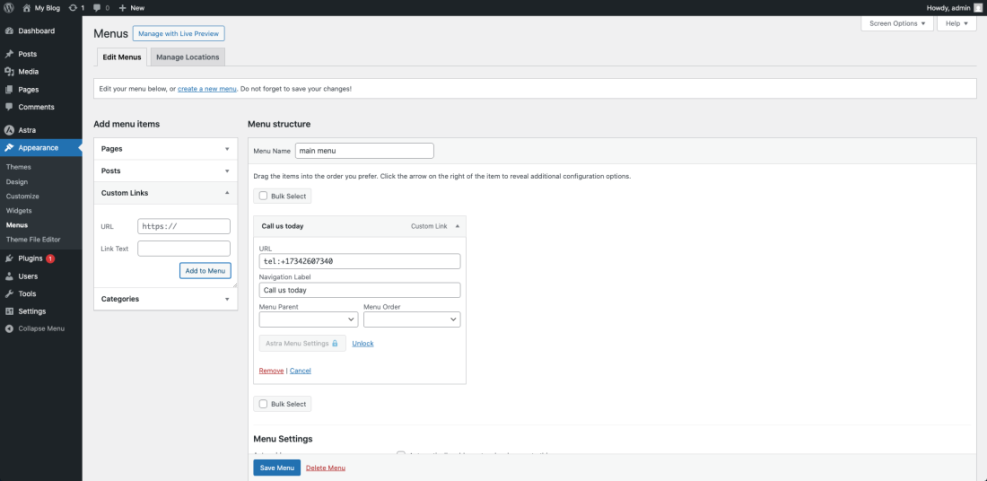
The fastest way to add a call option is to turn your main phone number into a clickable link using the tel: protocol or a dedicated plugin. Many site owners use tools similar to WP Call Button or other click-to-call plugins, because they generate mobile-friendly call buttons that sit on top of your existing design.
You can also place call links inside contact pages, hero sections, and sticky headers. In addition, it helps to show your local number near your contact form so users can choose whether to submit a form or speak to someone right away.
Track Calls From Campaigns and Forms
To understand which marketing efforts drive calls, set up separate tracking numbers for key campaigns. One number can appear on Google Ads, another on your email newsletter, and a third on your main landing pages. Then you can review call logs and tie conversions back to your traffic sources.
On WordPress, you might later combine this with a planned guide on Best contact form plugins for WordPress so calls and form submissions share the same analytics. In addition, call recordings and tags can help you refine your messaging and offers over time.
Test Reliability Before You Commit
Before you move your main number, run a structured test. First, make and receive calls from different networks and devices, including mobile data and home internet. Next, test what happens when a call goes unanswered, when the internet drops, and when several people call at once. Finally, verify that voicemail notifications and call routing behave as expected.
Business Phone Services Conclusion
Modern business phone services turn your phone number into a flexible communication hub instead of a simple dial tone. When you combine a cloud-based system with smart WordPress integrations, customers can reach you quickly, and your team can respond from anywhere without losing context.
Your next best move is to shortlist two or three cloud providers, run a focused trial, and wire the winner into your site with click-to-call and call tracking. When your phones, website, and customer tools work together, every visitor has a clear path from curious click to real conversation.
More WordPress Guides You Might Like
To round out your communication stack, you may want to explore more WordPress-focused tutorials and comparisons. These planned guides will help you connect your phone system to performance, conversion, and tracking improvements across your site.
- Best contact form plugins for WordPress
- How to start a blog WordPress
- How to add a contact form to WordPress
- Is WordPress good for seo
- Developer hooks for optimizing WordPress plugins with code
As you build out these pieces, your phone system becomes one part of a complete lead generation engine instead of a standalone tool.
Frequently Asked Questions About Business Phone Services
What is a business phone service?
How much do business phone services cost?
Can I keep my existing business phone number?
Do I need special hardware for VoIP?
How does a business phone service work with WordPress?