Content Briefs for Faster WordPress Writing
Practical steps to streamline posts with clear article plans

Content briefs can transform how quickly you write strong WordPress posts. Instead of staring at a blank editor, you start with clear goals, SEO targets, and a simple outline, so drafting feels more like filling in the blanks than inventing from scratch.
You will see how to plan effective briefs, turn them into reusable templates, and plug them into your WordPress workflow. Along the way, you will learn how to reduce revisions, keep writers and clients aligned, and measure how much time content briefs actually save you.
How Content Briefs Speed Up Writing
The easiest way to speed up WordPress writing is to separate thinking from typing. A good brief captures decisions about topic, angle, outline, and SEO before you open the editor, so you can spend your writing time on clear sentences instead of constant rethinking.
What Is a Content Brief?
A content brief is a one-page guide for a single article. It usually includes the topic, goal, target reader, main keyword, supporting keywords, outline, internal links, external references, and examples. When it is clear and focused, any competent writer can follow it without guesswork.
Why Do Writers Skip Briefs?
Many writers skip briefs because they feel like extra work. However, writing without a plan often leads to scattered research, changes in direction halfway through, and painful rewrites. When you track your time honestly, a short brief almost always saves more minutes than it costs.
How Briefs Save Time in Practice
First, briefs reduce context switching because you research once and write once. Next, they cut feedback cycles since stakeholders agree on the angle before drafting. Finally, they make batch work easier, so you can prepare several briefs at once and draft multiple posts in a focused block.
Why Briefs Make Writing Faster
Content creation slows down when you keep changing your mind about the topic, structure, or call to action. A brief locks those choices early, so you move through research, drafting, and editing in a straight line instead of looping back to the start.
Reduce Research and Second Guessing
When you research after you begin writing, you bounce between browser tabs and lose momentum. With a brief, you collect key sources, SERP notes, and examples first. During drafting, you simply consult the brief instead of opening yet another search.
Cut Back and Forth With Clients
Client and stakeholder revisions often come from unclear expectations. Therefore, you use the brief to capture audience details, brand voice, must-include talking points, and off-limits topics. Once everyone signs off on the brief, review rounds usually shrink to light copy edits instead of structural changes.
Limit Revisions and Scope Creep
Rewriting whole sections is slow and frustrating. Instead, you adjust the outline inside the brief while the change is cheap. Because scope and angle are agreed in writing, it is much easier to push back gently when someone tries to add “just one more section” at the last minute.
Plan Strong Briefs for WordPress Posts
A strong brief balances guidance and freedom. It should be specific enough that writers know exactly what to cover, yet flexible enough that they can choose their own stories, examples, and conversion copy.
Define Goal and Target Reader
Start by deciding what success looks like for the article. For example, do you want email signups, plugin sales, discovery of a service page, or support for a cornerstone guide? Then define one primary reader persona so the writer knows whose questions, objections, and pain points to address.
Map SEO Keywords and Topics
Next, run keyword research and pick one main keyword plus a small cluster of related terms. You can then decide search intent, main questions to answer, and which existing pages to link. If you already follow a structured Content planning workflow, you can connect each brief to a clear position in your editorial calendar.
Outline Sections and Calls to Action
Finally, sketch a simple outline with planned H2 and H3 headings. Add a clear call to action, such as joining your newsletter, downloading a checklist, or viewing a product page. When the writer sees the path from introduction to CTA, transitions become smoother and easier to draft.
Create a Reusable Brief Template
To avoid reinventing the wheel, you can turn your favorite brief into a template and reuse it for every new WordPress post. This keeps your content strategy consistent and makes it easier to onboard new writers.
Essential Fields for Every Brief
Most effective templates include sections for article goal, target reader, funnel stage, main keyword, supporting keywords, SERP notes, outline, internal links, external references, and formatting notes. When every brief follows the same structure, your team can skim and understand assignments much faster.
Simple Example Content Brief Layout
You can keep the layout very simple. Use a top block for summary and objective, a second block for SEO details, and a third block for outline and notes. A small checklist at the end helps you confirm that internal links, media, and conversion points have all been covered.
How Detailed Should a Content Brief Be?
A brief should be detailed enough that the writer does not need follow-up calls, but not so strict that it kills creativity. As a rule, you cover what to say and why it matters while leaving how to say it up to the writer’s judgment and voice.
Before turning templates into a habit, it helps to compare different ways of working.
| Approach | Main Benefit | Main Risk |
|---|---|---|
| No Brief | Fast to start | High chance of rewrites |
| One-Off Brief | Good for unique projects | Harder to standardize |
| Reusable Template | Consistent, scalable process | Template can get bloated |
This comparison shows why a lean, reusable template is usually the best fit for ongoing WordPress blogging.
If you want more inspiration, you can study detailed examples from guides such as this content brief tutorial or template collections like this content brief template overview.
Add Briefs to Your WordPress Workflow
Once your template works on paper, the real speed boost comes from putting content briefs inside the WordPress writing flow. Keeping the brief next to the editor cuts tab switching and helps writers follow the agreed outline.
Where to Store Briefs in WordPress
There are several simple options. You can paste the brief at the top of the post and remove it before publishing, store it in custom fields, or use an editorial workflow plugin. For multi-author blogs, separate brief fields keep the draft itself clean and easier to review.
From the Dashboard, click Posts and then Add New to load a fresh article screen where you can paste your brief template.
How Do You Use a Content Brief in WordPress?
First, copy your template into the post or custom field. Next, fill in goal, audience, and keyword cluster based on your research. Then, confirm the outline and planned internal links. Finally, write the article from top to bottom while keeping the brief visible, adjusting only when a change clearly improves the piece.
From the Dashboard, click Posts and then All Posts to review your queue and check which articles already have completed briefs.
Use Simple Automation for Brief Templates
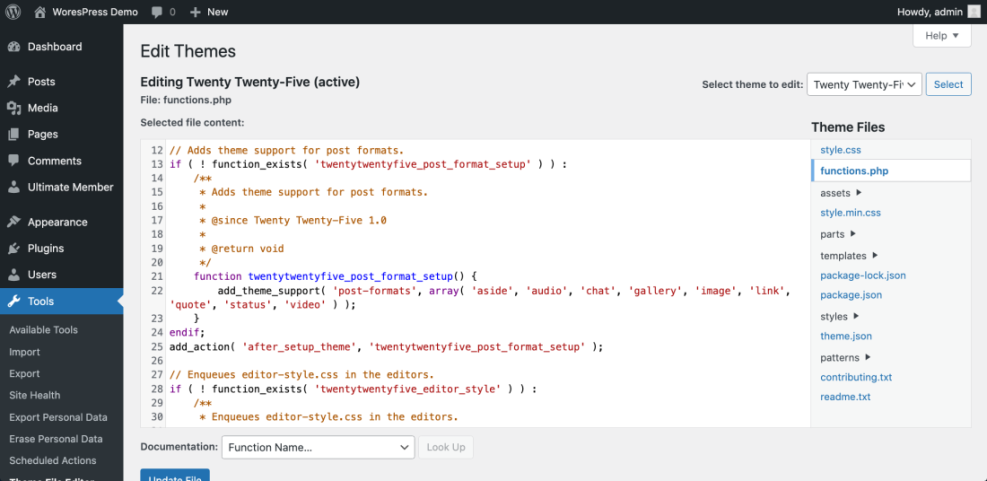
Instead of pasting your template manually, you can add a small code snippet that inserts a content brief skeleton into every new post. This keeps your process consistent even when new authors join your team.
function wpheadliner_default_content_brief( $content ) {
    if ( get_post_type() === 'post' ) {
        $content  = "## Content Briefnn";
        $content .= "Goal:nn";
        $content .= "Target reader:nn";
        $content .= "Primary keyword and cluster:nn";
        $content .= "Key points and outline:nn";
        $content .= "---nn";
        $content .= "## Article Startnn";
    }
    return $content;
}
add_filter( 'default_content', 'wpheadliner_default_content_brief' );
This snippet pre-fills the WordPress Classic Editor content area with a simple brief plus a divider for the actual article. You can adapt the headings to match your own template and editorial workflow.
Track Results and Refine Process
Once content briefs are part of your routine, you can treat them like any other optimization. You measure the impact, keep what works, and drop anything that adds friction without improving results.
Measure Writing and Editing Time
To start, track how long it takes to write and edit a typical article with and without a brief. You can use a simple spreadsheet or a time-tracking app. Over a few weeks, you should see clearer patterns in planning time, drafting time, and number of revision rounds.
Review Performance and SEO Metrics
In addition, review performance metrics such as clicks, time on page, and conversions from posts written with stronger briefs. When you combine this data with keyword rankings and internal linking reports, you get a fuller picture of how briefs support your overall SEO plan and content strategy.
Update Brief Templates Regularly
Finally, schedule a quick review of your template every few months. Remove fields nobody uses, tighten questions that confuse writers, and add prompts that match your latest SEO or conversion priorities. You can also align your briefs with resources like the WordPress SEO guide to keep structure and optimization in sync.
Content Briefs Conclusion
Content briefs turn WordPress writing from a guessing game into a repeatable process. When each article starts with a clear goal, keyword plan, and outline, you move faster, reduce revisions, and create content that fits both your readers and your SEO strategy.
The next step is simple. Choose one template structure, add it to your favorite tools, and test it on the next few posts. As you refine the questions, connect briefs with your editorial calendar, and use them across your team, you will build a smoother, more predictable writing workflow for every WordPress site you manage.
More WordPress Guides You Might Like
If you want to go deeper into planning, workflows, and optimization around WordPress content, these guides pair well with a strong brief-driven process.
- Content Workflows for Multi Author WordPress Blogs
- How to Add Keywords in WordPress
- Email Marketing with WordPress
- Content briefs WordPress writing
- Content briefs WordPress writing
As you read these resources, look for places where a consistent brief format will make planning, optimization, and promotion easier for you and any other writers on your team.
Frequently Asked Questions About Content Briefs
Do I need a content brief for every WordPress post?
How long should a typical content brief be?
Who is responsible for creating content briefs?
Can I reuse one content brief for several posts?
How do content briefs fit with my editorial calendar?